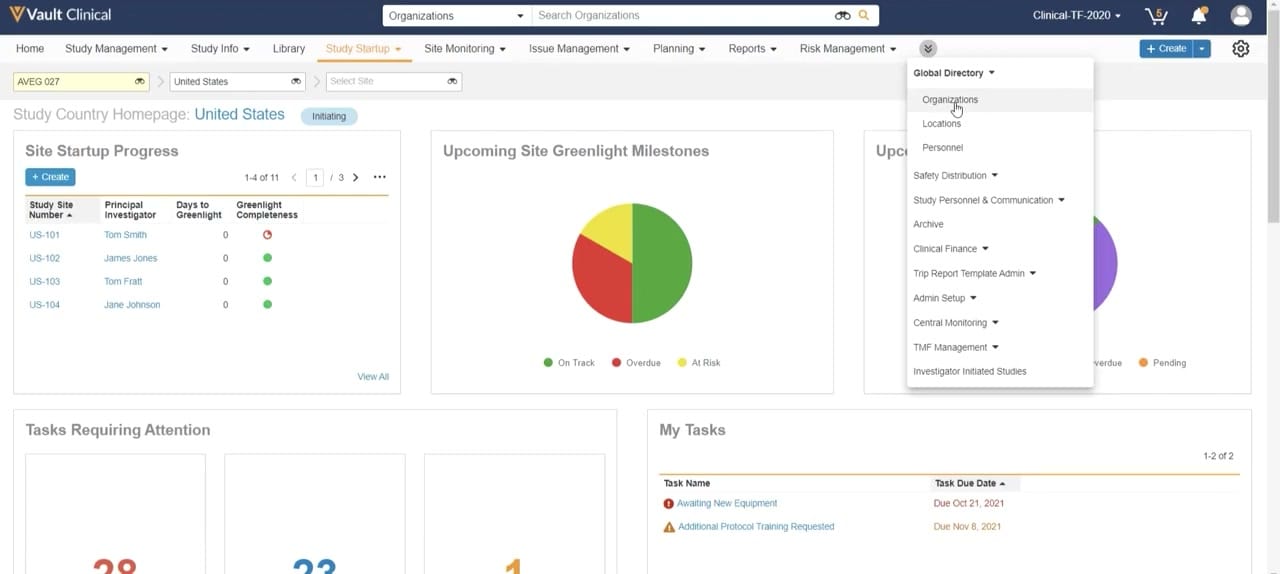
What this Study Startup screenshot shows
This screenshot displays the Study Country Homepage within Veeva Vault Clinical, specifically focused on the Study Startup module. The interface presents a dashboard view for a selected study, "AVEG 027", filtered to the "United States" country level. The page provides a high-level summary of site startup progress, upcoming milestones, and pending tasks. An active dropdown menu is visible, showing navigation options under the Global Directory and other clinical administration categories, with the cursor hovering over "Organizations". The dashboard layout contains multiple widgets, including a tabular list of study sites, pie charts representing milestone statuses, and a list of specific tasks requiring attention. This interface serves as a central hub for monitoring study startup activities at a country-specific level, allowing users to track progress toward site greenlight milestones.
Visible interface elements
- Study and country selectors at the top left, displaying "AVEG 027" and "United States".
- "Site Startup Progress" table listing site numbers US-101 through US-104 and their respective principal investigators.
- "Upcoming Site Greenlight Milestones" pie chart showing green, red, and yellow segments for on-track, overdue, and at-risk statuses.
- "My Tasks" widget listing specific tasks like "Awaiting New Equipment" with associated due dates in 2021.
- Open navigation dropdown menu displaying options such as "Global Directory", "Organizations", and "Clinical Finance".
- Top navigation bar highlighting the "Study Startup" tab with an orange underline.
- "Initiating" status badge next to the "Study Country Homepage: United States" title.
Interface details
The user interface features a top navigation bar with standard Vault Clinical tabs, including Study Management, Study Info, Library, and Study Startup, which is currently selected. Below this, breadcrumb-style dropdown selectors allow users to filter by study, country, and site. The main workspace displays the "Study Country Homepage: United States" with an "Initiating" status badge. The page is organized into several distinct widgets. On the left, the "Site Startup Progress" panel lists site numbers, principal investigators, days to greenlight, and greenlight completeness indicators. The center widget, "Upcoming Site Greenlight Milestones", features a multi-colored pie chart indicating on-track, overdue, and at-risk statuses. At the bottom, the "My Tasks" panel lists specific action items, such as "Awaiting New Equipment" and "Additional Protocol Training Requested", alongside their respective due dates. A prominent vertical dropdown menu is open on the right side of the screen, displaying options like Global Directory, Safety Distribution, and Clinical Finance, with a cursor positioned over the "Organizations" link.
Workflow context
In a clinical operations workflow, this interface can support study managers and startup specialists in tracking the progress of site activation within a specific country. By presenting aggregated data on site startup progress and greenlight completeness, the dashboard could help users identify bottlenecks or delayed sites that require immediate attention. The "Upcoming Site Greenlight Milestones" pie chart can assist in resource allocation by highlighting which sites are at risk or overdue. Additionally, the "My Tasks" section provides direct visibility into individual responsibilities, helping coordinators prioritize daily activities such as addressing outstanding protocol training or equipment requests. The open dropdown menu suggests a workflow where a user is navigating from the country-level dashboard to broader administrative directories, such as managing organizations or personnel, to update contact details or institutional profiles necessary for ongoing site feasibility and qualification processes.
Source, version, and interpretation limits
The screenshot is sourced from a public Veeva Study Startup Unified Demo, published around 2020. Because this is a static image of a demonstration environment, the displayed data, including study names, investigator names, dates, and task statuses, is synthetic and intended for illustrative purposes only. The visible configuration, including specific dashboard widgets, menu options, and terminology, represents a specific point-in-time setup. Actual customer implementations may vary significantly based on organization-specific configurations, software version updates, and active user permissions. This static view cannot verify real-time data synchronization, automated milestone tracking, or active integration with external clinical systems.
Authoritative references
Use these primary sources to confirm current product positioning, terminology, and release-specific behavior.
- Veeva Study Startup Unified Demo(Official Veeva hosted demo)
- Veeva Study Startup product overview(Official Veeva product page)
- Veeva Study Startup features(Official Veeva resource)