What this Study Startup screenshot shows
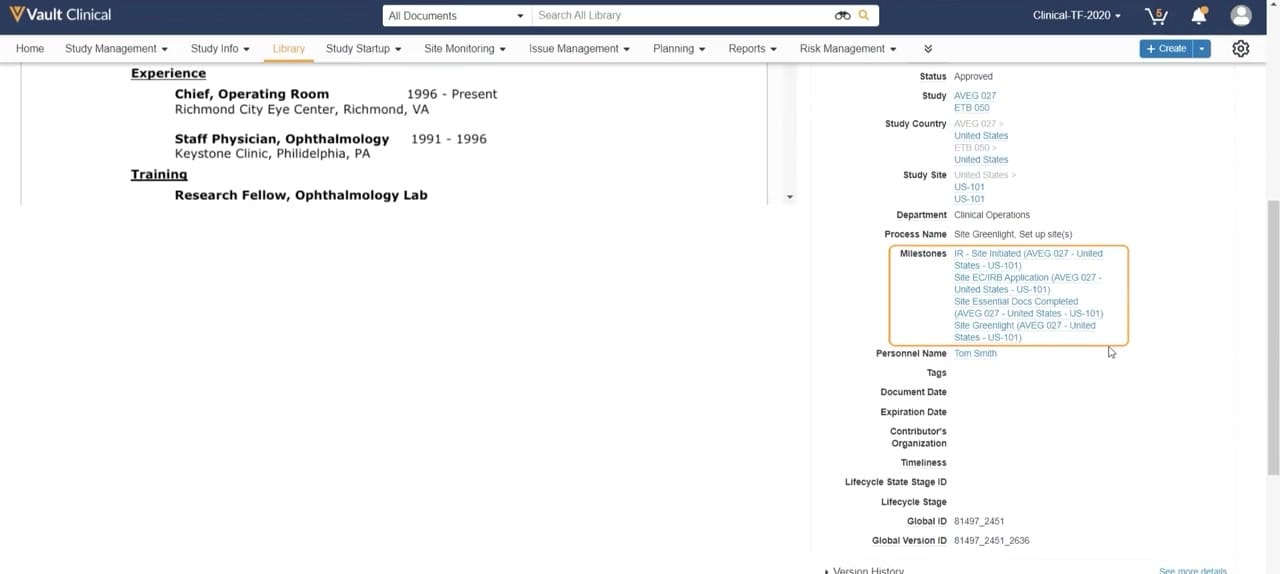
This public interface reference displays the document metadata and properties panel within Veeva Vault Clinical, specifically configured for a Study Startup workflow. The screen is split into two primary sections: a document viewer on the left displaying a professional curriculum vitae or experience profile, and a detailed metadata panel on the right. The metadata panel organizes key attributes associated with the document, including its approval status, associated study identifiers, study countries, and specific study sites. A highlighted section focuses on the Milestones field, which lists critical startup milestones such as Site Initiated, Site EC/IRB Application, Site Essential Docs Completed, and Site Greenlight. This interface demonstrates how clinical operations teams can view a document alongside its structured metadata, helping them track progress against specific site activation milestones within a unified clinical trial management environment.
Visible interface elements
- Document viewer pane on the left displaying Experience and Training sections of a professional profile.
- Metadata panel on the right displaying document properties such as Status, Study, and Department.
- Highlighted Milestones field containing links for Site Initiated, Site EC/IRB Application, and Site Greenlight.
- Study and Study Site fields displaying synthetic identifiers like AVEG 027 and US-101.
- Navigation bar at the top with tabs for Library, Study Startup, and Site Monitoring.
- Header search bar labeled Search All Library next to a Create button.
- Technical metadata fields at the bottom of the panel, including Global ID and Global Version ID.
Interface details
The user interface features a standard Veeva Vault header with global search capabilities, a navigation bar containing tabs such as Study Management, Library, and Study Startup, and action buttons like Create. The main workspace is divided into a document preview pane and a properties sidebar. The document preview on the left displays text sections for Experience and Training, indicating a clinical investigator or staff profile. The right-hand properties panel displays structured metadata fields. Key fields include Status, which is set to Approved, and Study, which lists AVEG 027 and ETB 050. Below these, the Study Country and Study Site fields map the document to specific geographic regions and site codes, such as US-101. An orange border highlights the Milestones field, which contains multiple active links corresponding to key startup milestones. Other visible metadata fields include Department, Process Name, Personnel Name, and technical identifiers like Global ID and Global Version ID. A scrollbar on the far right indicates additional metadata fields are accessible below the current view.
Workflow context
In a clinical operations context, this interface supports the document review and site greenlight processes during study startup. By displaying a staff member's experience and training document alongside its metadata, the system can help clinical operations users verify qualifications for specific study sites. The highlighted Milestones field links the document directly to critical-path events, such as Site EC/IRB Application and Site Greenlight. This association can help users track whether necessary documentation has been completed to meet site activation requirements. The structured metadata, including study codes like AVEG 027 and site identifiers like US-101, allows users to understand the exact context of the document without navigating away from the viewer. This integrated presentation of content and metadata can support efficient decision-making and milestone tracking during the site qualification and activation phases of a clinical trial.
Source, version, and interpretation limits
The screenshot is sourced from the Veeva Study Startup Unified Demo, representing the user interface around 2020. It displays synthetic demonstration data, including mock study codes like AVEG 027 and a placeholder personnel name, Tom Smith. Because this is a static image, it cannot establish real-time data synchronization, automated milestone updates, or active integration with external clinical trial management systems. The specific fields, layout, and highlighted elements reflect a particular demonstration configuration and may differ based on individual customer configurations, Vault releases, or specific organizational workflows. The presence of these fields does not guarantee regulatory compliance or validated status for any specific clinical trial.
Authoritative references
Use these primary sources to confirm current product positioning, terminology, and release-specific behavior.
- Veeva Study Startup Unified Demo(Official Veeva hosted demo)
- Veeva Study Startup product overview(Official Veeva product page)
- Veeva Study Startup features(Official Veeva resource)