What this Site Connect screenshot shows
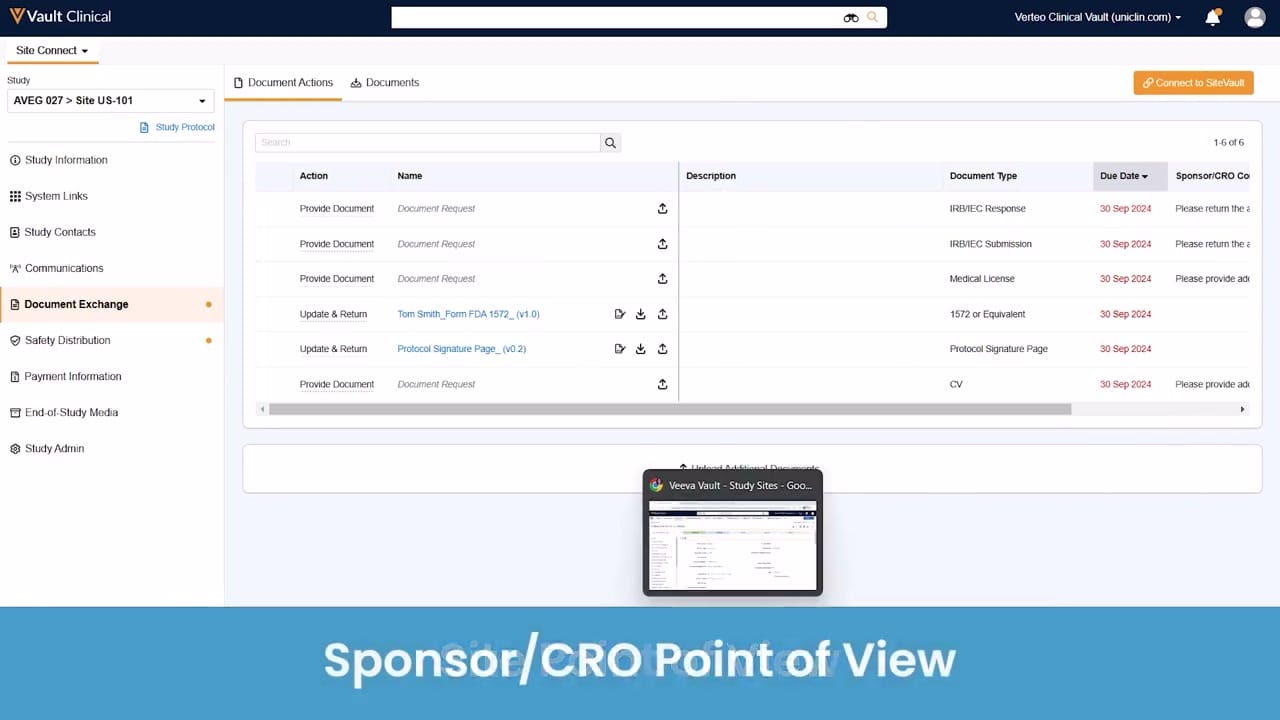
This public interface reference displays the Veeva Site Connect environment from the sponsor or CRO point of view, focusing on the Document Exchange workflow. The screen shows a structured list of document actions required for a specific clinical trial study, identified as AVEG 027, Site US-101. The interface is organized with a left-hand navigation menu for study-related categories and a central workspace displaying the Document Actions tab. Within this tab, users can view pending requests, document types, and due dates. The layout is designed to facilitate the tracking of essential clinical trial documents, such as IRB submissions, medical licenses, and protocol signature pages. This interface supports the coordination of document collection and updates between sponsors, CROs, and clinical research sites during the trial lifecycle.
Visible interface elements
- Left navigation panel showing the selected Document Exchange menu item with an orange indicator dot.
- Study selection dropdown displaying the synthetic study AVEG 027 and Site US-101.
- Document Actions table listing six rows of document requests with columns for Action, Name, Document Type, and Due Date.
- Action column values including Provide Document and Update & Return with associated upload and download icons.
- Due Date column displaying 30 Sep 2024 in red text for all listed document actions.
- Orange Connect to SiteVault button located in the top right corner of the main workspace.
- Document Type column showing values such as IRB/IEC Response, Medical License, 1572 or Equivalent, and Protocol Signature Page.
Interface details
The interface features a dark blue top header containing the Vault Clinical branding, a global search bar, and user profile controls. Below this, the left navigation panel allows users to select the active application, Site Connect, and filter by study and site using a dropdown menu. The navigation list highlights Document Exchange as the active section, marked with an orange indicator. The main content area displays two primary tabs: Document Actions and Documents. An orange button labeled Connect to SiteVault is positioned in the upper right corner. The central table lists six document tracking records, displaying columns for Action, Name, Description, Document Type, Due Date, and Sponsor/CRO Comments. Action types include Provide Document and Update & Return. Interactive icons for downloading, uploading, and editing are associated with specific rows, such as those for the FDA 1572 form and the Protocol Signature Page. Due dates are highlighted in red text, indicating a consistent deadline of 30 Sep 2024 across the visible records. A search bar is also available directly above the document table to filter the listed actions.
Workflow context
In clinical operations, managing the exchange of essential documents is critical for maintaining trial momentum and compliance. This interface provides a centralized view that can help sponsors and CROs monitor the status of outstanding document requests from specific research sites. By presenting clear action items like Provide Document or Update & Return alongside specific document types, the system can support study startup and ongoing maintenance activities. Users can identify which documents require immediate attention, such as pending CVs, medical licenses, or IRB responses, based on the displayed due dates. This structured tracking could help reduce communication delays and streamline the collection of required regulatory files. Additionally, the option to connect to SiteVault suggests a pathway for direct collaboration with investigator sites, potentially simplifying the submission and retrieval of critical trial documentation.
Source, version, and interpretation limits
The screenshot is sourced from an official Veeva hosted demo titled Site Connect Automatic Document Exchange, representing the sponsor/CRO point of view. As a static image, this reference cannot verify real-time data updates, automated workflows, or active integration with external systems. The visible study names, site identifiers, document titles, and dates are synthetic demonstration data and do not represent actual clinical trial records. The specific layout, available fields, and navigation options may vary based on individual customer configurations, user permissions, and specific Veeva Vault software releases.
Authoritative references
Use these primary sources to confirm current product positioning, terminology, and release-specific behavior.
- Site Connect Automatic Document Exchange(Official Veeva hosted demo)
- Veeva Site Connect product overview(Official Veeva product page)
- Veeva Site Connect features brief(Official Veeva resource)