What this Site Connect screenshot shows
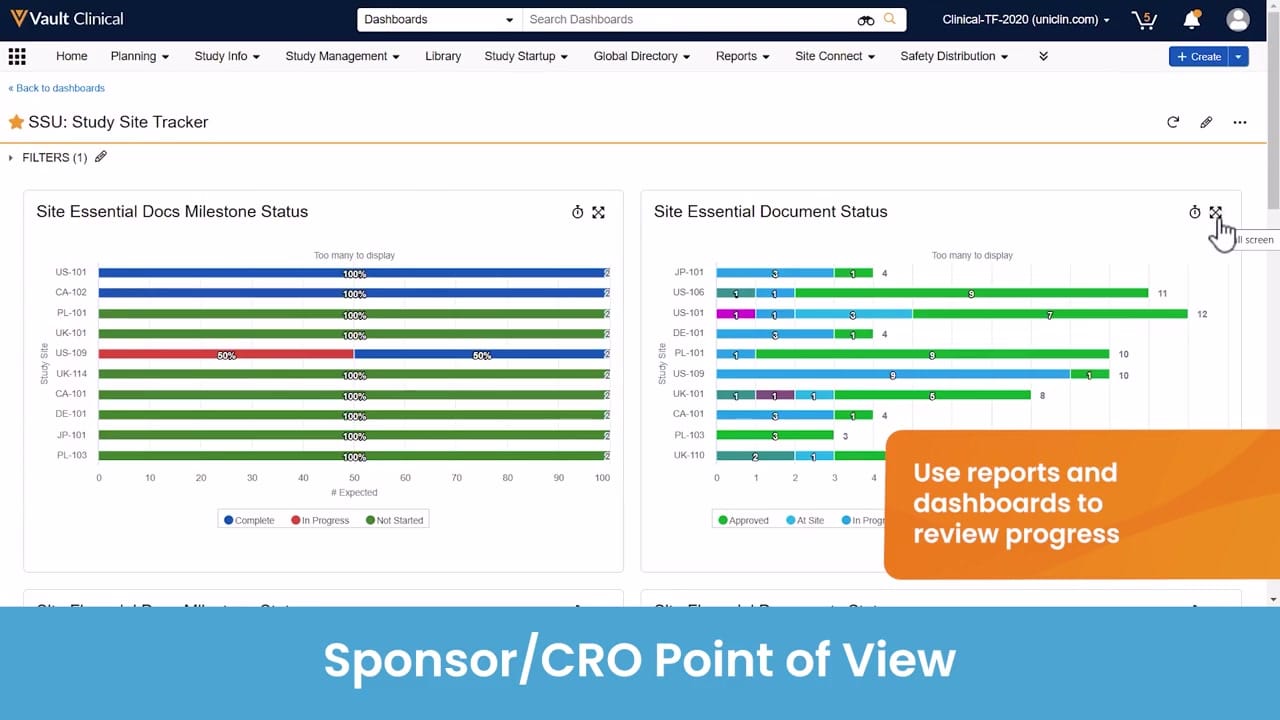
This interface displays the "SSU: Study Site Tracker" dashboard within the Veeva Vault Clinical application, specifically presenting a sponsor or CRO point of view. The dashboard provides visual reporting on study startup and document exchange progress across multiple global research sites. Two primary horizontal bar charts dominate the workspace: "Site Essential Docs Milestone Status" and "Site Essential Document Status." These charts display synthetic tracking data for various international site identifiers, such as US-101, CA-102, and JP-101. The interface includes standard navigation options, a filters panel, and dashboard customization controls. By presenting aggregated status metrics, this view serves as a centralized reporting hub for clinical operations teams monitoring document exchange milestones and site readiness.
Visible interface elements
- SSU: Study Site Tracker dashboard title with refresh, edit, and action icons.
- Site Essential Docs Milestone Status horizontal bar chart with Complete, In Progress, and Not Started legend.
- Site Essential Document Status horizontal bar chart with Approved, At Site, and In Progress legend.
- Global navigation header displaying Vault Clinical tabs such as Study Startup, Reports, and Site Connect.
- Collapsible Filters panel located directly beneath the dashboard title.
- Synthetic study site identifiers listed on the vertical axes, including US-101, CA-102, and JP-101.
- Interactive full-screen icon on the top right of the chart cards with a visible cursor hover effect.
Interface details
The interface features a standard Vault Clinical header with global navigation tabs, including Study Startup, Reports, and Site Connect. Below the header, the "SSU: Study Site Tracker" dashboard title is visible alongside action icons for refreshing, editing, and expanding the view. A collapsible filters panel is positioned on the left. The main content area is divided into two distinct visualization cards. The left card, titled "Site Essential Docs Milestone Status," contains a horizontal stacked bar chart showing percentage completion rates for expected milestones, color-coded by Complete, In Progress, and Not Started. The right card, titled "Site Essential Document Status," displays a horizontal stacked bar chart tracking document volume counts across statuses like Approved, At Site, and In Progress. Both charts list study sites along the vertical axis and include a "Too many to display" warning, indicating a larger dataset. Interactive elements such as full-screen toggle icons are visible on each chart card, and a cursor is shown hovering over the right chart's expand icon.
Workflow context
In a clinical trial management workflow, this dashboard can support sponsors and CROs in tracking the progress of essential document collection during study startup. By reviewing the "Site Essential Docs Milestone Status" chart, clinical operations managers could quickly identify which sites, such as US-109, have pending milestones compared to those that are fully complete. Simultaneously, the "Site Essential Document Status" chart could help teams monitor the distribution and approval state of individual documents across different global locations. This consolidated reporting view can assist in identifying bottlenecks in document exchange, allowing study managers to target follow-up communications to specific sites. The dashboard thus serves as an analytical tool to help coordinate startup activities and maintain oversight of site activation timelines.
Source, version, and interpretation limits
The screenshot is sourced from an official Veeva hosted demo titled "Site Connect Automatic Document Exchange," representing a sponsor or CRO point of view. The data displayed, including site codes like PL-101 and UK-114, is synthetic demonstration data and does not represent actual clinical trial progress or real-world site performance. Because this is a static image, it cannot establish real-time data synchronization, automated background updates, or active integration with live eTMF systems. Additionally, the visible user interface, available fields, and specific dashboard configurations may vary depending on the active Vault release and individual customer settings.
Authoritative references
Use these primary sources to confirm current product positioning, terminology, and release-specific behavior.
- Site Connect Automatic Document Exchange(Official Veeva hosted demo)
- Veeva Site Connect product overview(Official Veeva product page)
- Veeva Site Connect features brief(Official Veeva resource)