What this eTMF screenshot shows
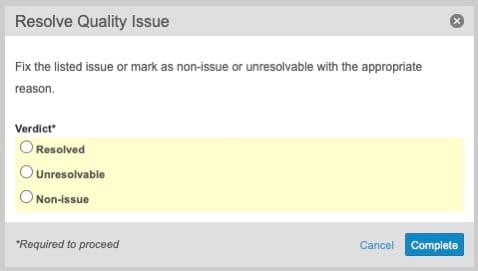
This interface screenshot displays the "Resolve Quality Issue" dialog box from Veeva Vault eTMF, which is a component of Veeva's clinical operations suite. The dialog serves as a structured decision point for users managing document quality issues within an electronic trial master file. It presents a simple, focused modal window designed to capture a user's final determination regarding a previously identified quality issue. By prompting the user to select a specific verdict, the interface facilitates the formal progression of document review tasks. The modal contains clear instructions, a mandatory selection field, and standard action buttons to either commit the decision or cancel the operation. This clean layout represents a typical 2020-era Veeva Vault user interface pattern for task completion and quality control workflows.
Visible interface elements
- "Resolve Quality Issue" dialog title in the header bar
- Close button (X icon) in the top-right corner of the modal
- Instructional text guiding the user to fix the issue or select a reason
- "Verdict*" required field label with an asterisk
- Three radio button options: "Resolved", "Unresolvable", and "Non-issue" inside a yellow highlighted box
- "*Required to proceed" explanatory text in the footer
- "Cancel" text link and blue "Complete" button in the bottom-right corner
Interface details
The "Resolve Quality Issue" dialog is structured as a modal window with a grey header bar containing the title on the left and a circular close icon on the far right. Below the header, a brief instructional sentence directs the user to fix the listed issue or categorize it appropriately. The primary input area features a required field labeled "Verdict" marked with an asterisk. This field contains three radio button options arranged vertically within a light yellow highlighted container: "Resolved", "Unresolvable", and "Non-issue". At the bottom of the dialog, a footer area provides clear navigation and action controls. On the left side of the footer, the italicized text "*Required to proceed" clarifies the necessity of the verdict selection. On the right side, a text-based "Cancel" link is positioned next to a prominent blue "Complete" button. The use of color highlighting on the input field draws immediate visual attention to the decision-making area, while the standard button hierarchy guides the user toward completing the task.
Workflow context
Within the context of clinical trial document management, resolving quality issues is a key step in maintaining an inspection-ready electronic trial master file. When a reviewer identifies a discrepancy or error in a document, a quality issue is typically logged. This dialog represents the closing phase of that sub-workflow. A clinical operations user can utilize these options to document the final status of the issue. Selecting "Resolved" indicates that the underlying problem has been corrected, while "Unresolvable" or "Non-issue" allows the user to categorize items that cannot be fixed or were flagged in error. This structured categorization can support downstream reporting and help study managers track overall TMF health and completeness. By requiring an explicit verdict, the system helps ensure that quality issues are not left open without a formal resolution path, thereby supporting TMF quality control processes.
Source, version, and interpretation limits
The screenshot is sourced from an official Veeva PDF titled "Quality Issues feature brief," representing a 2020-era user interface. As a static image of a single modal dialog, it does not show the broader document viewer, the specific document metadata, or the history of the quality issue being resolved. The visible fields and options reflect a specific configuration that may vary across different Vault releases, study protocols, or organizational preferences. This reference copy describes only the visible interface elements and does not imply real-time system behavior, automated validation, or regulatory compliance status for any active clinical trial.
Authoritative references
Use these primary sources to confirm current product positioning, terminology, and release-specific behavior.
- Quality Issues feature brief(Official Veeva PDF)
- Veeva eTMF product overview(Official Veeva product page)
- Veeva guide to eTMF features and inspection readiness(Official Veeva resource)