What this eTMF screenshot shows
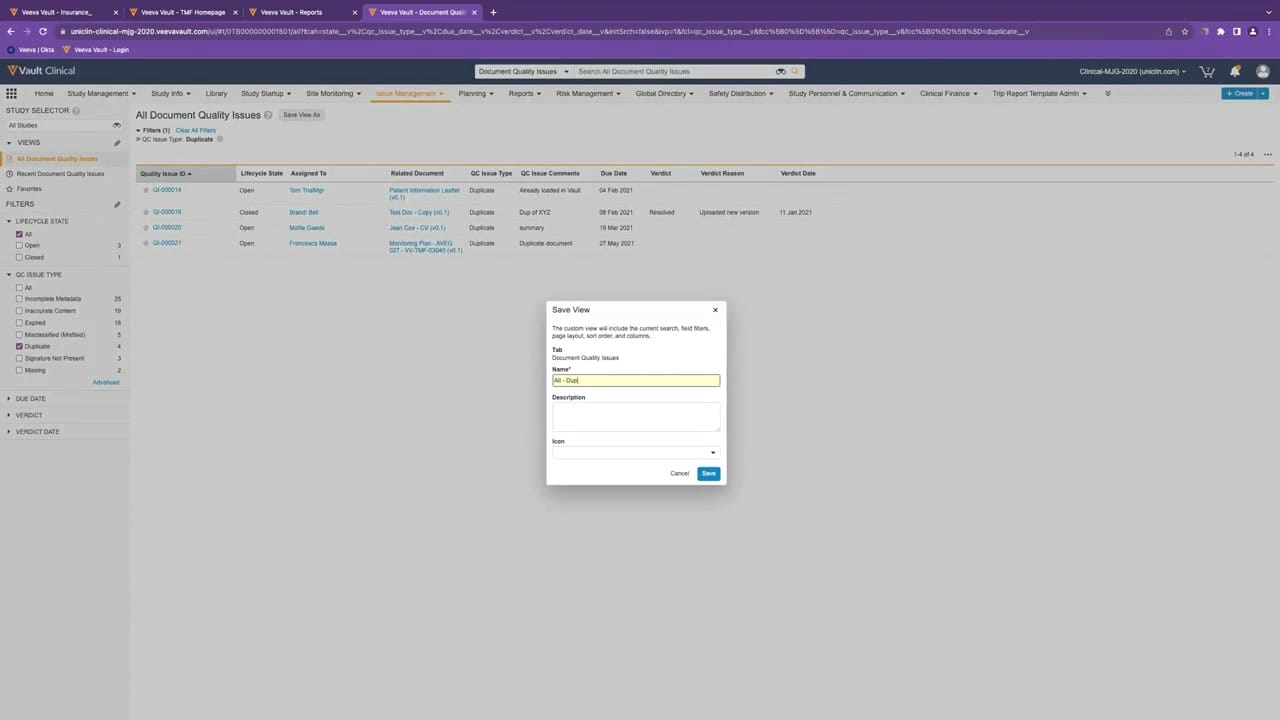
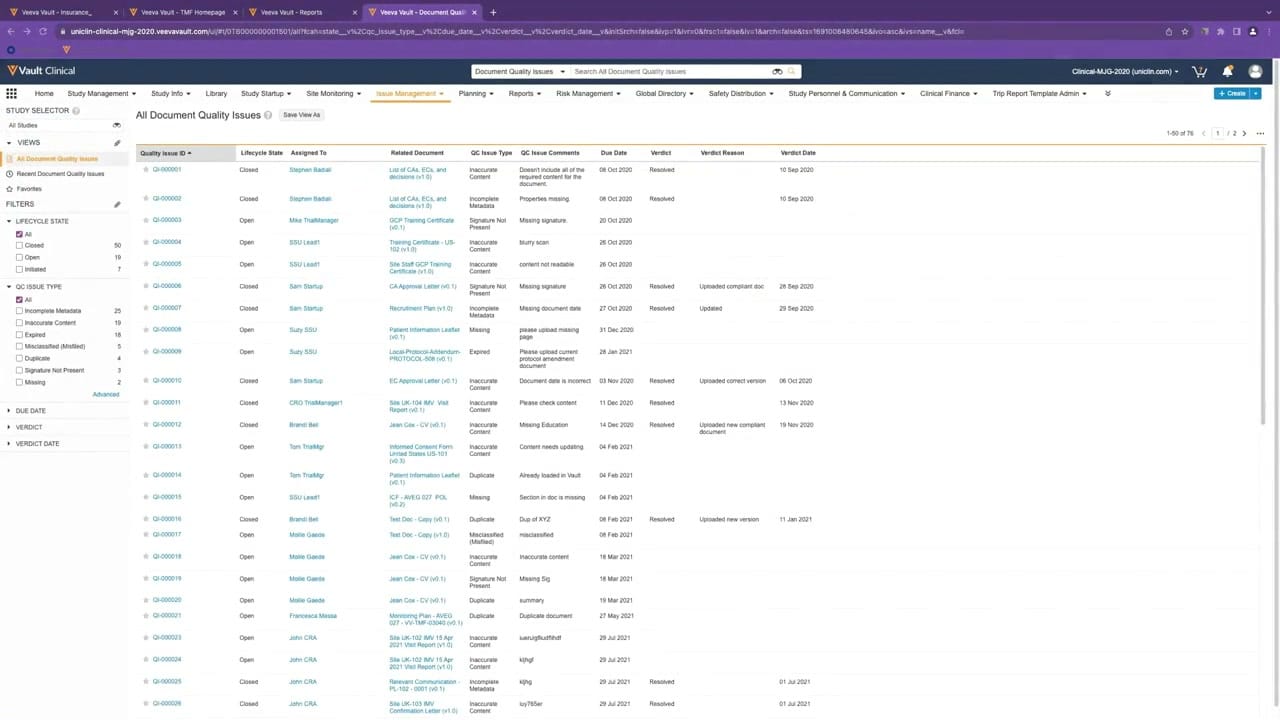
This public interface reference displays the "All Document Quality Issues" queue within Veeva Vault Clinical, specifically configured for eTMF workflows. The screen presents a tabular list view designed to track and manage document-level quality issues. Users can view key metadata such as issue identifiers, lifecycle states, assignees, related documents, issue types, comments, due dates, and resolution verdicts. A left-hand sidebar provides robust filtering options based on lifecycle state and quality control (QC) issue types, complete with record counts for each category. The interface supports clinical operations teams in monitoring document completeness and quality review tasks. The displayed data is synthetic demonstration data, showing various open and closed quality issues with associated dates, assignees, and comments.
Visible interface elements
- "Issue Management" tab highlighted in the top navigation bar.
- Left-hand filter panel showing counts for "Lifecycle State" (such as 50 Closed and 19 Open) and "QC Issue Type".
- "All Document Quality Issues" table header with a "Save View As" button.
- Table columns including Quality Issue ID, Lifecycle State, Assigned To, Related Document, and QC Issue Type.
- List of quality issues ranging from QI-000001 to QI-000026 with clickable links.
- Pagination indicator showing "1-50 of 76" in the upper right of the table grid.
- Search bar at the top labeled "Search All Document Quality Issues".
Interface details
The interface is structured with a top navigation bar containing tabs for clinical operations, with "Issue Management" currently selected. Below this, the main workspace is split into a left-hand navigation panel and a central data table. The left panel features a "Study Selector" and a "Views" section, followed by collapsible "Filters" for Lifecycle State and QC Issue Type. These filters display dynamic counts, such as fifty closed issues and nineteen open issues. The central table, titled "All Document Quality Issues," displays ten columns: Quality Issue ID, Lifecycle State, Assigned To, Related Document, QC Issue Type, QC Issue Comments, Due Date, Verdict, Verdict Reason, and Verdict Date. Each row represents a specific quality issue, such as QI-000001 or QI-000003, with interactive links for the issue ID, assignee, and related document. Pagination controls in the upper right indicate that fifty of seventy-six records are currently displayed on this page.
Workflow context
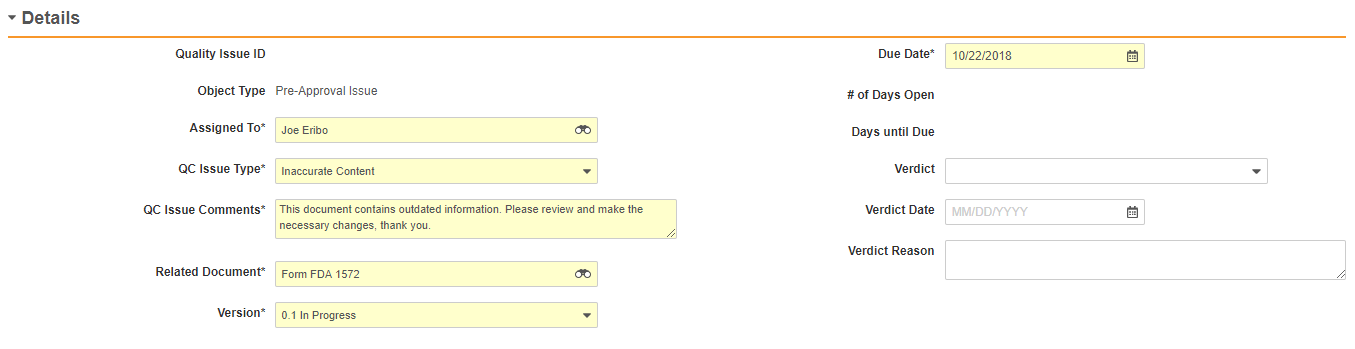
In a clinical trial master file (TMF) environment, this quality issue queue can support clinical operations users in identifying, assigning, and resolving document discrepancies. By presenting a centralized list of issues like "Inaccurate Content" or "Incomplete Metadata," the interface could help study managers and clinical research associates prioritize remediation efforts. For instance, users can filter by "Open" status to focus on pending tasks or review "Closed" items to verify past resolutions. The "Assigned To" column indicates ownership, which can assist in distributing workload across the study team. Additionally, tracking due dates and resolution verdicts can support inspection-readiness by providing a clear history of quality control activities. This structured visibility could help teams maintain TMF quality and completeness throughout the lifecycle of a clinical trial.
Source, version, and interpretation limits
The screenshot is sourced from an official Veeva hosted demo titled "Track, Manage, and Report on Quality Issues," published around 2023. As a static image, it represents a configured Vault environment and does not reflect real-time data, automated updates, or active validation status. The visible names, dates, document titles, and issue counts are synthetic demonstration data. Actual user interfaces, available fields, and specific workflows may vary depending on the customer configuration, Vault release, and individual organizational settings. This reference does not imply that IntuitionLabs designed or owns the interface, nor does it establish regulatory compliance.
Authoritative references
Use these primary sources to confirm current product positioning, terminology, and release-specific behavior.
- Track, Manage, and Report on Quality Issues(Official Veeva hosted demo)
- Veeva eTMF product overview(Official Veeva product page)
- Veeva guide to eTMF features and inspection readiness(Official Veeva resource)