What this eTMF screenshot shows
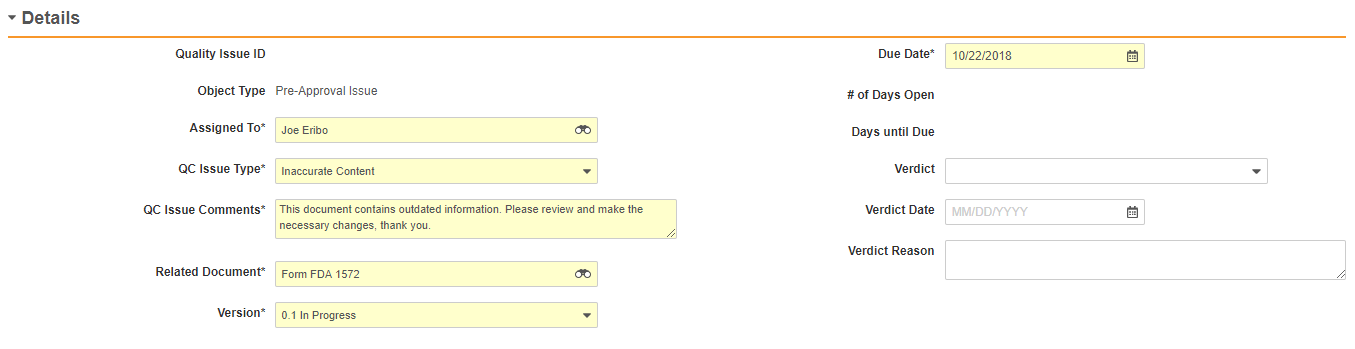
This public interface fragment displays a "Details" form within Veeva Vault eTMF, specifically illustrating the "Create Quality Issue" workflow. The interface presents a structured data entry layout designed to document and track quality concerns related to specific trial master file documents. Key fields are organized into two columns under a collapsible "Details" header. The form captures essential metadata such as the assigned personnel, the specific type of quality control issue, descriptive comments, and the associated document. Several fields are highlighted in yellow, indicating required inputs or active focus, while other fields remain blank or optional for subsequent resolution steps. This interface fragment represents a 2020-era configuration of the Veeva Vault platform, demonstrating how clinical operations teams can log and categorize document discrepancies during quality review processes.
Visible interface elements
- "Details" collapsible section header with a small arrow icon.
- "Assigned To" input field populated with "Joe Eribo" and a lookup icon.
- "QC Issue Type" dropdown menu set to "Inaccurate Content".
- "QC Issue Comments" text area containing a description of outdated information.
- "Related Document" field linked to "Form FDA 1572" with a lookup icon.
- "Due Date" field populated with "10/22/2018" and a calendar icon.
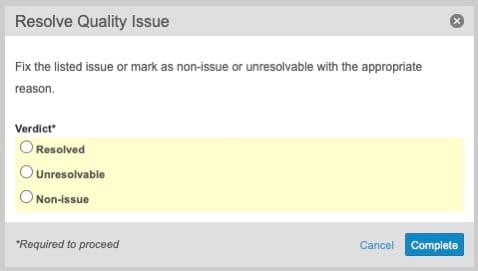
- "Verdict", "Verdict Date", and "Verdict Reason" fields for documenting resolution.
Interface details
The interface is structured as a two-column form under a collapsible "Details" section header. The left column contains fields for identifying and describing the issue. "Quality Issue ID" and "Object Type" (populated with "Pre-Approval Issue") appear as read-only labels. Required fields, marked with asterisks and highlighted in yellow, include "Assigned To" (set to "Joe Eribo" with a lookup icon), "QC Issue Type" (set to "Inaccurate Content"), "QC Issue Comments" (containing descriptive text about outdated information), "Related Document" (linked to "Form FDA 1572"), and "Version" (set to "0.1 In Progress"). The right column contains scheduling and resolution fields. The "Due Date" is a required field set to "10/22/2018" with a calendar picker icon. Read-only fields for "# of Days Open" and "Days until Due" are currently empty. Optional fields for documenting the resolution include "Verdict" (a dropdown menu), "Verdict Date" (a date input with a placeholder), and "Verdict Reason" (a multi-line text area). This layout separates the initial logging of a quality issue from its eventual evaluation and closure.
Workflow context
In the context of clinical trial master file management, this form supports the document review and quality control workflow. When a reviewer identifies an issue with a document, such as outdated information in a "Form FDA 1572," they can use this interface to log a formal quality issue. Assigning the issue to a specific user and setting a due date can help clinical operations teams manage tasks and maintain document completeness. The categorization of the issue type and the inclusion of detailed comments can support clear communication between reviewers and document owners. Furthermore, the presence of verdict fields suggests a structured resolution process where a supervisor or owner can later record the final decision and reasoning. This structured tracking could help organizations maintain inspection readiness by documenting the identification and remediation of TMF quality issues.
Source, version, and interpretation limits
The screenshot is sourced from an official Veeva PDF, specifically the Quality Issues feature brief, representing a 2020-era user interface. Because this is a static, historical image fragment, it does not reflect the current live version of Veeva Vault eTMF or any specific customer configuration. The visible data, including names like "Joe Eribo" and dates like "10/22/2018," is synthetic demonstration data used for illustrative purposes. This static view cannot verify real-time system behavior, automated workflows, validation rules, or regulatory compliance status. Actual field labels, required inputs, and available dropdown options may vary based on individual organization configurations and subsequent software updates.
Authoritative references
Use these primary sources to confirm current product positioning, terminology, and release-specific behavior.
- Quality Issues feature brief(Official Veeva PDF)
- Veeva eTMF product overview(Official Veeva product page)
- Veeva guide to eTMF features and inspection readiness(Official Veeva resource)