What this eTMF screenshot shows
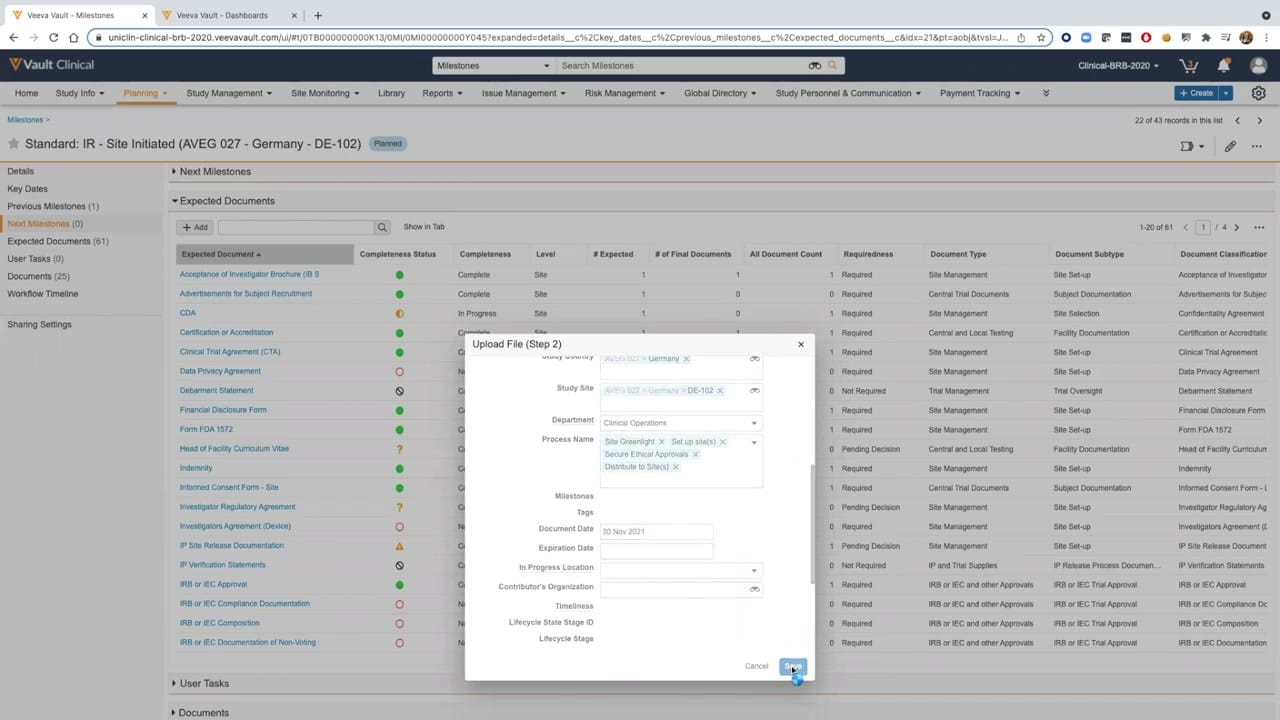
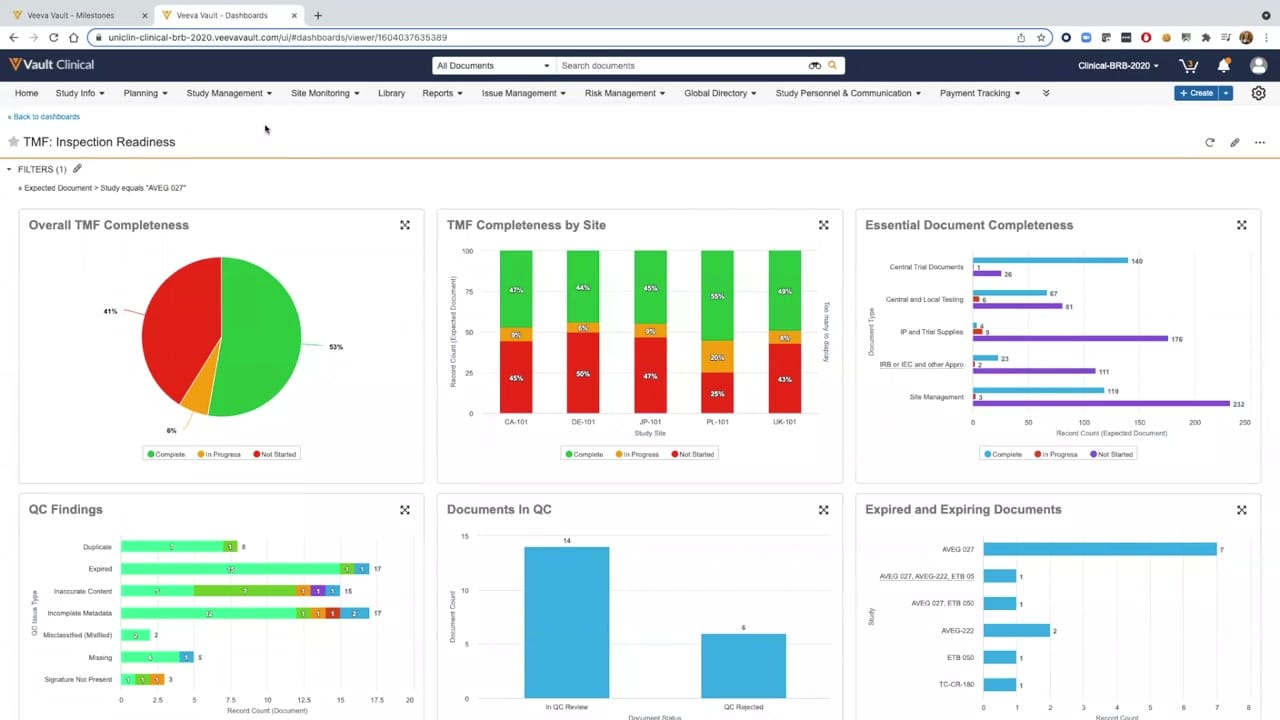
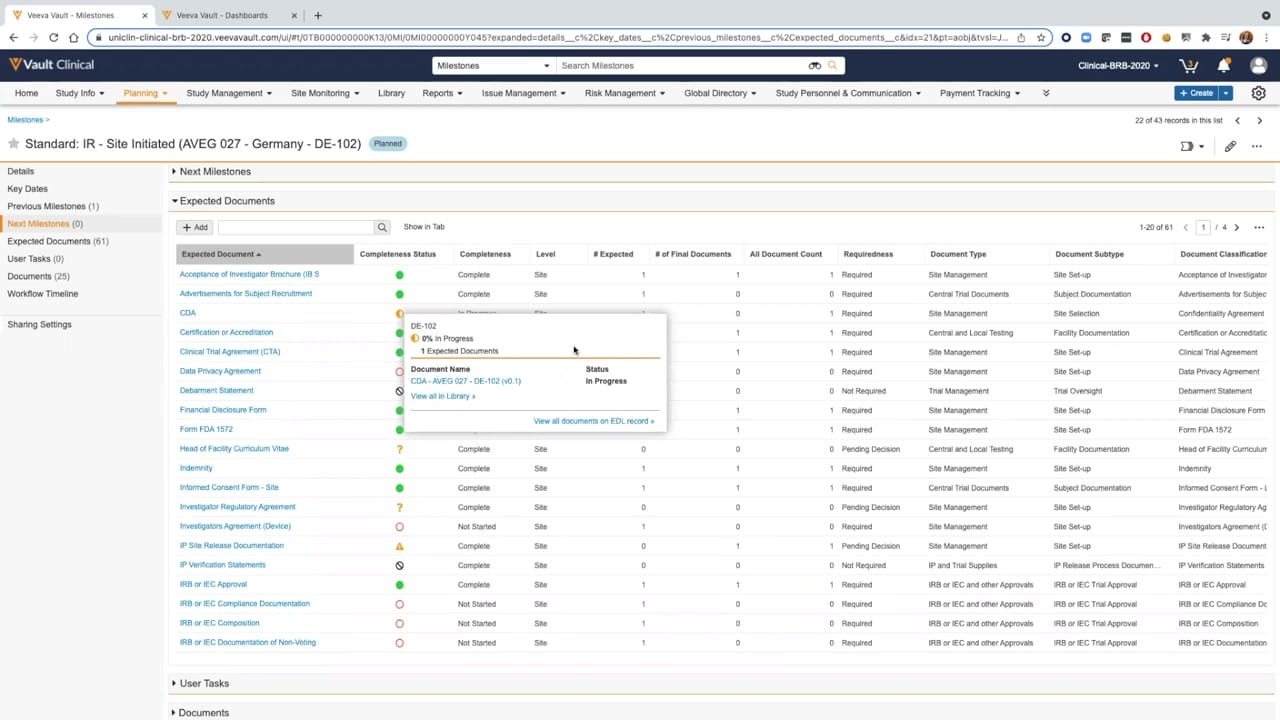
This reference page describes the Expected Document List (EDL) interface within Veeva Vault eTMF, focusing on document completeness tracking for a specific clinical trial milestone. The screenshot displays a detailed list of expected documents for a site-initiated milestone in Germany (DE-102) under study AVEG 027. The interface organizes document requirements into a structured table, allowing clinical operations teams to monitor the progress of essential trial documentation. Users can view completeness status, requiredness, and document classifications directly within the grid. A popover card provides a detailed status breakdown for a specific document, such as a Confidentiality Disclosure Agreement (CDA), showing its current version and progress. This view supports trial managers in identifying missing or incomplete documentation needed to satisfy milestone requirements.
Visible interface elements
- Milestone header showing "Standard: IR - Site Initiated (AVEG 027 - Germany - DE-102)" with a "Planned" status badge.
- Left navigation panel displaying document and milestone categories with numerical counts.
- Expected Documents table with columns for Completeness Status, Requiredness, and Document Type.
- Color-coded status icons representing complete, in-progress, and not-started document states.
- Popover detail card displaying status and version information for a Confidentiality Disclosure Agreement (CDA).
- Action buttons and search fields located above the Expected Documents table.
- Top navigation bar containing links to Home, Study Info, Planning, and Study Management.
Interface details
The interface features a multi-column data grid under the Expected Documents section, which is nested within a larger milestone detail page. The left-hand navigation panel lists related categories such as Key Dates, Previous Milestones, and Expected Documents, with count indicators. The main table contains columns for Expected Document name, Completeness Status, Completeness level, number of expected documents, number of final documents, total document count, requiredness, and hierarchical document classifications (Type, Subtype, and Classification). Visual status indicators, including green circles for complete items, orange circles for in-progress items, and red outlines for not-started items, provide immediate visual cues. A popover window, activated by hovering over a row, displays specific details for the selected document, including its name, version number, and status, along with navigation links to view the document in the library or access the full EDL record. The top of the page displays breadcrumbs, the milestone name, and a status badge indicating the milestone is planned.
Workflow context
In clinical trial management, maintaining a complete and inspection-ready trial master file is a critical operational goal. This interface supports clinical operations users by providing a centralized view of the Expected Document List associated with a specific milestone, such as site initiation. By presenting the requiredness and completeness status of each document type, the system can help study managers identify outstanding documentation before proceeding to the next study phase. For example, the visual indicators could help a user quickly spot that a Confidentiality Disclosure Agreement is still in progress or that an Investigator Agreement is not started. This structured tracking can support overall trial compliance and streamline the quality review process by highlighting exactly which documents are missing or require action, thereby assisting teams in preparing for regulatory inspections.
Source, version, and interpretation limits
The analyzed image is a static screenshot from an official Veeva hosted demo titled "Vault eTMF Demo: Part 2, TMF Completeness," dating from approximately 2020. Because this represents a demonstration environment, the visible names, study codes, dates, and document counts are synthetic data designed solely for illustrative purposes. A static image cannot confirm real-time data synchronization, automated status updates, or active integration with other clinical systems. Additionally, the user interface layout, available fields, and specific terminology may vary depending on the software release version and individual customer configurations within Veeva Vault eTMF.
Authoritative references
Use these primary sources to confirm current product positioning, terminology, and release-specific behavior.
- Vault eTMF Demo: Part 2, TMF Completeness(Official Veeva hosted demo)
- Veeva eTMF product overview(Official Veeva product page)
- Veeva guide to eTMF features and inspection readiness(Official Veeva resource)