What this eTMF screenshot shows
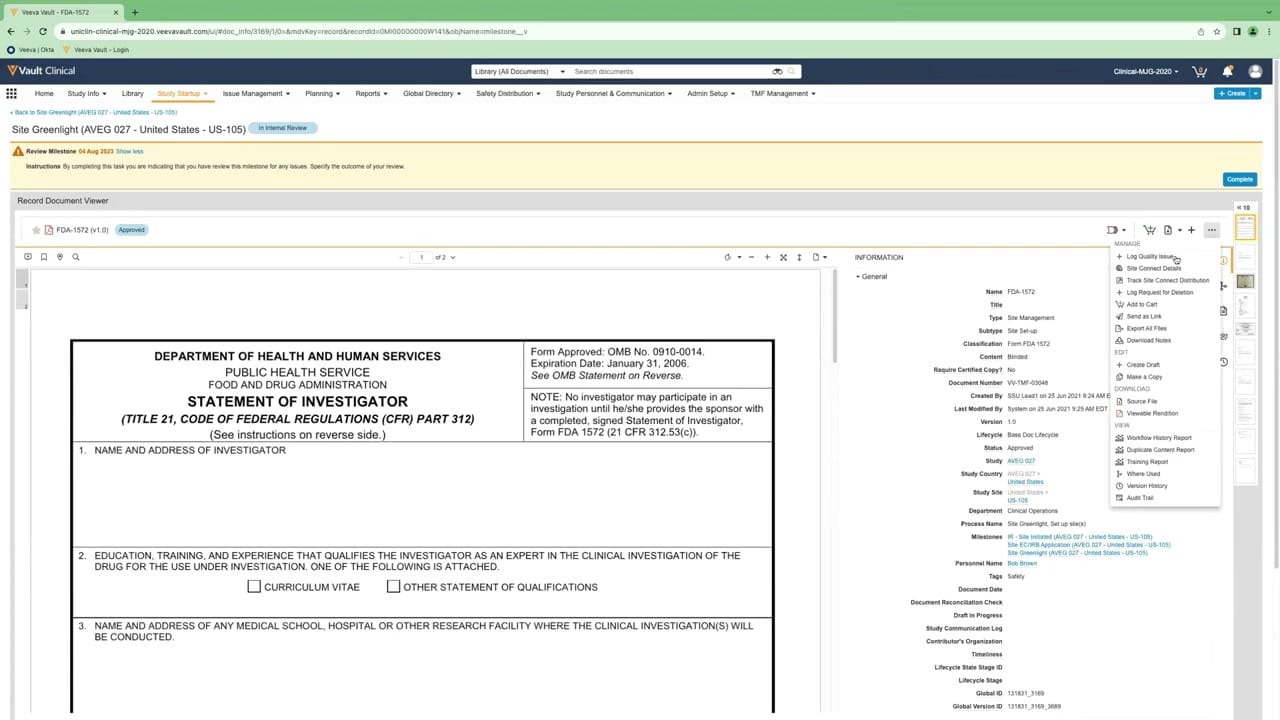
This public interface reference displays the document and metadata review interface within Veeva Vault eTMF, specifically showing a Form FDA 1572 document. The layout is split into a document viewer on the left and a detailed metadata panel on the right, facilitating simultaneous verification of document content and system properties. A yellow instruction banner at the top guides the user through a milestone review task, prompting them to specify the outcome of their review before completing the task. The interface includes a contextual action menu that is currently expanded, displaying options for managing, editing, downloading, and viewing the document's history. This layout supports clinical operations teams by centralizing document inspection and metadata verification in a single, unified workspace.
Visible interface elements
- Document viewer displaying a Form FDA 1572 Statement of Investigator.
- Information panel on the right showing metadata fields such as Name, Title, Type, and Status.
- Yellow instruction banner at the top for a milestone review task with a blue Complete button.
- Expanded action dropdown menu showing options like Log Quality Issue and Audit Trail.
- Top navigation bar with tabs including Study Startup, Issue Management, and TMF Management.
- Status badge indicating In Internal Review for Site Greenlight.
- Breadcrumb link pointing back to Site Greenlight (AVEG 027 - United States - US-105).
Interface details
The interface is structured with a top navigation bar containing tabs such as Study Startup, Issue Management, and TMF Management. Below this, the main workspace displays the "Record Document Viewer" for a Form FDA 1572. The left side of the viewer renders the document pages, complete with zoom, page navigation, and search controls. The right side features an "INFORMATION" panel detailing metadata fields, including document classification, version number, lifecycle status, study country, and associated milestones. An active dropdown menu on the right side of the document viewer exposes several administrative actions. Under the "MANAGE" section of this menu, options include "+ Log Quality Issue", "Site Connect Details", and "+ Log Request for Deletion". Other sections in the menu cover "EDIT", "DOWNLOAD", and "VIEW" actions, such as accessing the "Workflow History Report" or the "Audit Trail". A prominent yellow banner at the top of the workspace provides instructions for the active milestone review task and features a blue "Complete" button to finalize the action.
Workflow context
In a clinical trial master file workflow, this interface can support the quality control and verification process for essential site documents. A clinical operations specialist reviewing the Form FDA 1572 can compare the physical text within the document viewer against the structured metadata fields on the right, such as the study site and personnel name. The presence of the "+ Log Quality Issue" option in the active menu suggests how a reviewer could flag discrepancies or missing information directly from the document view. Completing the milestone review task via the top banner could help advance the site greenlight process within the study startup phase. This integrated view of document content, metadata, and task instructions can help streamline the inspection-readiness review by reducing the need to navigate between different screens to verify information.
Source, version, and interpretation limits
The screenshot is sourced from an official Veeva hosted demo titled "Track, Manage, and Report on Quality Issues," published around 2023. This static image represents a configured environment, and actual user interfaces, labels, and available actions may vary based on specific Vault releases and customer configurations. All names, dates, study codes, and document records, such as "Site Greenlight (AVEG 027 - United States - US-105)" and "Bob Brown," are synthetic demonstration data. Because this is a static screenshot, it cannot establish real-time data synchronization, automated validation, or regulatory compliance status for any active clinical trial.
Authoritative references
Use these primary sources to confirm current product positioning, terminology, and release-specific behavior.
- Track, Manage, and Report on Quality Issues(Official Veeva hosted demo)
- Veeva eTMF product overview(Official Veeva product page)
- Veeva guide to eTMF features and inspection readiness(Official Veeva resource)