What this eTMF screenshot shows
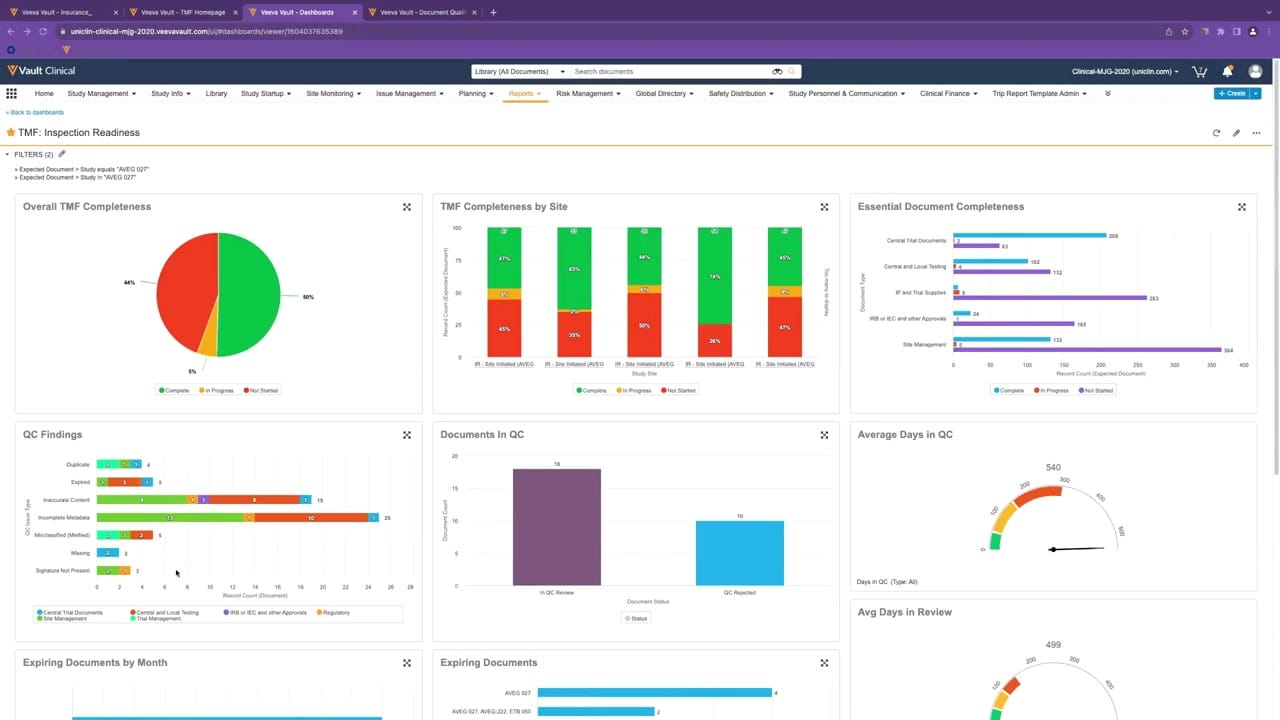
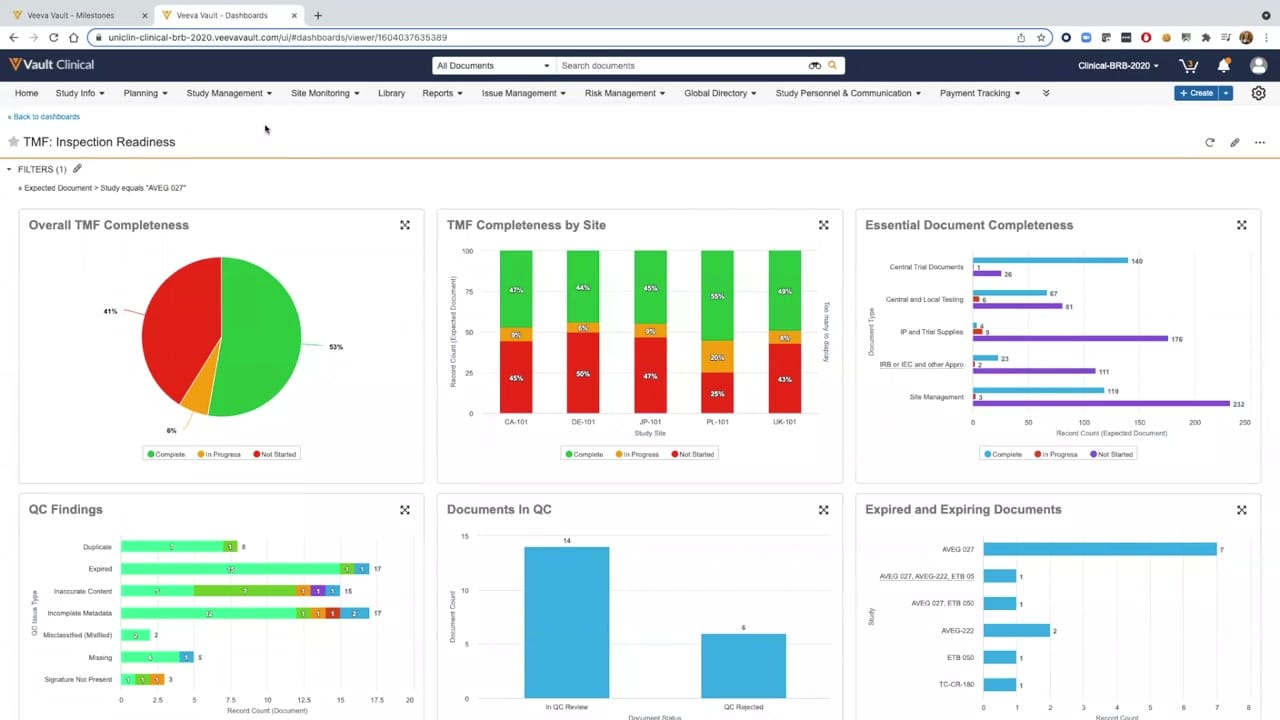
This public interface reference displays the "TMF: Inspection Readiness" dashboard within the Veeva Vault Clinical application, specifically configured for trial master file (TMF) completeness reporting. The dashboard presents a consolidated view of document collection progress and quality control status for a specific study, identified in the active filter as "AVEG 027". Six distinct graphical widgets provide visual summaries of key metrics, including overall completeness percentages, site-level progress, and document-type breakdowns. Additionally, the interface highlights quality control findings, documents currently undergoing review, and expiring records. This centralized reporting interface is designed to help clinical operations teams monitor the status of expected trial documentation, identify gaps in collection, and track quality issues across various study sites.
Visible interface elements
- "TMF: Inspection Readiness" dashboard title with a star icon and active filter for study "AVEG 027".
- "Overall TMF Completeness" pie chart showing percentages for Complete, In Progress, and Not Started documents.
- "TMF Completeness by Site" stacked vertical bar chart displaying progress across five synthetic site codes.
- "Essential Document Completeness" horizontal bar chart categorized by document types like Central Trial Documents and Site Management.
- "QC Findings" horizontal bar chart detailing issue types such as Duplicate, Expired, and Incomplete Metadata.
- "Documents In QC" vertical bar chart showing counts for documents in review and those rejected.
- "Expired and Expiring Documents" horizontal bar chart displaying record counts grouped by study identifiers.
Interface details
The user interface features a standard Veeva Vault navigation header at the top, containing global search capabilities, user profile options, and a primary navigation bar with tabs such as Study Info, Planning, Study Management, and Reports. Below this header, the dashboard title "TMF: Inspection Readiness" is clearly displayed alongside a filter panel. The active filter restricts the displayed data to the study "AVEG 027". The main body of the page is organized into a clean, two-row grid containing six visualization widgets. The top row features a pie chart representing "Overall TMF Completeness" alongside two stacked bar charts showing "TMF Completeness by Site" and "Essential Document Completeness". The bottom row displays three bar charts: "QC Findings" categorized by issue type, "Documents In QC" showing review and rejection counts, and "Expired and Expiring Documents" grouped by study. Each widget includes interactive controls, such as a full-screen toggle icon in the top-right corner, and color-coded legends to distinguish between status categories like Complete, In Progress, and Not Started.
Workflow context
In a clinical trial management workflow, this dashboard can support clinical operations managers and TMF specialists in evaluating inspection readiness. By reviewing the "Overall TMF Completeness" and "TMF Completeness by Site" widgets, users can quickly identify which investigative sites are lagging in document submission. The "QC Findings" and "Documents In QC" charts could help quality managers pinpoint recurring documentation errors, such as incomplete metadata or missing signatures, allowing them to target corrective actions. Furthermore, tracking "Expired and Expiring Documents" can assist teams in proactively updating essential records before they impact compliance. This structured presentation of expected versus received documents helps streamline the reconciliation process, supporting study teams in maintaining a high-quality, audit-ready trial master file throughout the lifecycle of the clinical trial.
Source, version, and interpretation limits
The screenshot is sourced from an official Veeva hosted demo titled "Vault eTMF Demo: Part 2, TMF Completeness," published around 2020. Consequently, the interface reflects an older software release, and the displayed metrics, study names, and site codes represent synthetic demonstration data rather than actual clinical trial records. Because this is a static image, it cannot establish real-time data synchronization, automated validation, or active integration with live clinical systems. The specific layout, dashboard widgets, and filtering options reflect a particular customer configuration and may differ significantly from current production environments or alternative system setups.
Authoritative references
Use these primary sources to confirm current product positioning, terminology, and release-specific behavior.
- Vault eTMF Demo: Part 2, TMF Completeness(Official Veeva hosted demo)
- Veeva eTMF product overview(Official Veeva product page)
- Veeva guide to eTMF features and inspection readiness(Official Veeva resource)