What this CTMS screenshot shows
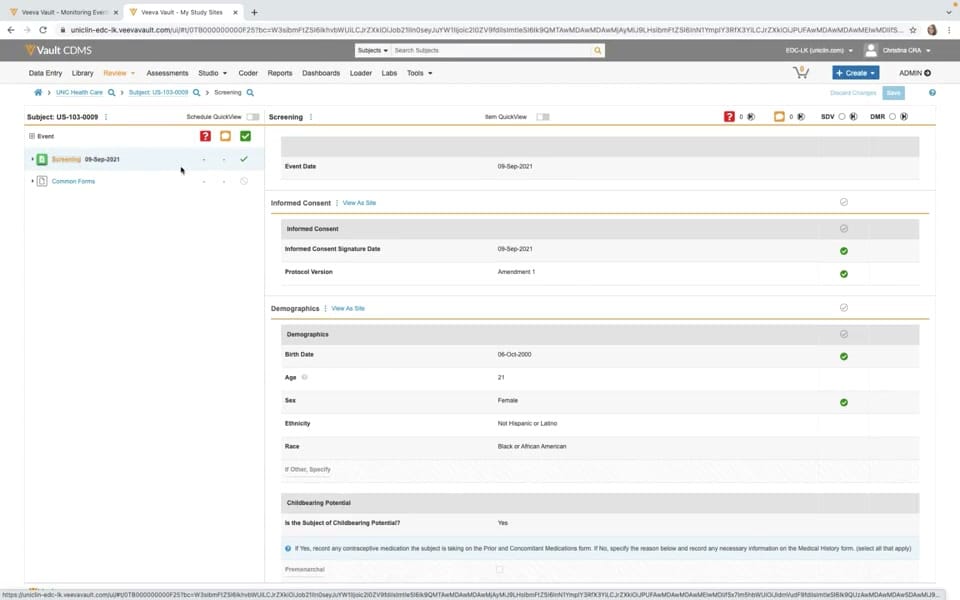
This reference page describes a user interface from Veeva Vault CDMS, displaying a subject data entry and review screen during a clinical trial. The interface presents clinical data for a specific subject, identified as US-103-0009, at the UNC Health Care site during a screening event. The screen is divided into a left-hand navigation panel showing events and forms, and a main content area displaying detailed clinical data fields. Visible sections in the main panel include Event Date, Informed Consent, Demographics, and Childbearing Potential. The interface provides clinical research associates and data managers with a structured view of patient-level data, including signature dates, protocol versions, and demographic details. This layout supports the systematic review of case report forms and helps users verify that required screening steps are documented.
Visible interface elements
- Vault CDMS header navigation bar with tabs for Data Entry, Library, Review, and Assessments.
- Breadcrumb trail showing the path UNC Health Care, Subject: US-103-0009, and Screening.
- Left-hand navigation panel listing the Screening event dated 09-Sep-2021 and Common Forms.
- Informed Consent section displaying the signature date of 09-Sep-2021 and Protocol Version Amendment 1.
- Demographics section containing fields for Birth Date, Age, Sex, Ethnicity, and Race.
- Childbearing Potential section with a Yes selection and instructional text for concomitant medications.
- Action buttons for Discard Changes and Save located in the upper right corner.
Interface details
The interface features a multi-pane layout designed for clinical data management. At the top, the Vault CDMS navigation bar includes tabs such as Data Entry, Review, Assessments, and Reports, alongside user identification for a clinical research associate. Below this, a breadcrumb trail tracks the path from the site level to the specific subject and screening event. The left sidebar lists the subject's events, highlighting the "Screening" event dated 09-Sep-2021 with a green checkmark, alongside a folder for "Common Forms." The main panel displays the data entry forms for the selected event. The "Informed Consent" section shows the consent signature date and the protocol version, marked with green completion icons. The "Demographics" section displays structured fields including Birth Date, Age, Sex, Ethnicity, and Race. Further down, the "Childbearing Potential" section includes conditional logic instructions and a yes/no selection. In the upper right of the main panel, action buttons for "Discard Changes" and "Save" are visible, alongside status indicators for queries, source data verification, and data clarification requests.
Workflow context
In a clinical trial, this interface can support the critical workflow of source data verification and initial data entry review by a clinical monitor or data manager. By presenting the screening event forms in a single, organized view, the system could help users confirm that informed consent was obtained on the correct date and under the approved protocol version before other trial procedures began. The structured demographic fields and childbearing potential questions can support the verification of subject eligibility criteria. Additionally, the visible status indicators for queries and source data verification allow users to track outstanding data clarifications directly within the form context. This integrated presentation of data and status indicators can help clinical operations teams maintain data quality and monitor site compliance during the screening phase of a study.
Source, version, and interpretation limits
The provided screenshot is sourced from an official Veeva hosted demo representing a 2020-era release of Vault CDMS. Because this image represents a static, configured demonstration environment, it does not reflect real-time clinical trial data, active patient records, or live system integrations. The specific fields, labels, and workflows shown are subject to change based on individual customer configurations, study protocols, and subsequent software updates. This reference description is limited strictly to the visible interface elements and does not verify regulatory compliance, data validation status, or the operational efficacy of the underlying software platform.
Authoritative references
Use these primary sources to confirm current product positioning, terminology, and release-specific behavior.
- Monitoring in Veeva CTMS(Official Veeva hosted demo)
- Veeva CTMS product overview(Official Veeva product page)
- Veeva CTMS trial-management overview(Official Veeva resource)