What this CTMS screenshot shows
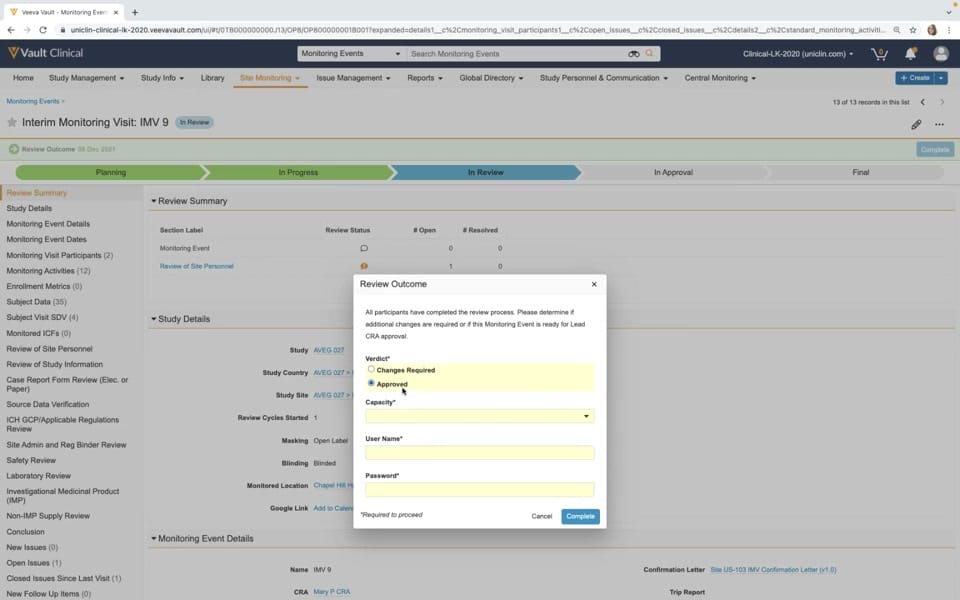
This public interface reference displays the monitoring report sign-off workflow within Veeva Vault CTMS. The screenshot captures a modal dialog titled "Review Outcome" superimposed over an Interim Monitoring Visit record (IMV 9) that is currently in the "In Review" stage of its lifecycle. The background interface displays a structured chevron progress bar tracking the monitoring event from planning to final approval. A comprehensive left-hand navigation panel lists various monitoring activities, study details, and issue tracking metrics. The modal dialog serves as a checkpoint for the reviewer to submit their verdict, requiring credentials to proceed. This interface illustrates how clinical trial managers and monitors can document and finalize site monitoring visits within a centralized clinical trial management system.
Visible interface elements
- "Review Outcome" modal dialog with Verdict selection
- Chevron progress indicator showing the "In Review" stage highlighted
- Left-hand navigation menu listing monitoring activities and metrics
- "Interim Monitoring Visit: IMV 9" record header with "In Review" status tag
- "Review Summary" table showing review status and open issues
- User Name and Password input fields within the modal dialog
- "Complete" action button in the modal footer
Interface details
The user interface is organized into a primary workspace with a prominent modal dialog in the foreground. The background features a top navigation bar with standard Veeva Vault Clinical controls, including search and quick-create options. Below this, a chevron-style progress indicator visualizes the lifecycle stages: Planning, In Progress, In Review, In Approval, and Final, with "In Review" highlighted in blue. The left sidebar provides a detailed menu of monitoring components, such as Study Details, Subject Visit SDV, and Open Issues. The central "Review Outcome" modal dialog prompts the user with a message indicating that all participants have completed the review process. It contains interactive elements including a "Verdict" radio button group with options for "Changes Required" and "Approved" (which is selected). Below the verdict, there are input fields for "Capacity" (a dropdown menu), "User Name", and "Password", which are marked with asterisks to denote mandatory fields. The modal is completed by "Cancel" and "Complete" action buttons at the bottom right.
Workflow context
In clinical operations, the monitoring report sign-off is a critical step to verify that a site visit has been thoroughly documented and reviewed. This interface presents the specific moment where a reviewer submits their formal evaluation of the Interim Monitoring Visit. By selecting "Approved" and entering their credentials, the user can transition the record to the next stage of the lifecycle, such as "In Approval." This structured workflow can support clinical operations teams by providing a clear path for report finalization and electronic signature capture. It could help organizations maintain oversight of monitoring activities and track outstanding issues or deviations identified during the visit. The visual progress bar and structured sections allow users to easily verify that all necessary monitoring activities, such as source data verification and consent form reviews, have been addressed before formal sign-off.
Source, version, and interpretation limits
The source of this image is an official Veeva hosted demo titled "Monitoring in Veeva CTMS," representing an older Vault release from around 2020. Because this is a static screenshot of a demonstration environment, it does not represent real-time data, active clinical trials, or live system integrations. The visible fields, labels, and workflow configurations reflect a specific demonstration setup and may differ from actual customer implementations or newer software releases. Additionally, the screenshot cannot confirm regulatory compliance, validation status, or the completeness of the underlying clinical data. All names, dates, and study identifiers are synthetic demonstration data.
Authoritative references
Use these primary sources to confirm current product positioning, terminology, and release-specific behavior.
- Monitoring in Veeva CTMS(Official Veeva hosted demo)
- Veeva CTMS product overview(Official Veeva product page)
- Veeva CTMS trial-management overview(Official Veeva resource)