What this CTMS screenshot shows
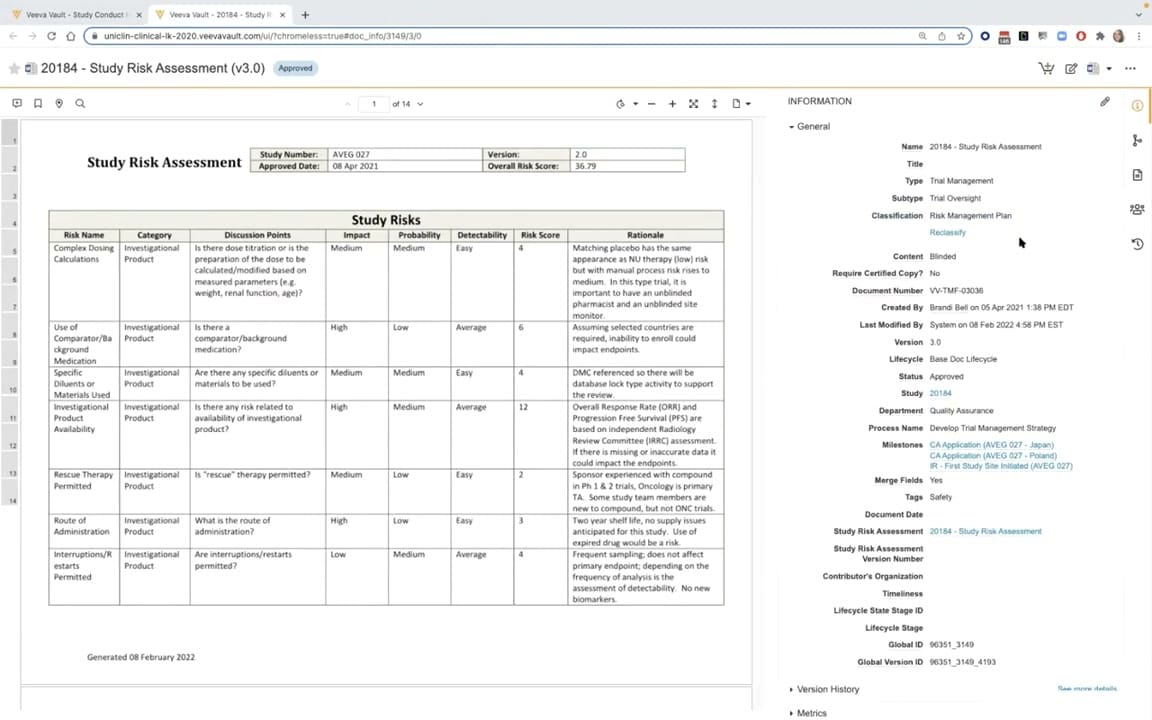
This interface displays a generated Study Risk Assessment document within Veeva Vault CTMS. The screen is split into two primary sections: an interactive document viewer on the left and a detailed metadata panel on the right. The document viewer displays a structured PDF containing a "Study Risks" table, which outlines specific risk names, categories, discussion points, impact, probability, detectability, risk scores, and rationales. The right-hand information panel displays key document attributes, including classification, versioning, lifecycle status, and associated study milestones. This view provides clinical operations teams with a centralized, auditable record of study-level risk assessments, linking structured risk data directly to the corresponding document metadata. The interface supports document-level actions and metadata management, facilitating compliance and oversight during clinical trial execution.
Visible interface elements
- Document preview pane displaying a "Study Risk Assessment" table with columns for Risk Name, Category, and Risk Score.
- Document header table containing Study Number "AVEG 027" and an Overall Risk Score of "36.79".
- Top header displaying the document title "20184 - Study Risk Assessment (v3.0)" with a blue "Approved" status badge.
- Right-hand "Information" panel showing collapsible metadata sections including "General", "Version History", and "Metrics".
- Metadata fields in the "General" section, including Document Number "VV-TMF-03036" and Status "Approved".
- Active hyperlinks under the "Milestones" field, such as "CA Application (AVEG 027 - Japan)".
- Vertical toolbar on the far right containing icons for document actions and navigation.
Interface details
The user interface is divided into a document preview pane and an information sidebar. The document preview pane on the left displays page one of a fourteen-page "Study Risk Assessment" document. This document features a structured header table with fields such as Study Number, Version, Approved Date, and Overall Risk Score. Below the header, a detailed "Study Risks" table lists multiple risk items, including "Complex Dosing Calculations" and "Investigational Product Availability," along with their associated impact, probability, and calculated risk scores. On the right side of the screen, the "Information" panel organizes document metadata under collapsible sections like "General," "Version History," and "Metrics." The "General" section displays critical fields such as Document Number, Lifecycle, Status, and associated Milestones, which are presented as active hyperlinks. A vertical toolbar on the far right provides quick access to document actions, sharing settings, and version comparisons. The top header of the page displays the document name, version number, and an "Approved" status badge, alongside standard browser and navigation controls.
Workflow context
In clinical trial management, generating and maintaining a Study Risk Assessment is a critical component of trial oversight and risk-based monitoring. This interface represents the culmination of a risk assessment workflow, where structured risk data entered into the CTMS is compiled into a formal, version-controlled document. Clinical operations personnel use this view to review the generated document, verify that all identified risks and mitigation rationales are accurately captured, and confirm that the document metadata aligns with the study's current status. The "Approved" status badge indicates that the document has completed its defined lifecycle workflow. By linking the generated PDF directly to metadata fields like "Study," "Milestones," and "Process Name," the system ensures that risk documentation remains traceable and easily accessible for audits, inspections, and ongoing study management activities.
Source, version, and interpretation limits
The screenshot is sourced from the "CTMS Oversight Deep Dive Demo," an official Veeva YouTube demonstration published in March 2022. The visible interface displays synthetic demonstration data, including mock study numbers, risk scores, and user names. Because this screenshot represents a specific product release and a configured environment, the actual user interface, available metadata fields, and document layouts may vary based on individual customer configurations, active Vault modules, and subsequent software updates. The browser chrome and demo tenant URL are visible, indicating a non-production environment. This reference description is strictly bounded by the visible elements in the static image.
Authoritative references
Use these primary sources to confirm current product positioning, terminology, and release-specific behavior.
- CTMS Oversight Deep Dive Demo(Official Veeva YouTube demo)
- Veeva CTMS product overview(Official Veeva product page)
- Veeva CTMS trial-management overview(Official Veeva resource)