What this CTMS screenshot shows
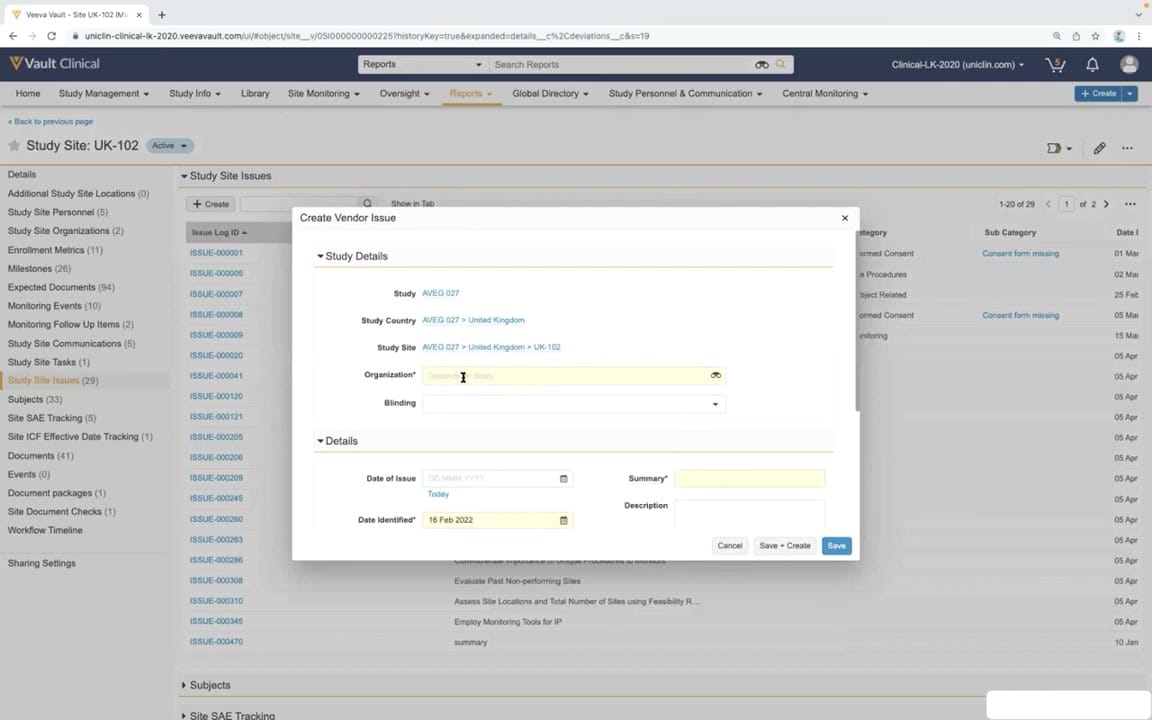
This reference screenshot displays the "Create Vendor Issue" modal dialog within the Veeva Vault CTMS interface. The modal is overlaid on the "Study Site Issues" log for a specific active site, "UK-102," under study "AVEG 027." The dialog is divided into two primary sections: "Study Details" and "Details." The "Study Details" section automatically populates hierarchical context, including the study name, country, and site, while requiring input for the organization and blinding status. The "Details" section captures specific issue metadata, such as the date of issue, date identified, a summary, and a detailed description. Required fields are highlighted in yellow to guide user input. This interface demonstrates how clinical operations teams can log and track vendor-related issues directly within the context of a specific study site, ensuring comprehensive oversight and streamlined issue management.
Visible interface elements
- "Create Vendor Issue" modal dialog overlaying the main workspace.
- "Study Details" section containing hierarchical links for Study, Study Country, and Study Site.
- Required "Organization" lookup field highlighted in yellow.
- "Details" section with "Date of Issue", "Date Identified", "Summary", and "Description" fields.
- "Cancel", "Save + Create", and "Save" action buttons at the bottom of the modal.
- Left-hand navigation panel highlighting "Study Site Issues (29)".
- Top navigation bar with tabs including "Study Management", "Site Monitoring", and "Oversight".
Interface details
The interface features a centered modal dialog titled "Create Vendor Issue" overlaying a dimmed background of the "Study Site Issues" list. Within the modal, the "Study Details" section displays read-only breadcrumbs linking the issue to "AVEG 027," "United Kingdom," and "UK-102." Below these, a required "Organization" field includes a lookup icon, and a "Blinding" dropdown is available. The "Details" section contains date inputs, including "Date of Issue" with a "Today" shortcut and a pre-populated "Date Identified" set to "16 Feb 2022." A required "Summary" text field and an optional "Description" text area are positioned on the right. Action buttons "Cancel," "Save + Create," and "Save" sit at the bottom right of the modal. In the background, the left-hand navigation pane lists site-specific categories, highlighting "Study Site Issues (29)." The top header displays standard Veeva Vault navigation tabs, such as "Study Management," "Site Monitoring," and "Oversight," alongside a global search bar and user profile controls, maintaining a consistent application frame.
Workflow context
The "Create Vendor Issue" workflow is a critical component of clinical trial management, enabling clinical operations personnel to document and track vendor performance and compliance issues. By initiating this workflow directly from the "Study Site Issues" tab of a specific site, the system automatically inherits the relevant study, country, and site context, reducing manual entry errors. Users can specify the responsible vendor organization, define blinding implications, and record key dates and descriptions. This structured data entry supports robust tracking, escalation, and resolution protocols. Within the broader CTMS ecosystem, logging these issues feeds into site monitoring, vendor oversight, and risk management dashboards. This centralized tracking ensures that study managers can monitor vendor-related risks across multiple sites and studies, facilitating timely corrective and preventive actions to maintain trial integrity and regulatory readiness.
Source, version, and interpretation limits
The screenshot is sourced from the "CTMS Oversight Deep Dive Demo" video published in March 2022. It represents a configured demonstration environment of Veeva Vault CTMS, showing synthetic study and site data. Because this is a demonstration tenant, the visible fields, layout, and available navigation tabs reflect a specific configuration that may differ from production environments. Actual user interfaces, required fields, and workflows are highly customizable based on individual organizational processes, system configurations, and software release versions. The browser chrome and demo-specific URLs visible in the screenshot are characteristic of a simulated environment rather than an active clinical trial.
Authoritative references
Use these primary sources to confirm current product positioning, terminology, and release-specific behavior.
- CTMS Oversight Deep Dive Demo(Official Veeva YouTube demo)
- Veeva CTMS product overview(Official Veeva product page)
- Veeva CTMS trial-management overview(Official Veeva resource)