What this Study Startup screenshot shows
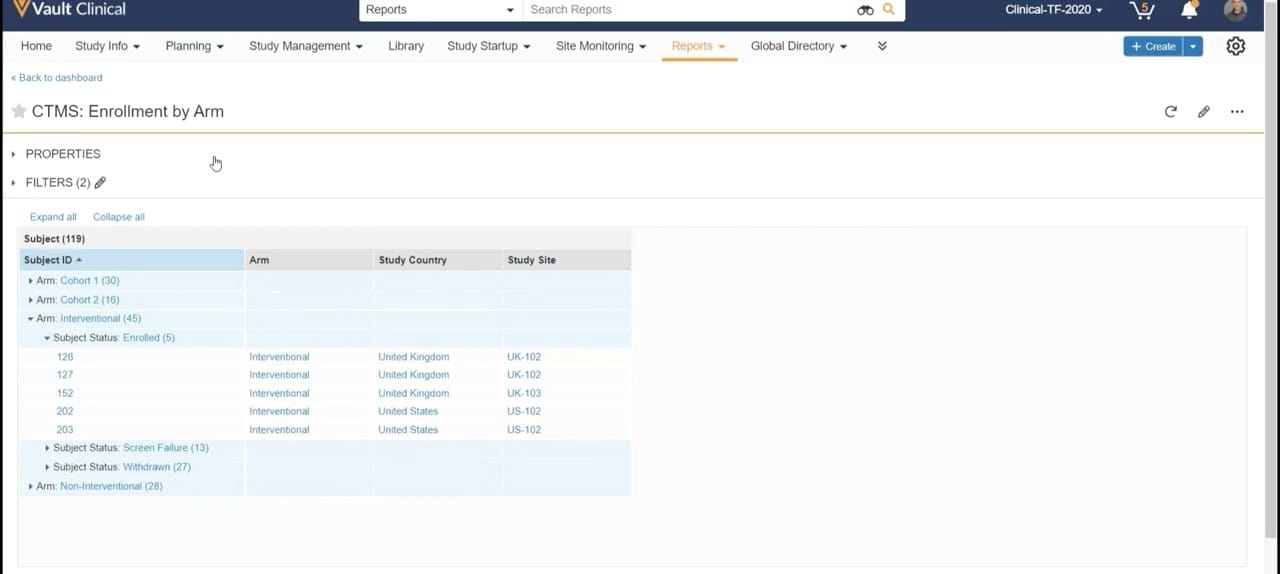
This reference page describes a report interface within Veeva Vault Clinical, specifically displaying the "CTMS: Enrollment by Arm" report. The interface presents a structured, hierarchical view of clinical trial subject enrollment data, organized by study arm and subject status. The active tab is "Reports," indicating that this view is part of the reporting module of the clinical trial management system. The report displays synthetic demonstration data for 119 subjects, categorized into cohorts and interventional or non-interventional arms. Users can view key attributes such as Subject ID, Arm, Study Country, and Study Site. This structured layout provides clinical operations teams with a clear overview of subject distribution across different study arms and geographic locations, supporting the monitoring of enrollment progress and trial demographics.
Visible interface elements
- Reports navigation tab highlighted in the top menu bar.
- Report title 'CTMS: Enrollment by Arm' with action icons for refresh, edit, and more options.
- Collapsible 'PROPERTIES' and 'FILTERS (2)' sections located above the main data table.
- Expandable table structure grouping 119 subjects by study arm and subject status.
- Individual subject records displaying Subject ID, Arm, Study Country, and Study Site.
- Expand all and Collapse all text links for managing table row visibility.
- Top search bar configured for searching reports with a binoculars icon.
Interface details
The interface features a standard Veeva Vault navigation header at the top, with the "Reports" tab highlighted. Below the main navigation, a breadcrumb link allows users to return to the dashboard. The report title, "CTMS: Enrollment by Arm," is accompanied by action icons for favoriting, refreshing, editing, and accessing additional options. Two collapsible sections, "PROPERTIES" and "FILTERS (2)," are positioned above the main data table, allowing users to view or modify report parameters. The main data table, titled "Subject (119)," utilizes a nested, expandable row structure. The data is grouped by "Arm" (such as Cohort 1, Cohort 2, Interventional, and Non-Interventional) and further sub-grouped by "Subject Status" (such as Enrolled, Screen Failure, and Withdrawn). In the expanded "Interventional" arm, individual subject records are visible, showing specific details like Subject ID, Arm type, Study Country (e.g., United Kingdom, United States), and Study Site (e.g., UK-102, US-102). Controls for "Expand all" and "Collapse all" are located directly above the table to facilitate navigation of large datasets.
Workflow context
In the context of clinical trial management, the "CTMS: Enrollment by Arm" report serves as a tool for clinical operations personnel to track and analyze subject recruitment and enrollment status. By grouping subjects by study arm and status, the interface can support study managers in identifying enrollment trends, monitoring site performance, and assessing the progress of specific cohorts. For instance, seeing the distribution of enrolled subjects versus screen failures or withdrawals across different countries and sites could help teams identify potential recruitment bottlenecks or outstanding site-level issues. This visibility is crucial for maintaining study timelines and ensuring balanced distribution across treatment arms. While the displayed data is synthetic, the structured reporting format illustrates how clinical operations users can leverage Vault Clinical to maintain oversight of subject enrollment metrics across global clinical trial sites.
Source, version, and interpretation limits
The screenshot is sourced from an official Veeva hosted demo, representing a typical configuration of the Veeva Vault Clinical platform. The data displayed, including subject counts, IDs, countries, and site codes, is entirely synthetic and intended for demonstration purposes only. Because this is a static image, it does not reflect real-time data updates, active database integrations, or specific customer configurations. Actual user interfaces, available fields, and reporting capabilities may vary depending on the specific Vault release, system configuration, and user permissions. This reference description is bounded strictly by the visible elements in the provided screenshot.
Authoritative references
Use these primary sources to confirm current product positioning, terminology, and release-specific behavior.
- Veeva Study Startup Unified Demo(Official Veeva hosted demo)
- Veeva Study Startup product overview(Official Veeva product page)
- Veeva Study Startup features(Official Veeva resource)