What this Study Startup screenshot shows
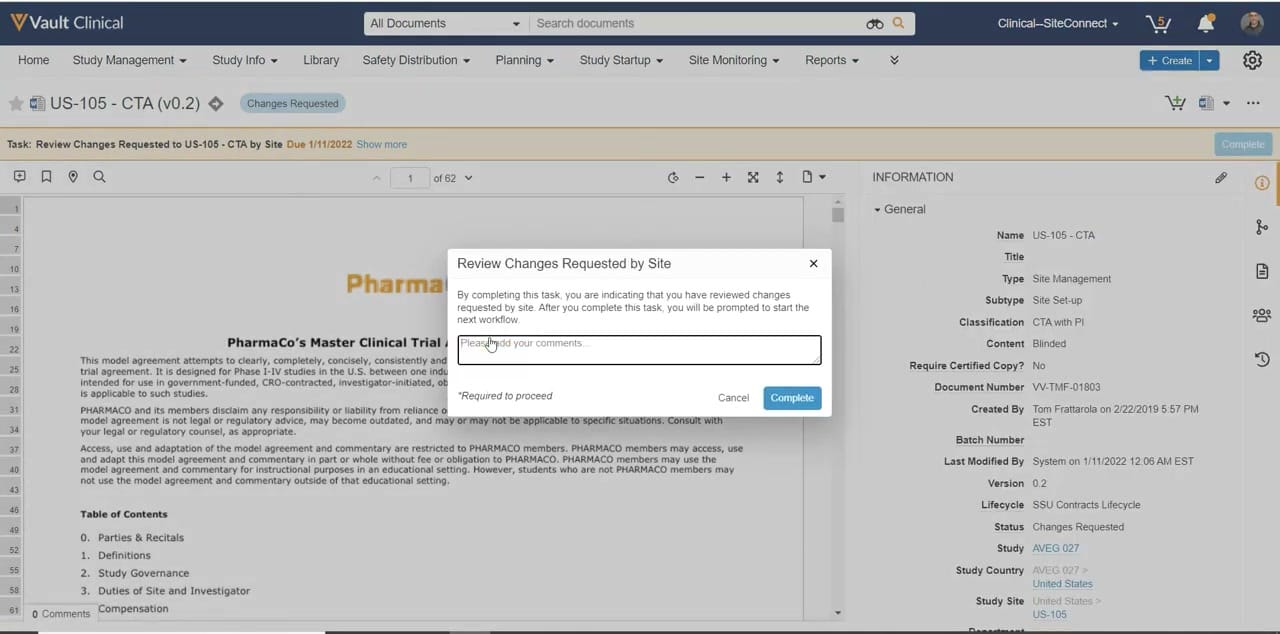
This interface reference displays the Veeva Vault Clinical interface during a contract review and reassignment workflow within the Study Startup module. The screen presents a document viewer on the left, displaying a draft of a clinical trial agreement titled "US-105 - CTA (v0.2)" with a status of "Changes Requested." An active modal dialog box titled "Review Changes Requested by Site" is superimposed over the document viewer, prompting the user to enter required comments before completing the task. On the right side of the screen, a detailed Information panel displays metadata associated with the document, including its classification, version, lifecycle status, and associated study site details. This layout provides a centralized workspace for managing document-centric tasks during the study startup phase.
Visible interface elements
- Document title "US-105 - CTA (v0.2)" with a "Changes Requested" status badge.
- Task banner displaying "Task: Review Changes Requested to US-105 - CTA by Site Due 1/11/2022".
- Document viewer displaying the first page of "PharmaCo's Master Clinical Trial Agreement".
- Modal dialog box titled "Review Changes Requested by Site" with a required comments text field.
- Information panel on the right displaying metadata such as Document Number "VV-TMF-01803" and Lifecycle "SSU Contracts Lifecycle".
- Study context fields in the Information panel showing Study "AVEG 027" and Study Site "US-105".
- Global navigation bar with options including "Study Startup" and "Reports".
Interface details
The interface is structured with a global navigation header at the top, featuring tabs for Study Management, Study Info, Library, Safety Distribution, Planning, Study Startup, Site Monitoring, and Reports. Below the navigation bar, a task banner highlights the current action: "Review Changes Requested to US-105 - CTA by Site," indicating a due date of January 11, 2022. The main workspace is split into two primary sections. The left section contains an interactive document viewer displaying the first page of a sixty-two-page clinical trial agreement. The "Review Changes Requested by Site" modal overlay sits in the center, containing an instruction text block, a text entry field for comments, and "Cancel" and "Complete" buttons. The right-hand Information panel lists key metadata fields under a collapsible "General" section. Visible fields include the document name, type, subtype, classification, document number, creation details, and the current lifecycle status, which is marked as "Changes Requested." Additionally, study-specific context such as the study code, country, and site are displayed at the bottom of this panel.
Workflow context
In the context of clinical trial operations, this interface supports the review and negotiation of site-specific contracts during the study startup phase. A clinical operations user can utilize this view to evaluate requested modifications to a clinical trial agreement before advancing the document to the next stage of the lifecycle. The central modal ensures that users document their review comments, which can support audit readiness and maintain a clear history of negotiations. The side-by-side presentation of the document text and its metadata could help coordinators verify that site-specific details, such as the study country and site identifier, align with the contract terms. By completing this task, the user can transition the document status from "Changes Requested" to the next step in the configured study startup workflow, facilitating progress toward site activation.
Source, version, and interpretation limits
The screenshot is sourced from the Veeva Vault Study Startup Homepage, published in February 2022. Because this is a static image of a demonstration environment, it does not represent real-time data, automated system validations, or active regulatory compliance status. The visible names, dates, document versions, and study identifiers are synthetic demonstration data and do not reflect actual clinical trial records. The specific fields, layout options, and workflow steps shown are subject to change based on the software version, user permissions, and individual organization configurations within the Veeva Vault platform.
Authoritative references
Use these primary sources to confirm current product positioning, terminology, and release-specific behavior.
- Veeva Vault Study Startup Homepage(Official Veeva YouTube demo)
- Veeva Study Startup product overview(Official Veeva product page)
- Veeva Study Startup features(Official Veeva resource)