What this Study Startup screenshot shows
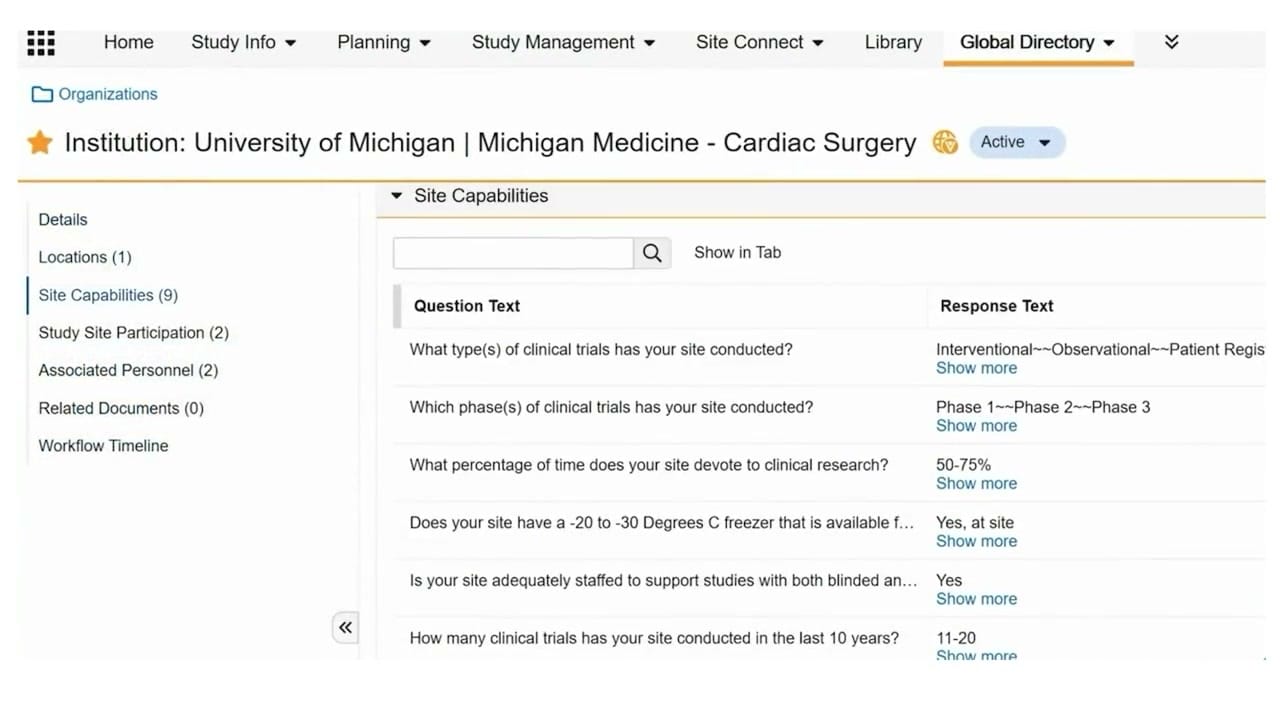
This public interface screenshot displays the Veeva Vault Study Startup interface, specifically focusing on the completed feasibility survey details for an institution. The view is situated within the Global Directory tab, showing the profile of a synthetic organization labeled "University of Michigan | Michigan Medicine - Cardiac Surgery" with an active status. The left-hand navigation panel highlights the "Site Capabilities" section, which contains nine recorded entries. The main content area presents a structured table detailing specific feasibility questions and their corresponding responses. This layout provides a centralized view of a site's operational parameters, such as past trial experience, phase capabilities, research dedication, equipment availability, staffing, and historical trial volume. The interface illustrates how clinical operations teams can review structured survey responses collected during the site qualification and feasibility assessment phases of study startup.
Visible interface elements
- Global Directory navigation tab highlighted in the top menu bar.
- Institution name header displaying University of Michigan | Michigan Medicine - Cardiac Surgery with an Active status badge.
- Left-hand navigation menu showing Site Capabilities selected with nine associated records.
- Search input field with a magnifying glass icon located above the main table.
- Two-column table layout with headers for Question Text and Response Text.
- Feasibility questions regarding trial types, phases, research time, freezer availability, staffing, and trial volume.
- Show more links next to each response in the Response Text column.
- Collapsible panel arrow button positioned between the left menu and the main content area.
Interface details
The interface features a standard Veeva Vault navigation bar at the top, with options including Home, Study Info, Planning, Study Management, Site Connect, Library, and the currently selected Global Directory. Below this, the organization's name is displayed alongside an "Active" status badge. A left-hand vertical menu allows users to navigate through different categories of the institution's profile, including Details, Locations, Site Capabilities, Study Site Participation, Associated Personnel, Related Documents, and Workflow Timeline. The "Site Capabilities" section is selected, displaying a search bar, a "Show in Tab" option, and a two-column table. The table columns are labeled "Question Text" and "Response Text." The visible questions cover topics such as trial types, phases conducted, percentage of time devoted to research, freezer availability, staffing adequacy, and trial volume over the last ten years. Each response includes a "Show more" link, indicating that additional text or options can be expanded. A collapsible arrow button sits between the left menu and the main table, allowing users to maximize the workspace.
Workflow context
In the context of clinical trial startup, evaluating site feasibility is a critical step to ensure selected institutions possess the necessary infrastructure, experience, and resources. The visible screen shows how a clinical operations user can review completed feasibility survey responses for a specific institution. By examining the "Site Capabilities" table, coordinators can verify if a site meets protocol requirements, such as having a -20 to -30 Degrees C freezer or adequate staffing for blinded and unblinded studies. This structured data can support the decision-making process during site selection and qualification. Rather than searching through disparate documents, the interface consolidates survey answers directly within the institution's profile in the Global Directory. This centralized visibility could help study teams identify qualified sites more efficiently, track historical performance, and streamline the transition from feasibility assessment to active study site participation.
Source, version, and interpretation limits
The source of this image is an official Veeva hosted demo titled "Veeva Study Startup Feasibility Surveys," published around 2020. The screenshot represents a static view of a configured Vault environment and displays synthetic demonstration data. Because this is a static image, it cannot verify real-time data synchronization, automated workflow progression, or active integration with external survey tools. The specific fields, labels, navigation tabs, and available options reflect a particular configuration and software release. Actual user interfaces and available features may vary based on individual customer configurations, organizational permissions, and subsequent Veeva Vault product updates.
Authoritative references
Use these primary sources to confirm current product positioning, terminology, and release-specific behavior.
- Veeva Study Startup Feasibility Surveys(Official Veeva hosted demo)
- Veeva Study Startup product overview(Official Veeva product page)
- Veeva Study Startup features(Official Veeva resource)