What this CTMS screenshot shows
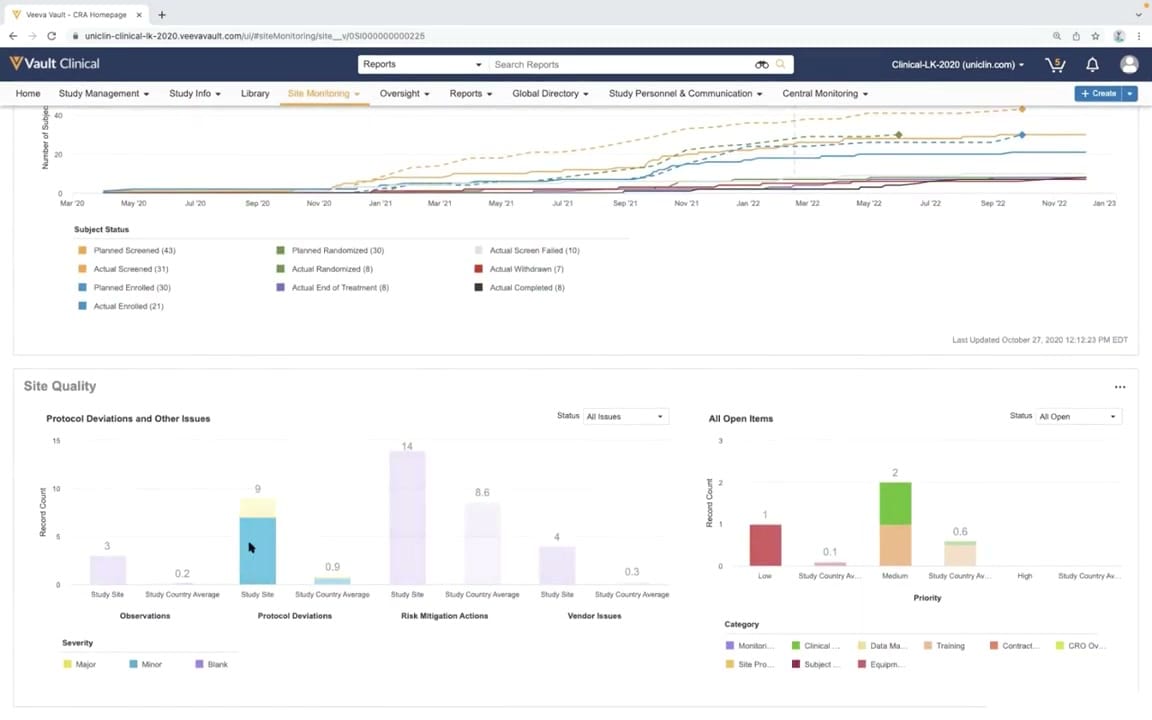
This screenshot displays a Site Quality dashboard within Veeva Vault CTMS, designed to provide clinical operations teams with visual metrics regarding study progress and site performance. The interface is divided into two primary sections. The upper section features a line graph tracking subject status metrics, such as screening, enrollment, and randomization, over a multi-year timeline. The lower section, titled Site Quality, contains two bar charts that compare site-specific performance against country averages. The left chart displays protocol deviations and other issues categorized by severity, while the right chart tracks open items by priority level and category. Together, these visual components offer a centralized view of site-level operational data, helping users monitor study milestones and identify potential quality trends across active clinical trial sites.
Visible interface elements
- Vault Clinical header with global search and navigation tabs including Site Monitoring and Oversight.
- Subject Status line graph tracking planned versus actual screening, enrollment, and randomization over time.
- Site Quality panel containing two interactive bar charts for issue tracking.
- Protocol Deviations and Other Issues bar chart comparing Study Site to Study Country Average.
- Severity legend categorizing issues as Major, Minor, or Blank.
- All Open Items bar chart displaying record counts by priority levels.
- Status dropdown filters for All Issues and All Open items.
- Timestamp indicating the last update time of October 27, 2020.
Interface details
The user interface features the standard Veeva Vault Clinical header with a global search bar and a navigation menu containing tabs such as Study Management, Site Monitoring, and Oversight. Below the navigation bar, the main workspace is organized into distinct graphical widgets. The top widget displays a cumulative line chart tracking subject status over time, complete with a detailed legend for statuses like Planned Screened and Actual Enrolled. A timestamp indicates when the data was last updated. The bottom Site Quality panel contains two side-by-side bar charts. The left chart, Protocol Deviations and Other Issues, features a dropdown menu to filter by status and compares Study Site metrics to Study Country Averages across categories like Observations and Risk Mitigation Actions. A color-coded legend defines severity levels as Major, Minor, or Blank. The right chart, All Open Items, displays open issues by priority, using a multi-colored stacked bar format to represent different categories such as Monitoring, Clinical, and Training. Dropdown menus and interactive tooltips, visible via a cursor hover, allow users to interact with the displayed data points.
Workflow context
In a clinical trial management workflow, this dashboard can support clinical research associates and study managers in evaluating site performance and compliance. By comparing individual study site metrics against country averages, the interface could help users identify outliers or sites requiring additional oversight. For instance, a higher volume of protocol deviations or open risk mitigation actions at a specific site compared to the national average might indicate a need for targeted training or corrective actions. The subject status timeline can assist in tracking enrollment milestones, allowing teams to see if actual enrollment aligns with planned projections. Monitoring open items by priority and category can help coordinators prioritize outstanding tasks, such as resolving data management queries or addressing equipment issues. This consolidated view of quality and enrollment metrics supports proactive study management and helps maintain oversight of critical trial activities.
Source, version, and interpretation limits
The screenshot is sourced from the Veeva CTMS Oversight Deep Dive Demo, published in March 2022. It represents a configured demonstration environment containing synthetic data, meaning the specific metrics, labels, and layouts shown may not reflect actual clinical trial results or standard production configurations. Because this is a static image, it cannot verify real-time data synchronization, automated calculations, or active integration with other clinical systems. Additionally, user interface elements, navigation options, and available features may vary depending on the specific Veeva Vault release, user permissions, and individual customer configurations.
Authoritative references
Use these primary sources to confirm current product positioning, terminology, and release-specific behavior.
- CTMS Oversight Deep Dive Demo(Official Veeva YouTube demo)
- Veeva CTMS product overview(Official Veeva product page)
- Veeva CTMS trial-management overview(Official Veeva resource)