


Zero Data Retention for Copilot and Azure OpenAI: A Life Sciences Deep Dive

Executive Summary
Zero data retention across Microsoft's AI stack is not one setting, because Microsoft's AI stack is not one product. Azure OpenAI carries its own sales gated zero data retention and abuse monitoring arrangement, independently verifiable through a documented Azure portal check. Microsoft Copilot, renamed this year from Microsoft 365 Copilot, works differently, operating inside the Microsoft 365 service boundary with its own Purview based auditing rather than the Azure OpenAI abuse monitoring mechanics that sit one layer below it. A third layer, Anthropic operating as a Microsoft subprocessor, splits further into two distinct arrangements with different defaults by region and different retention guarantees. This guide walks through all three layers precisely, names the verification path for each, and closes with a Copilot and Azure specific version of this series' buyer checklist.
What Zero Data Retention Means
A reader arriving at this piece directly needs the same grounding the series' opening guide and its first platform deep dive both opened with. Zero data retention, often shortened to ZDR, is not a single feature every AI vendor either has or lacks. It ranges from a self serve request parameter on one end to a sales gated enterprise agreement on the other, with a contractual data processing agreement amendment sitting in between depending on the vendor and product. That framing matters here more than almost anywhere else in this series, because Microsoft's own stack does not have one answer to "does Microsoft offer ZDR," it has three, and conflating any two of them is exactly the kind of brand versus product trap this series exists to catch. For the full four platform comparison, see the series' opening guide. For how this same spectrum plays out on OpenAI's own ChatGPT and API platform specifically, see the first deep dive in this series.
Microsoft's stack needs a three layer answer because Copilot, Azure OpenAI, and the Anthropic subprocessor arrangement inside both are three separate data handling regimes sitting under one corporate umbrella. Azure OpenAI is the infrastructure layer, a developer facing API service with its own abuse monitoring and zero data retention approval process. Copilot is the product layer built on top of it, governed by Microsoft's own Microsoft 365 service boundary and compliance commitments rather than by Azure OpenAI's mechanics directly. Anthropic sits as a subprocessor inside that product layer, and, as this guide details below, actually represents two distinct arrangements with different defaults and different guarantees, not one. Each of these three layers gets its own section below, in that order, precisely because treating any two as interchangeable is the single most common way a buyer misreads what Microsoft actually commits to.
Azure OpenAI: Abuse Monitoring and the Verification Path
By default, Azure OpenAI may temporarily retain prompts and completions, along with any generated images, for up to 30 days for abuse monitoring and service reliability purposes ([1]). This is the starting state for every customer who has not been separately approved for something further, the same abuse monitoring baseline the first deep dive in this series documented for OpenAI's own API platform. Zero data retention is not a self service Azure portal setting. It is a gated capability requiring Microsoft's approval, and current documentation states it is available only to customers on an Enterprise Agreement or a Microsoft Customer Agreement ([1][2]). A narrower, related approval, modified abuse monitoring, is also available: for applications approved under this arrangement, Azure OpenAI will not store any prompts and completions associated with the approved subscription, a distinct and narrower commitment than full zero data retention ([2]). This mirrors, almost exactly, the modified versus full distinction the first deep dive in this series documented for OpenAI's own Modified Abuse Monitoring and Zero Data Retention tiers, worth noting since it suggests this two tier structure is closer to an industry pattern than a single vendor's idiosyncratic design.
The single most concretely verifiable claim in this entire piece is the mechanism Microsoft provides for a customer to confirm, independently, that abuse monitoring has actually been turned off for their own resource, rather than trusting an approval email alone. Microsoft's own architecture documentation walks through this directly: navigate to the resource's Overview page in the Azure portal, open the JSON view, and look for a field named ContentLogging. Microsoft's documentation states this precisely: the value "false" for the "ContentLogging" attribute "appears only if data storage for abuse monitoring is turned off. Otherwise, this property will not appear in either Azure portal or Azure CLI's output." ([3]) That second sentence is worth reading twice, because it means the field's absence, not merely its value, is itself informative. If a customer's resource shows no ContentLogging field at all in either the Azure portal or the Azure CLI, abuse monitoring is still active for that resource, full stop. This same check is available through the Azure CLI or any management API, not only the graphical portal, giving an engineering team a scriptable way to confirm the setting across many resources at once rather than checking each one by hand ([3]).
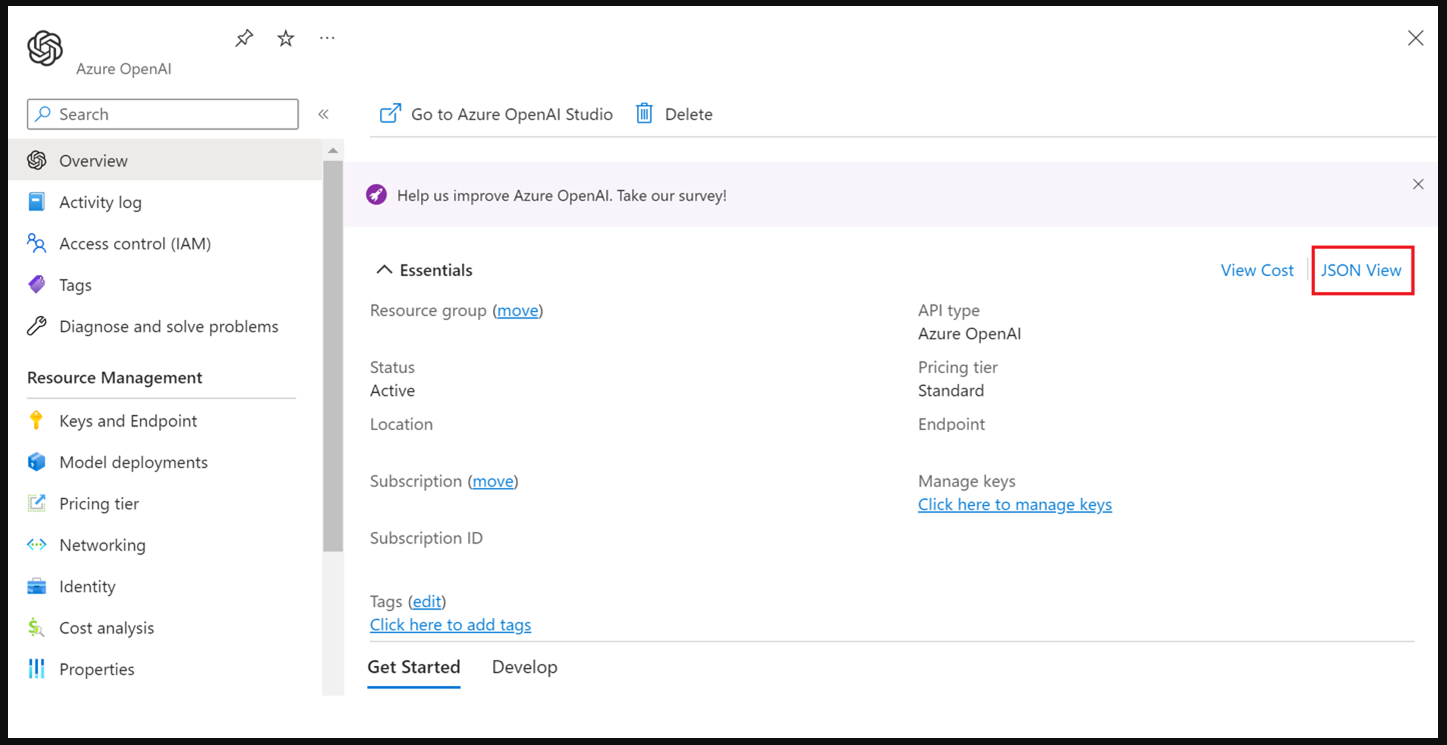 The Azure portal navigation path to a resource's JSON view: Overview page, then JSON View, the starting point for checking whether abuse monitoring is actually off for that resource. Screenshot source: Microsoft Learn, Azure OpenAI data privacy documentation.[3]
 The resulting JSON output, with the
 ContentLogging attribute set to false, the value that appears only when data storage for abuse monitoring is actually turned off; its absence from the output, not just its value, means abuse monitoring is still active. Screenshot source: Microsoft Learn, Azure OpenAI data privacy documentation.[3]
This guide independently confirmed this exact verification screen live, including the JSON view link and the resulting attribute, during its own research. One naming note worth stating plainly, since citation freshness is part of this series' own verification discipline: this documentation now sits under Microsoft's newer "Foundry" branding rather than being framed purely as "Azure OpenAI," reflecting a broader platform rename that has occurred since this series' opening guide was first drafted. The underlying mechanics, the JSON verification path, and the 30 day abuse monitoring default are all unchanged. Only the product name and documentation URL around them have shifted, the same kind of citation drift the first deep dive in this series flagged for a different Microsoft owned tool.
Retention and abuse monitoring are one question; HIPAA coverage is a separate one, and this guide's own research closed a gap the opening pillar guide had left open. Microsoft's compliance documentation states that Azure is an in-scope service under the Microsoft HIPAA Business Associate Agreement, made available by default through the Microsoft Product Terms and the Products and Services Data Protection Addendum, with no separate BAA signature required once a customer identifies as a covered entity or business associate and executes a qualifying licensing agreement ([15][16]). Azure OpenAI specifically is treated as HIPAA-eligible under that same default mechanism, corroborated across multiple direct Microsoft engineering responses on Microsoft Q&A, with one precise caveat worth stating rather than glossing over: Microsoft's own guidance points to text-based interactions as the covered modality, and a buyer should not assume image or realtime audio inputs carry the same coverage until Microsoft states otherwise in its own documentation ([17]). A BAA existing is not the same claim as full compliance; Microsoft's own FAQ on this point states plainly that having a BAA in place does not, by itself, make a customer's use of Azure HIPAA compliant, that remains the customer's own responsibility ([16]).
Copilot Itself Works Differently From the Layer Beneath It
Microsoft 365 Copilot is now named simply Microsoft Copilot, and Microsoft 365 Copilot Chat is now Microsoft Copilot Chat. Microsoft's own current documentation states directly that there are "no changes to security, compliance, and privacy for organizations" as a result of this rename ([4]). This guide uses the current name throughout, and flags the shift once here rather than repeatedly, since a reader researching this topic may encounter both names across older and newer material.
The distinction most worth holding onto through the rest of this section is simple to state and easy to lose in practice: Copilot honors the same data protection, access control, and compliance capabilities that apply across Microsoft 365 generally. It does not operate under the Azure OpenAI specific abuse monitoring and ContentLogging mechanics described in the previous section ([5]). In other words, the JSON view check that tells a buyer whether their organization's Azure OpenAI resource has abuse monitoring turned off says nothing directly about that same organization's Copilot deployment. These are two different verification questions, answered in two different places, governed by two different sets of terms, and this guide treats them as such rather than blending them into one narrative the way a brand level summary might.
Copilot interaction data is stored within Microsoft 365 services themselves, and Microsoft's own architecture documentation names the specific locations directly: a hidden folder within the user's Exchange Online mailbox that contains that user's prompts and Copilot's responses, a preservation hold library in SharePoint, a Microsoft AI powered chat files folder within the user's OneDrive, and a user owned SharePoint embedded container for content created with Copilot Pages ([5]). This data can be discovered, audited, and retained using Microsoft Purview's own capabilities, including audit logs, eDiscovery, communication compliance, and retention policies, the same governance tooling an organization already uses for its broader Microsoft 365 estate ([5][6]). Retention and deletion behavior for this data follows an organization's own configured Purview retention policies rather than a single fixed Microsoft default, meaning a life sciences buyer's actual retention posture for Copilot data is substantially a function of how their own Purview policies are configured, not solely a vendor provided setting ([6]).
Microsoft's own architecture diagram for this exact system is worth including directly rather than only describing, since it is genuinely adjacent, honestly framed administrative material rather than a retention toggle: it shows Copilot related data flowing from Exchange Online, OneDrive, and SharePoint into Purview's eDiscovery, communication compliance, and retention tools, numbered end to end. For a compliance reviewer trying to understand where Copilot data actually lives before it can be audited or retained, this diagram answers that question more directly than prose alone.
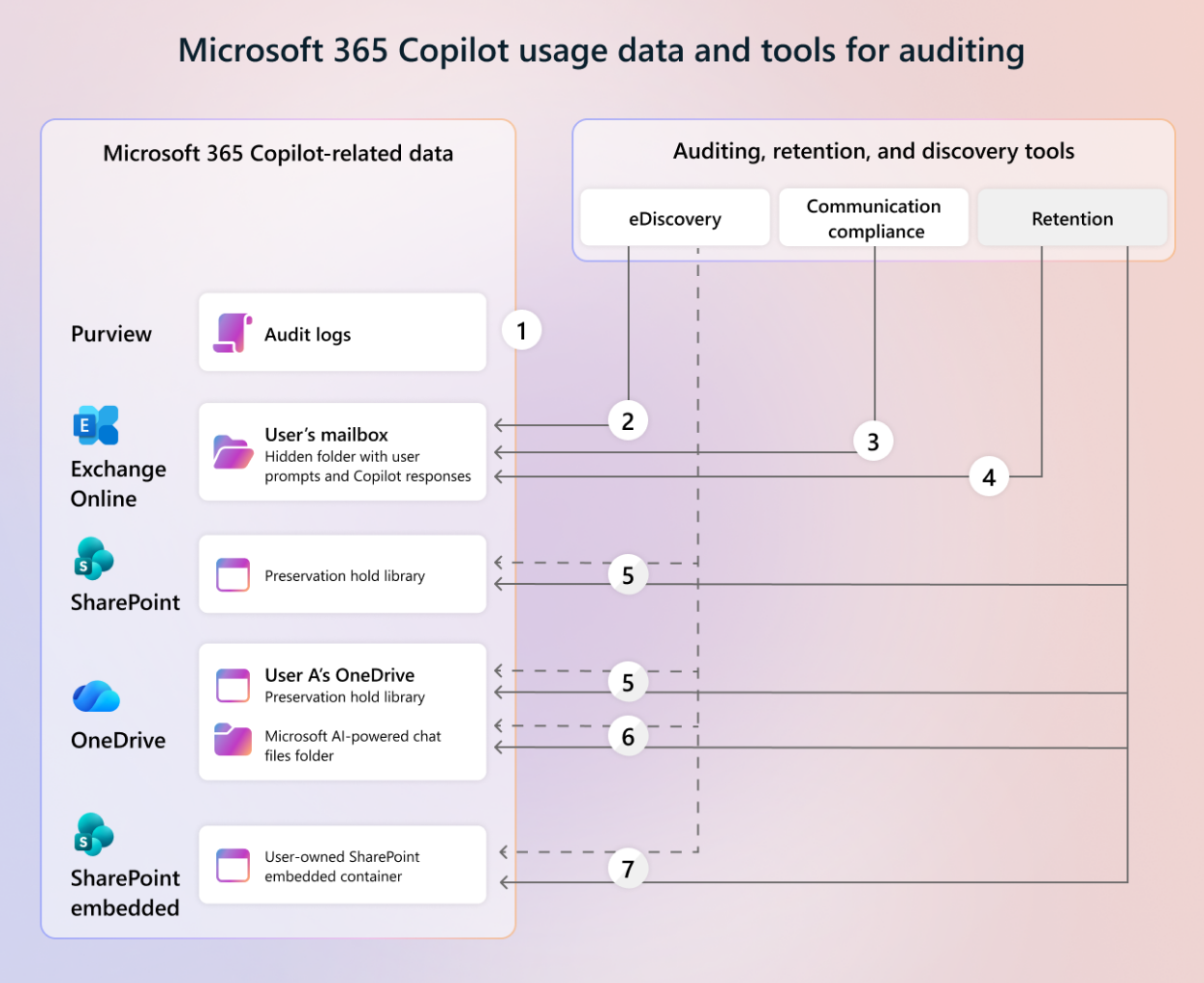 Microsoft 365 Copilot usage data and the auditing, retention, and discovery tools that connect to it, including the hidden Exchange Online mailbox folder, OneDrive chat files folder, and SharePoint embedded container. Screenshot source: Microsoft Learn, "Microsoft 365 Copilot data protection architecture."[5]
Two adjacent points are worth a brief mention without expanding into full sections of their own. Copilot can only summarize or reference content a user is already authorized to access, and Purview sensitivity labels together with SharePoint and OneDrive access controls shape what Copilot can discover without changing the underlying permission model itself ([5]). Separately, for European customers, Microsoft's EU Data Boundary commitments apply to Copilot, meaning in scope prompts and responses are processed and stored within the EU and EEA ([7]). This is a data residency commitment, distinct from the retention questions this guide otherwise covers, and worth naming precisely rather than treating as the same thing.
Anthropic as a Microsoft Subprocessor: Two Arrangements, Not One
This is the richest and most current material in this entire piece, and the section most worth reading slowly, because it resolves into two genuinely distinct arrangements that are easy to collapse into one if a buyer only skims the surface.
Anthropic has onboarded as a Microsoft subprocessor, effective January 7, 2026, as part of what Microsoft describes as an offering that delivers enterprise grade commitments and safeguards for Anthropic models used within Microsoft Copilot, Researcher, Copilot Studio, Power Platform, and Copilot in Microsoft 365 apps ([8]). As a subprocessor operating under Microsoft's oversight, Anthropic models used this way are governed by Microsoft's own Product Terms and Data Protection Addendum, not by Anthropic's own separate consumer or commercial terms, unless a specific model is labeled a Preview model with Data Retention, the second arrangement covered below ([8]).
Availability of this standard arrangement is not uniform, and the specific pattern matters directly for a life sciences buyer's own regional footprint. Microsoft enables Anthropic models on by default for most customers in commercial cloud, but explicitly excludes the European Union, the European Free Trade Association, and the United Kingdom, where the setting defaults to "No users" and a tenant admin must take a deliberate, separate action to opt in ([8]). Anthropic models are also entirely unavailable to federal customers in Government Community Cloud, and to all customers in GCC High and Department of Defense environments, where the option to enable them does not even appear in the admin center ([8]). As of July 22, 2026, a newer setting allows non federal GCC customers to opt in specifically, disabled by default, and Microsoft's own documentation attaches a direct warning to this option: when enabled, these Anthropic models "process Customer Data outside Microsoft's FedRAMP authorized U.S. Government cloud," a sentence worth a buyer's full attention rather than a passing read ([8]). For an organization operating in or serving the EU, EFTA, or UK specifically, this default off posture is directly relevant and worth its own line in the buyer checklist below, since it means the standard subprocessor arrangement requires an explicit administrative decision in those regions rather than arriving pre-enabled.
The second, separate arrangement is the one most likely to be missed entirely, and the one this guide treats with the most care. Certain advanced Anthropic models, which Microsoft's documentation describes with examples such as Claude Fable 5 and Claude Mythos 5, are offered specifically as "Preview models with Data Retention." For these particular models, and only these models, Anthropic acts as an independent data processor rather than as a Microsoft subprocessor, and Microsoft's own Product Terms and Data Protection Addendum simply do not apply to their use ([8][9]). Instead, use of these specific models is governed by Anthropic's own Commercial Terms of Service and Data Protection Addendum, and enabling them is entirely optional for an organization ([8]). The detail that most needs stating plainly: these Preview models with Data Retention are default off for every tenant, in every region, with no exception, including in regions and organizations where the standard Anthropic subprocessor arrangement described above is already on by default ([8]). Enabling one does not enable the other, and disabling the standard arrangement does not affect this separate, always-off-by-default setting either.
What "Data Retention" actually means for these specific preview models is worth stating with precision rather than as a vague caveat. Anthropic retains most inputs and outputs from these models for up to 30 days, and separately retains any content flagged by its own trust and safety classifiers for up to two years, with the classification scores themselves retained for up to seven years, per Anthropic's own commercial data retention policy for these covered models ([8][10]). Anthropic states it does not use this retained data for model training without a customer's express permission ([8]). Microsoft's own admin center interface, independently confirmed live during this guide's research, states the resulting position about as directly as a piece of enterprise software copy ever does: "Anthropic Preview models with Data Retention operating within Microsoft Online Services are not in scope for Microsoft's data residency and audit and compliance requirements and Anthropic does not guarantee Zero Data Retention." That sentence, quoted here exactly as it appears in the product itself, is the single most important line in this entire guide for a regulated buyer to sit with before any tenant administrator opts in on their behalf.
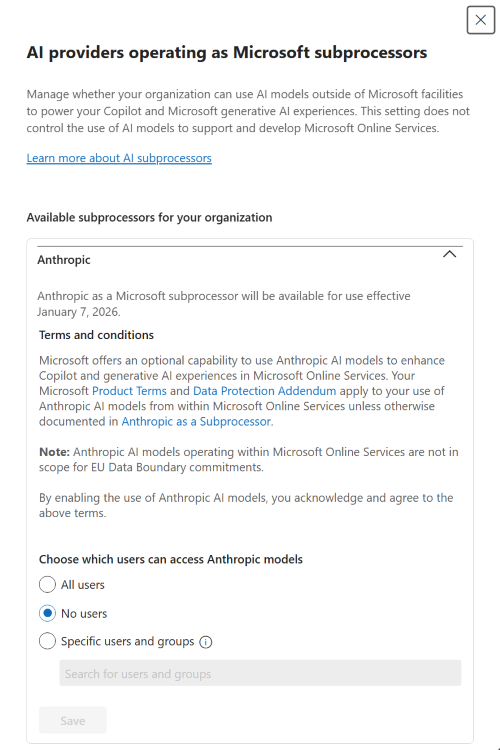 The Microsoft 365 admin center's "AI providers operating as Microsoft subprocessors" panel for Anthropic, independently confirmed live during this guide's research with "No users" selected, the compliant default state for regions where this arrangement is opt-in. Screenshot source: Microsoft Learn, "Anthropic models in Microsoft Online Services."[8]
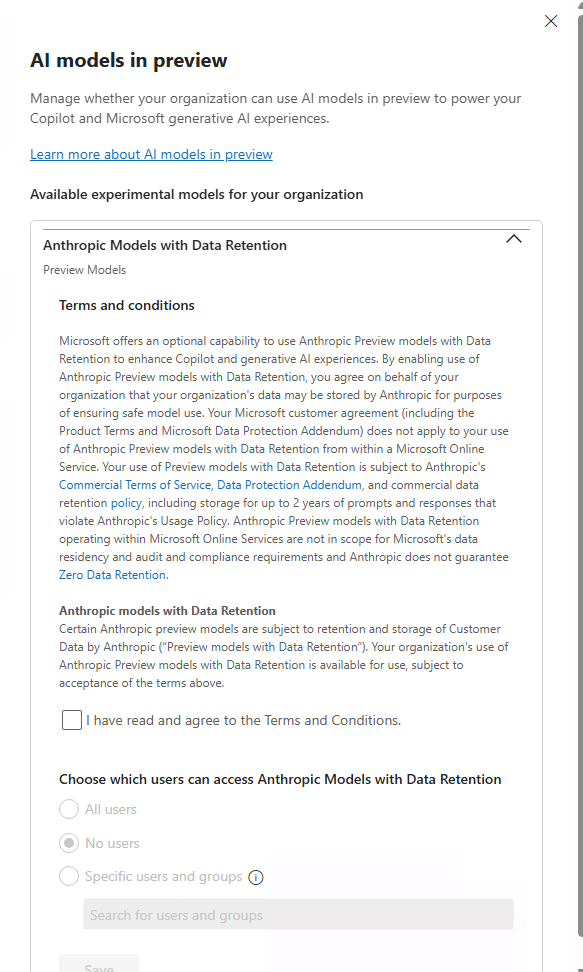 The separate "AI models in preview" panel specifically for Anthropic Preview models with Data Retention, also confirmed live with "No users" selected and displaying Microsoft's own stated position that Anthropic does not guarantee zero data retention for these specific models. Screenshot source: Microsoft Learn, "Anthropic models in Microsoft Online Services."[8]
One disclosure worth stating directly, since it recurs across this series wherever Claude or Anthropic enters the discussion: IntuitionLabs is a member of the Claude Partner Network, a direct relationship with Anthropic itself. That membership is entirely separate from, and has no bearing on, Microsoft's own subprocessor agreement with Anthropic described in this section. The two should never be read as connected.
On the HIPAA question for Copilot itself: Microsoft's own compliance documentation names Microsoft Copilot and Microsoft Copilot Chat directly as in-scope services under the same default, no-separate-signature Business Associate Agreement described above for Azure OpenAI, covering both the commercial and Government Community Cloud applicability tiers ([15]). Microsoft Copilot for Security is named separately again as its own in-scope service under the same BAA ([15]). None of this extends to the Anthropic subprocessor arrangement covered in this section; a signed Microsoft BAA for Copilot governs Microsoft's own handling of Copilot data, not the separate terms under which Anthropic processes data as a subprocessor or, for Preview Models with Data Retention, as an independent processor.
GitHub Copilot CLI: Availability, Training Data, and a Tier Based Distinction
GitHub Copilot CLI, described by GitHub as a terminal native coding agent that brings GitHub Copilot directly to the command line, became generally available for all Copilot subscribers on February 25, 2026, following a public preview period that began in September 2025 ([11]).
One distinction is worth stating precisely here, specifically because this guide's own research process nearly conflated two separate tools this session, and naming the near miss is more useful to a reader than silently avoiding it. GitHub's own gh command line tool, a general purpose tool for interacting with GitHub itself and a genuinely different piece of software from GitHub Copilot CLI, began sending pseudonymous usage telemetry by default starting with version 2.91.0 in April 2026 ([12]). Both of GitHub's own primary sources for that change state the same clarification in nearly identical language: this update "doesn't apply to GitHub Copilot or GitHub Copilot CLI, which handle data collection separately." ([12][13]) This guide states that distinction directly and in one place, so that a reader researching Copilot CLI's own data handling does not carry forward a fact that actually describes a different tool entirely.
Separately from telemetry, and specific to Copilot itself rather than to gh, GitHub announced a change to its own training data policy that took effect April 24, 2026, following 30 days notice given March 25, 2026 ([14]). From that date forward, interaction data, meaning inputs, outputs, code snippets, and associated context from Copilot sessions, may be used to train and improve GitHub's AI models for users on the Copilot Free, Pro, and Pro Plus plans, unless those individual users opt out ([14]). Copilot Business and Copilot Enterprise customers are explicitly excluded from this change entirely, and private repository content at rest is not used for training regardless of an account's plan tier ([14]). Opting out is done through an individual's own Copilot settings, under the Privacy section, by disabling the option labeled "Allow GitHub to use my data for AI model training," and the resulting opt-out applies across an entire account rather than being configurable on a per-repository basis ([14]).
Because GitHub Copilot CLI is available to all Copilot subscribers as of its general availability, this tier split applies directly and specifically to CLI usage in a way worth spelling out rather than leaving implicit: a Free, Pro, or Pro Plus subscriber running Copilot CLI in their terminal falls under this default-on training policy unless they have personally opted out, while a Business or Enterprise subscriber running the identical CLI tool does not, regardless of what either user actually types into it. For an engineering team inside a life sciences organization, this means the applicable data handling posture for Copilot CLI is a function of which specific subscription each individual engineer holds, not a single organization wide answer, and it is worth an explicit check rather than an assumption that an enterprise contract automatically covers every seat.
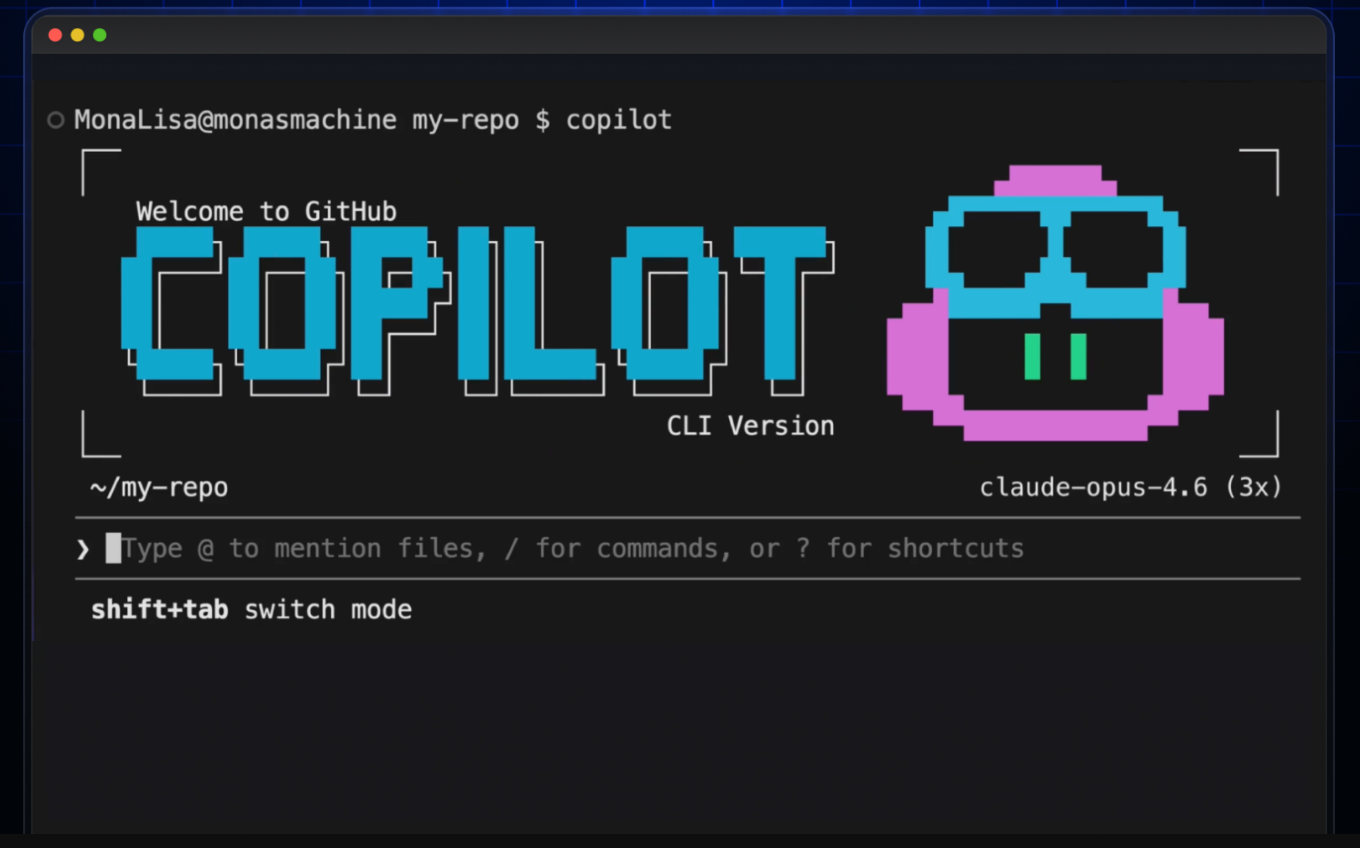 The GitHub Copilot CLI terminal interface as shown in GitHub's own general availability changelog post, genuinely adjacent, honestly framed material showing the tool's interface rather than a data retention screen. Screenshot source: GitHub Changelog, "GitHub Copilot CLI is now generally available."[11]
What to Ask Before You Sign: The Copilot and Azure Checklist
The platform specific detail above resolves into a short, portable checklist a life sciences buyer can bring directly to a Microsoft account team conversation or an internal security review, building on the general buyer checklist introduced in this series' opening guide.
| Question | Why it matters |
|---|---|
| Has your Azure OpenAI resource actually been approved for modified abuse monitoring or full zero data retention, and can you independently verify it? | Verification is checkable directly through the Azure portal JSON view or Azure CLI, looking for a ContentLogging attribute set to false. Its absence, not just its value, means abuse monitoring is still active. |
| Are you treating Copilot's own Purview based auditing and Azure OpenAI's abuse monitoring as the same control? | They are governed separately. A verified Azure OpenAI ContentLogging setting tells you nothing about your organization's Copilot deployment. |
| If your organization operates in the EU, EFTA, or the UK, do you know the standard Anthropic subprocessor arrangement defaults to off in your region? | This requires an explicit tenant admin opt-in in these regions, unlike most other commercial cloud regions where it is on by default. |
| Has anyone in your organization enabled Anthropic Preview Models with Data Retention? | Microsoft's own admin center interface states directly that Anthropic does not guarantee zero data retention for these specific models, and that they fall outside Microsoft's own data residency and audit commitments. |
| Does your Microsoft licensing agreement actually include the Business Associate Agreement, and have you confirmed which specific services it covers? | The BAA is included by default through the Product Terms and Data Protection Addendum, no separate signature exists to check for, but it is scoped to named in-scope services (Azure, Microsoft Copilot, Microsoft Copilot Chat, Microsoft Copilot for Security) and, for Azure OpenAI, to text-based interactions specifically rather than every modality. |
| If your engineering team uses GitHub Copilot CLI, which subscription tier is each user on? | Free, Pro, and Pro Plus tiers default into AI training data use as of April 24, 2026. Business and Enterprise tiers do not. The distinction is per user, not organization wide. |
| Does your organization's use of Anthropic models through Microsoft in any way depend on, or get confused with, a direct relationship with Anthropic itself? | These are separate relationships with separate terms. A vendor's own direct partnership with Anthropic has no bearing on how Anthropic operates as a Microsoft subprocessor. |
A useful discipline, borrowed directly from IntuitionLabs' own framework for evaluating AI vendor compliance in life sciences, applies here as much as anywhere in this series: ask for the named setting, the specific admin panel, the specific documentation page, not the adjective. "Microsoft is secure and compliant" is not, by itself, a verifiable claim about any one of the three distinct layers this guide has just walked through.
What's Next in This Series
This guide is one of four platform-specific deep dives in IntuitionLabs' zero data retention series, alongside the series' pillar overview and the ChatGPT and OpenAI API deep dive. The four deep dives are complementary, not sequential, and can be read in any order:
- Claude and Anthropic, covering the console navigation for privacy controls, the covered models retention policy in full, and Claude Code's specific zero data retention scope.
- Gemini and Vertex AI, covering the Developer API's store parameter, Vertex's contractual data processing agreement route, and the Gemini CLI to Antigravity CLI transition.
Readers who have not yet read the series' opening guide or the ChatGPT and OpenAI API deep dive can find both there. Readers evaluating an AI vendor specifically for a validated GxP environment should also read IntuitionLabs' existing coverage of ChatGPT and Copilot in GxP compliance and validation, which covers the broader regulatory landscape this guide does not repeat.
External Sources (17)[1]https://learn.microsoft.com/en-us/azure/ai-foundry/openai/concepts/abuse-monitoring?view=foundry-classic
[2]https://learn.microsoft.com/en-us/azure/foundry/openai/concepts/abuse-monitoring
[4]https://learn.microsoft.com/en-us/microsoft-365/copilot/microsoft-365-copilot-privacy
[6]https://learn.microsoft.com/en-us/purview/retention-policies-copilot
[7]https://learn.microsoft.com/en-us/copilot/privacy-and-protections
[8]https://learn.microsoft.com/en-us/microsoft-365/copilot/connect-to-ai-subprocessor
[9]https://support.claude.com/en/articles/15425996-data-retention-practices-for-covered-models
[10]https://platform.claude.com/docs/en/manage-claude/api-and-data-retention
[11]https://github.blog/changelog/2026-02-25-github-copilot-cli-is-now-generally-available/
[12]https://github.blog/changelog/2026-04-22-github-cli-opt-out-usage-telemetry/
[13]https://docs.github.com/en/github-cli/github-cli/github-cli-telemetry
[15]https://learn.microsoft.com/en-us/compliance/regulatory/offering-hipaa-hitech
[16]https://learn.microsoft.com/en-us/azure/compliance/offerings/offering-hipaa-us

Need Expert Guidance on This Topic?
Talk to IntuitionLabs about how to put this guide into practice on your team.
I'm Adrien Laurent, Founder & CEO of IntuitionLabs. With 25+ years of experience in enterprise software development, I specialize in creating custom AI solutions for the pharmaceutical and life science industries.
DISCLAIMER
The information contained in this document is provided for educational and informational purposes only. We make no representations or warranties of any kind, express or implied, about the completeness, accuracy, reliability, suitability, or availability of the information contained herein. Any reliance you place on such information is strictly at your own risk. This document may contain content generated with the assistance of artificial intelligence technologies. AI-generated content may contain errors, omissions, or inaccuracies. Readers are advised to independently verify any critical information before acting upon it. All product names, logos, brands, trademarks, and registered trademarks mentioned in this document are the property of their respective owners.