


Zero Data Retention for ChatGPT and the OpenAI API: A Life Sciences Deep Dive

Executive Summary
Zero data retention for OpenAI's platforms is not one setting. It is a layered system: an abuse monitoring default that most customers never leave, a Modified Abuse Monitoring tier, a full Zero Data Retention tier, and separate Eyes Off and Safety Retention provisions that specifically govern how protected health information can be handled under a signed Business Associate Agreement. Eligibility for any of these requires a conversation with OpenAI's sales team, not a self serve toggle, and coverage varies precisely by API endpoint rather than by platform as a whole. This guide, the first platform deep dive in a series that opened with a four platform ZDR overview for life sciences buyers, walks through what a buyer actually needs to verify for ChatGPT and the OpenAI API specifically: the structure of the Global Admin Console, exactly which endpoints are zero data retention eligible and which are not, how data residency and inference residency work as related but separate controls, and what the Codex CLI adds for engineering teams working with source code and sensitive data. It closes with a ChatGPT specific version of the buyer checklist introduced in the series' opening guide.
What Zero Data Retention Means
A reader arriving at this piece directly, without having read the first guide in this series, needs the same grounding that guide opened with. Zero data retention, often shortened to ZDR, is not a single feature every AI vendor either has or lacks. It ranges from a self serve request parameter on one end to a sales gated enterprise agreement on the other, with a contractual data processing agreement amendment sitting in between depending on the vendor and product. Naming this spectrum before looking at any one platform matters, because the question "does this vendor offer ZDR" does not have a single yes or no answer across the market.
For OpenAI specifically, the mechanism sits toward the sales gated end of that spectrum, and the details are more layered than a single approval. Even under an active ZDR agreement, most AI providers retain a narrow slice of data, typically bounded to a defined window, specifically to support safety and abuse monitoring systems, unless a customer has taken additional steps to disable or reconfigure that separate layer. OpenAI's own current documentation for the API platform confirms exactly this pattern for ChatGPT and the API: by default, all API usage generates abuse monitoring logs, retained for up to 30 days, containing prompts and responses along with metadata such as classifier outputs, "unless longer retention is required by law, or is reasonably necessary to protect our services or any third party from harm." ([1]) That default, not an opt in ZDR agreement, is the starting state for every customer who has not been separately approved for something further.
What makes this a genuinely layered system, more than most single line summaries suggest, is that "zero data retention" for OpenAI is actually three distinct approvals, not one. Modified Abuse Monitoring excludes customer content from abuse monitoring logs across API endpoints while leaving other platform behavior unchanged. Zero Data Retention does the same, and additionally forces the store parameter to false on the Responses API and Chat Completions API endpoints, even if a request attempts to set that value to true ([1]). Separately again, OpenAI reserves two further provisions, Eyes Off and Safety Retention, that can override either of the above for specific models, with advance written notice to affected customers ([1]). This mirrors a point the series' opening guide made about a different platform: ZDR terms are not fixed once a contract is signed, and a provider's own safety policy can narrow what "zero retention" means in practice.
The detail most worth a regulated buyer's attention sits inside those override provisions. For customers who have executed an OpenAI Business Associate and Healthcare Addendum, once an organization's ID is provisioned with Eyes Off, BAA eligible endpoints can be used for processing protected health information even if data is technically retained, because that retained content is excluded from human review unless legally required ([1]). That is a materially more precise statement than "ZDR means no PHI risk," and it is exactly the kind of brand level versus product level distinction that IntuitionLabs' own coverage of AI vendor compliance in life sciences asks buyers to press on for every vendor, not just OpenAI. For the fuller mechanics of what counts as protected health information and how de-identification and BAA coverage work across AI tools generally, see IntuitionLabs' own breakdown of that question.
The Global Admin Console
Enterprise customers requesting zero data retention or Modified Abuse Monitoring do so through OpenAI's sales team for eligible use cases, not through an automatic or self serve setting ([2]). Once that approval is in place, the console where a customer actually manages it, alongside identity, access, analytics, and billing, is OpenAI's Global Admin Console. OpenAI's own Help Center documentation, current as of this guide's research, describes a Tenant model underneath that console: a Tenant can contain one or multiple ChatGPT workspaces, one or multiple API Platform organizations, multiple verified domains, a single SSO connection, and one or multiple Global Admins ([3]).
Global Admins are a distinct role from workspace admins and owners, and membership in each is managed separately. A Global Admin can manage, meaning add, remove, or verify, an organization's domains; set up single sign on across ChatGPT workspaces, API Platform organizations, and the console itself; add or remove additional Global Admins; and rename the Tenant, which in turn changes the connection name users see when signing in through SSO ([3]). Workspace admins and owners, by contrast, get view, edit, and export access limited to the specific workspace they administer or own, and a separate Analytics Viewer role gets view and export access scoped only to the Analytics section for their workspace ([3]). For a life sciences buyer evaluating who inside their own organization would actually hold and exercise ZDR related settings, this distinction matters: a workspace admin cannot unilaterally change organization wide data retention posture, since that setting lives at the Tenant level a Global Admin controls.
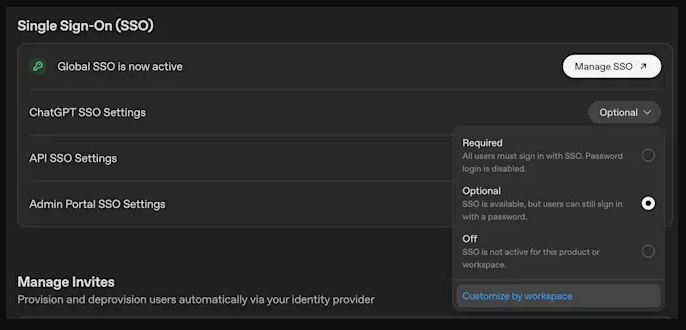 OpenAI's Global Admin Console, the tenant level surface where a Global Admin manages domains, single sign on across ChatGPT workspaces and API Platform organizations, and other Global Admins, distinct from workspace level admin access. Screenshot source: OpenAI Help Center, "Global Admin Console."[3]
OpenAI's own admin quickstart documentation, aimed at first time Workspace Owners setting up a new ChatGPT Enterprise deployment, lays out a recommended nine step setup order that is worth walking through directly, since step eight is the direct bridge into this guide's next section ([4]). The sequence runs: confirm roles, seat types, and launch scope; verify domains and configure identity; set up SSO and SCIM before broad onboarding; create groups and assign role based access control; configure workspace settings and user guidance; enable apps, GPTs, and approved data connections; enable Work and Codex for the right teams; configure required security and compliance controls; and monitor adoption, usage, and support readiness ([4]). That step eight, security and compliance controls, is exactly where an organization's ZDR and data retention posture gets configured, and it sits deliberately after identity and access setup rather than before it, reflecting OpenAI's own recommended sequencing for a regulated deployment.
For readers who want the fuller picture of ChatGPT Enterprise's admin and security surface beyond zero data retention specifically, including plan comparison, role based access control detail, IP allowlisting, Enterprise Key Management, and case studies of enterprise rollouts, IntuitionLabs has published a dedicated guide covering that broader ground. This piece stays narrower and deeper on zero data retention, per endpoint eligibility, and the Codex CLI specifically, rather than repeating that survey.
Enterprise SSO and Identity
Identity setup sits early in OpenAI's own recommended sequence for good reason: SSO and SCIM need to be in place before broad onboarding, not layered on afterward ([4]). How this actually works differs meaningfully by plan tier, which is itself a brand versus product distinction worth naming plainly, the same trap the series' opening guide identified for a different platform's BAA terms.
On ChatGPT Business, SSO is configured directly inside the workspace, under an Identity and Provisioning tab in workspace settings ([5]). Critically, ChatGPT Business does not include SCIM or Active Directory group synchronization, meaning all user provisioning and deprovisioning on that plan tier is manual, not automated ([5]). On ChatGPT Enterprise, by contrast, SCIM is available and is the mechanism OpenAI's own quickstart recommends configuring before broad onboarding: SCIM automatically creates, updates, and removes workspace accounts and invitations as employees join, move teams, or leave the company, keeping ChatGPT membership aligned with an organization's source directory without manual intervention ([6]).
For a life sciences buyer running an internal security or identity governance review, this is exactly the kind of question that sits adjacent to, but is distinct from, zero data retention itself: whether deprovisioning happens automatically when an employee with access to sensitive workflows leaves the organization is an access control question, not a data retention question, but a reviewer evaluating the whole platform will likely ask about both in the same pass. Full detail on SSO configuration, domain verification, and workspace SSO settings lives in OpenAI's own SSO documentation collection.
Data Controls in Practice: What the Admin Console Actually Shows
Documentation describes what a control does. A screenshot of the control itself, showing its actual default state, is a different and stronger form of evidence, and this series holds itself to showing only controls in their default, disabled state, or genuinely adjacent material honestly captioned as such, never a retention or data sharing control shown switched to enabled as if that were the platform's default.
A third party security guide, Harmonic Security's walkthrough of securing a ChatGPT Enterprise deployment, includes real screenshots of the API Platform's Data Controls panel, independently opened and visually confirmed during this guide's own research ([8]). The panel has four tabs: Visibility, Hosted Tools, Sharing, and Data Retention. The table below summarizes what each shows and its default state, drawn directly from that independently verified walkthrough.
| Data Controls tab | What it governs | Default state |
|---|---|---|
| Sharing | Model feedback sharing, evaluation and fine tuning data sharing, input and output sharing with OpenAI | All three toggles set to Disabled |
| Hosted Tools | MCP tool usage, web search, and file search availability across projects | Enabled for all projects |
| Data Retention | Audit logging of user actions and configuration changes; API call logging of supported API traffic | Audit logging Disabled; API call logging set to Enabled per call |
The Sharing tab is the cleanest evidence of a control shown in its default, disabled state: "Enable sharing of model feedback from the Platform" defaults to Disabled, "Share evaluation and fine tuning data with OpenAI" defaults to Disabled, and "Share inputs and outputs with OpenAI" defaults to Disabled, with only future traffic sent after a customer actively enables the setting ever being shared ([8]). Worth flagging directly since it is easy to miss: OpenAI offers a limited number of free weekly evaluations, and in some cases complimentary daily tokens, as an incentive to opt into these sharing settings. For a regulated workload, that incentive is worth resisting rather than accepting reflexively, since it trades a small usage credit for a real change to data handling posture.
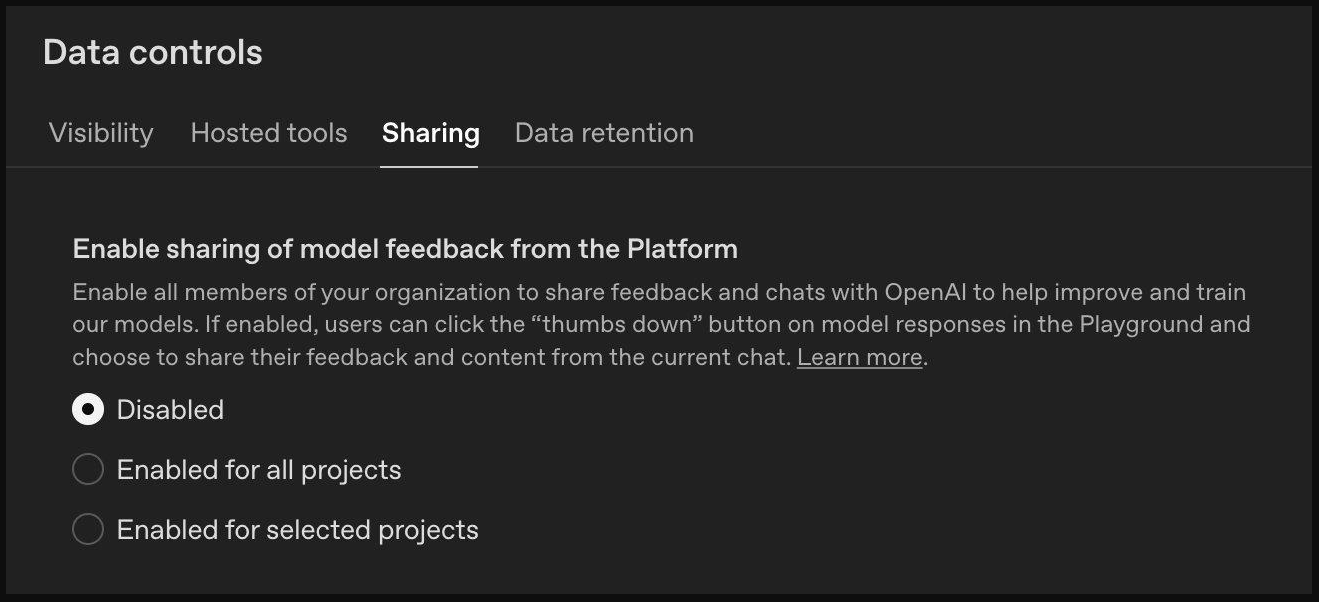 The Data Controls panel's Sharing tab, showing model feedback sharing, evaluation and fine tuning data sharing, and input/output sharing with OpenAI all defaulted to Disabled. Screenshot source: Harmonic Security, "Securing ChatGPT Enterprise."[8]
One distinction is worth making precisely here, since it is the same brand versus product trap this guide has already flagged twice. The screenshots above show the Sharing tab as it appears to a standard, self serve API Platform organization, the kind of account any developer can create directly. OpenAI's own current Help Center documentation for these exact settings states plainly that the input and output sharing setting, and separately the evaluation and fine tuning data sharing setting, are "not available to certain organizations, including Enterprise and customers with Zero Data Retention enabled" ([14]). In practical terms, this is a stronger posture than "off by default": for a contracted ChatGPT Enterprise organization or any organization already approved for Zero Data Retention, these sharing options do not merely default to disabled, they do not appear as a configurable choice at all. A buyer evaluating a specific organization's console should confirm which of these two states actually applies to their own contract, self serve default off, or Enterprise level unavailable, rather than assuming the screenshots above describe every account tier identically.
Separately, memory is disabled by default on the ChatGPT desktop app for Enterprise plans, meaning the application does not use or create memories unless a user explicitly turns that feature on ([8]).
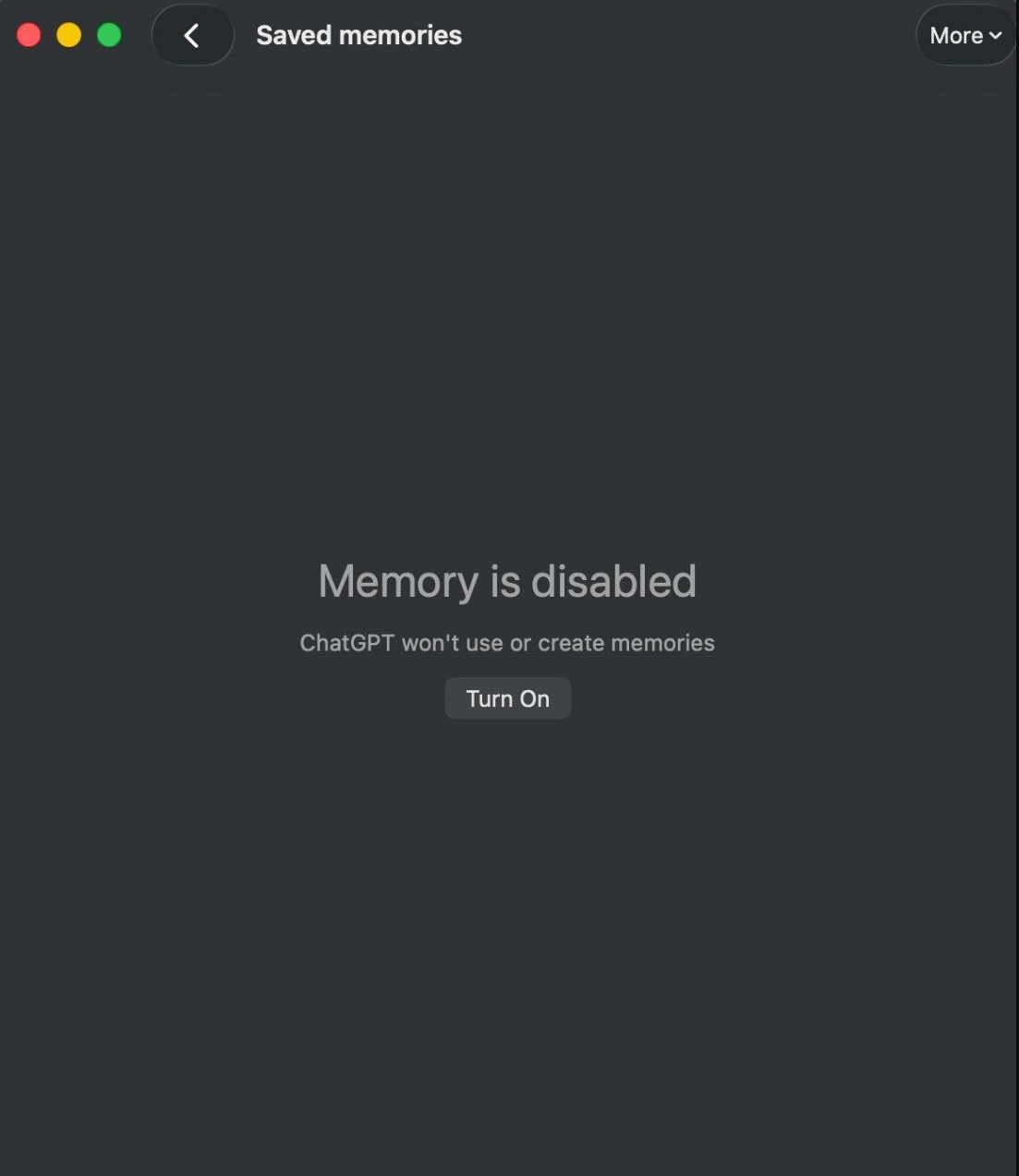 Memory disabled by default on the ChatGPT desktop app for Enterprise plans; the application does not use or create memories unless a user explicitly enables the feature. Screenshot source: Harmonic Security, "Securing ChatGPT Enterprise."[8]
The Hosted Tools tab tells a different story worth stating just as plainly, since it is not a control shown disabled: MCP tool usage defaults to "Enabled for all projects" on the API platform, alongside web search and file search under the same tab ([8]). This is genuinely useful information for a buyer, not something to obscure. An enabled by default control that governs which external tools and connections an organization's API traffic can reach is a real, actionable finding, and a regulated organization evaluating this platform should treat it as a setting requiring an explicit decision, not assume it starts in a locked down state the way the Sharing toggles do.
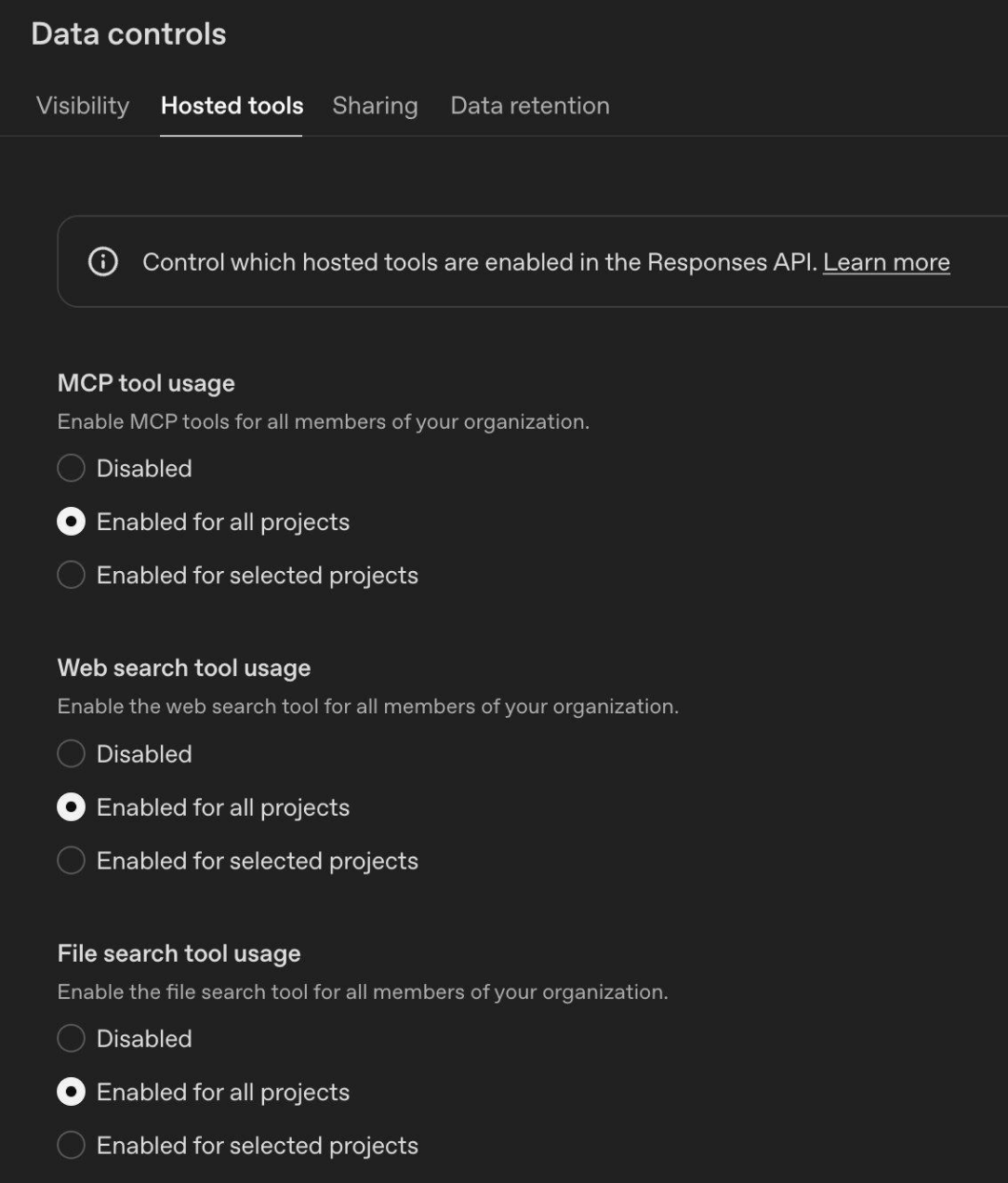 The Data Controls panel's Hosted Tools tab, showing MCP tool usage, web search, and file search availability defaulted to Enabled for all projects, unlike the Sharing tab's disabled defaults. Screenshot source: Harmonic Security, "Securing ChatGPT Enterprise."[8]
The Data Retention tab is the single most directly relevant screenshot available anywhere in this guide's research to date. It shows two settings side by side with different defaults: Audit logging, which enables logging of user actions and configuration changes for compliance and security analysis, defaults to Disabled, and once enabled cannot be disabled again without contacting OpenAI directly ([8]). API call logging, a separate setting governing how an organization logs data from its own supported API calls for internal review, analysis, and evaluation purposes, defaults to "Enabled per call," with a documented store=false API parameter available for any organization that wants to disable that logging on a per request basis ([1][8]). Both defaults are named here directly and attributed to their source, because this is the best available authentic evidence of that specific screen, independently opened and visually confirmed during this guide's research, exactly the standard the rest of this series holds itself to.
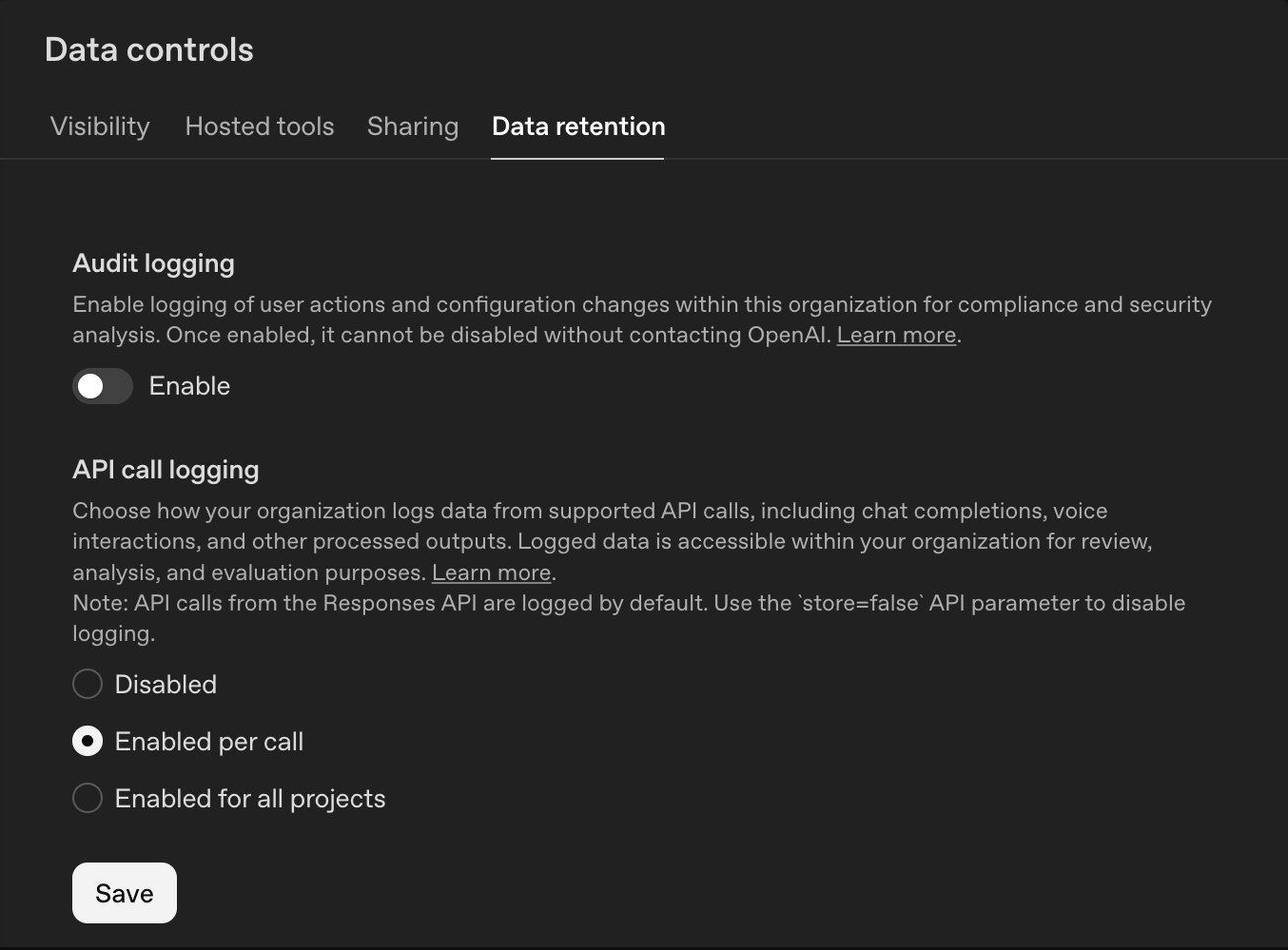 The Data Controls panel's Data Retention tab, the single most directly relevant screenshot in this guide's research: Audit logging defaults to Disabled, and API call logging defaults to Enabled per call, with a
 store=false API parameter available to disable it per request. Screenshot source: Harmonic Security, "Securing ChatGPT Enterprise."[8]
This same navigation path is independently corroborated by OpenAI's own written documentation, not just the third party screenshot above. OpenAI's API data controls guide states directly that "once your organization has been approved for data retention controls, you'll see a Data Retention tab within Settings, Organization, Data controls," configurable at both the organization level, choosing Zero Data Retention or Modified Abuse Monitoring for the entire organization, and the project level, where each project can inherit the organization setting, explicitly pick one of the two, or select None to disable these controls for that specific project ([1]). Two independent sources, OpenAI's own text documentation and a third party's visually confirmed screenshot, describe the identical tab in the identical location, which is a meaningfully stronger form of verification than either source alone.
A second, independent screenshot exists confirming these controls in a live customer tenant rather than a vendor walkthrough. Tenable's own documentation for integrating its AI security product with ChatGPT Enterprise includes a real screenshot, with usernames blurred, of a live ChatGPT Enterprise Settings and Permissions screen, showing a Data Controls entry visible in the left hand navigation ([9]). This does not show the Data Retention tab's contents specifically, but it independently confirms that a Data Controls surface with this structure exists in production ChatGPT Enterprise deployments, not only in documentation or a security vendor's own demonstration environment.
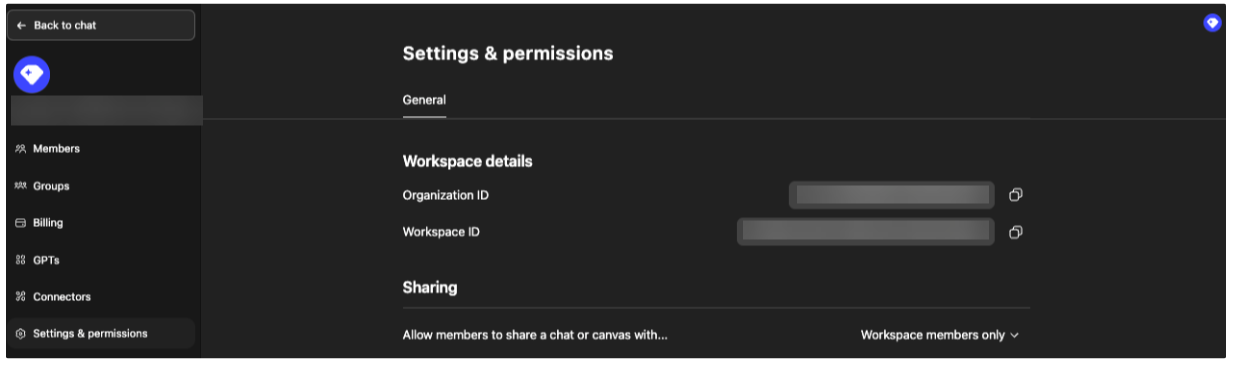 A live ChatGPT Enterprise Settings and Permissions screen from a production tenant, usernames blurred, showing the Data Controls entry in the left hand navigation, independent confirmation that this surface exists outside vendor documentation and demonstration environments. Screenshot source: Tenable, AI Exposure documentation for its ChatGPT Enterprise integration.[9]
Zero Data Retention by Endpoint: What's Actually Covered
The single most consequential detail for a buyer evaluating OpenAI's API for a specific use case is that zero data retention eligibility is not a platform wide setting. It is scoped precisely by API endpoint, and OpenAI's own documentation publishes the exact breakdown ([1]).
Endpoints that are zero data retention eligible, meaning they retain no application state when the setting is active, subject to narrow, named exceptions, include Chat Completions, the Responses API, Images generations and edits, Embeddings, Audio transcriptions, translations, and speech, Moderations, legacy Completions, and Realtime ([1]). The named exceptions on the two most commonly used of these are worth stating precisely rather than glossing over: Chat Completions stores audio output application state for one hour to enable multi turn conversations, and Responses API data has a 30 day application state retention period by default, or when the store parameter is set to true, though that behavior is overridden to always be false once Zero Data Retention is enabled for an organization ([1]). Both endpoints may also store encrypted key value tensors in GPU local storage for prompt caching purposes, not retained beyond a 24 hour expiration window ([1]).
A separate and larger set of endpoints and capabilities are explicitly not zero data retention eligible, meaning they may retain application state even when an organization has Zero Data Retention enabled elsewhere. This includes Conversations and Conversation Items, ChatKit threads, Assistants, Threads and their messages and runs, Vector Stores, Files, Fine tuning jobs, Evals, Batches, and Videos ([1]). Several of these retain data until explicitly deleted via the API or dashboard, and objects never deleted this way are retained indefinitely ([1]). This is precisely the kind of exclusion the series' opening guide flagged as easy to miss when evaluating a different provider's ZDR terms, and it holds just as directly here: a buyer whose use case relies on the Assistants API, persistent vector stores, or batch processing needs to understand that enabling Zero Data Retention at the organization level does not extend zero retention to those specific capabilities.
One feature carries a distinction sharp enough to warrant its own callout, because it intersects directly with HIPAA eligibility rather than only with general data retention. Web Search used with live internet access is explicitly not HIPAA eligible and is not covered by a Business Associate Agreement ([1]). Web Search used in an offline, cache only mode, configured by setting external_web_access to false, is eligible to be covered by a BAA, but only when used with an API key from a Zero Data Retention enabled project inside a Zero Data Retention enabled organization ([1]). This guidance applies specifically to the Responses API's web search tool; preview variants of that tool ignore the parameter entirely and behave as though external web access is always enabled, which OpenAI's own documentation flags directly as a reason to prefer the non preview tool for this exact use case ([1]). For a life sciences buyer, this is as close to a worked example as the raw documentation gets of IntuitionLabs' own standing evaluation discipline: ask for the named endpoint and the named configuration parameter, not the brand level assurance that a platform is "HIPAA ready." For the platform by platform comparison of HIPAA compliance and BAA availability that this specific finding sits alongside, see IntuitionLabs' existing coverage of that broader question.
Data Residency and Inference Residency
A separate but related control, easy to conflate with zero data retention itself, governs where a customer's data is geographically stored and processed rather than how long it is retained. OpenAI treats these as two distinct features. Data residency allows eligible customers to keep in scope customer content stored at rest in a specific geographic region. Inference residency, available only to eligible ChatGPT Enterprise and Edu customers who already have data residency enabled, additionally ensures that model inference itself, the actual GPU execution against that content, happens exclusively in region for supported locations ([10]).
As of this guide's research, data residency for ChatGPT is available in Australia, Canada, Europe covering the EEA and Switzerland, India, Japan, Singapore, South Korea, the United Kingdom, the United States, and the United Arab Emirates ([10]). The equivalent API platform data residency feature is documented separately, and carries additional detail worth a buyer's direct attention: data residency endpoints carry a ten percent pricing uplift for models released on or after March 5, 2026 that are eligible for data residency, and organizations selecting any region other than the United States must additionally be approved for abuse monitoring controls and execute a Modified Retention amendment ([1]). Selecting the United Arab Emirates region specifically requires further approval beyond the standard process ([1]).
Worth stating plainly, since it is the kind of detail a marketing summary would understandably omit: data residency does not cover everything an organization might assume it does. System data, meaning account information, metadata, and usage data that does not contain customer content itself, such as analytics, billing information, and support requests, is explicitly excluded from residency guarantees and may be processed or stored outside the selected region regardless of which region a customer has chosen ([1]). This is precisely the same "geographically, where is data actually processed" question the series' opening guide raised as a buyer checklist item, and the honest answer for OpenAI's platforms is that the answer differs depending on whether the data in question is customer content or system data, a distinction worth asking about explicitly rather than assuming a single residency commitment covers everything.
Codex CLI: Security, Data Controls, and Telemetry
For engineering teams inside a life sciences organization evaluating OpenAI's tooling for code focused work, Codex CLI is the relevant surface, and its own documentation frames data handling in terms distinct from the ChatGPT and API platform controls covered above. Codex's security documentation describes permissions, sandboxing, approvals, and network access as the trust boundaries that define what the tool can access and how sensitive actions are reviewed, explicitly noting that prompts sent through Codex can include source code and other sensitive data, and that tool arguments and outputs should be treated as sensitive by default ([11]).
Telemetry is the specific data handling control most directly comparable to the ZDR mechanics covered earlier in this guide, and it follows the same "off unless explicitly enabled" pattern this series looks for. Codex supports optional monitoring through OpenTelemetry, an open standard for collecting operational data, intended to help teams audit usage, investigate issues, and meet compliance requirements without weakening the tool's local security defaults ([12]). Telemetry is off by default and must be enabled explicitly through configuration; when enabled, Codex emits structured log events covering chats, API requests, streaming activity, user prompts, which are redacted by default, and tool approval decisions, each tagged with a service name, the CLI version, and an environment label distinguishing development, staging, and production traffic ([12]). Separately, local session transcript retention, meaning whether Codex saves a record of a session on the machine running it, is independently configurable through settings such as history.persistence and history.max_bytes under the tool's local configuration directory ([12]). Documentation also recommends routing any enabled telemetry only to collectors an organization itself controls, and applying retention limits and access controls aligned with that organization's own compliance requirements, rather than treating OpenAI's defaults as a substitute for an organization's own governance ([12]).
Codex CLI's own interface is worth seeing directly rather than only described, since it is genuinely adjacent, honestly framed material rather than a retention screen: a live rendered version of the terminal interface, shown in OpenAI's own current documentation, displays the tool launching with a model and working directory indicator and a short list of available commands, including /init to create an instructions file for the tool, /status to show current session configuration, /permissions to choose what the tool is allowed to do, /model to change the active model, and /review to review changes and find issues ([13]).
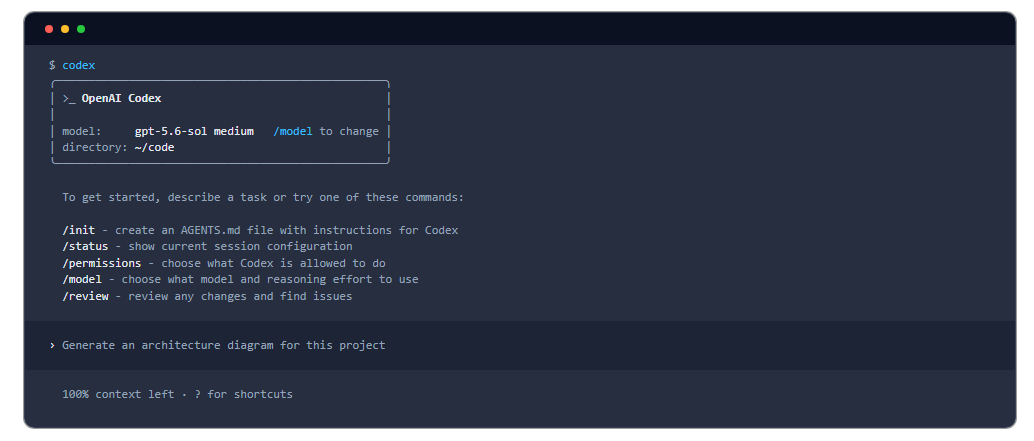 The Codex CLI terminal interface at launch, showing the model and working directory indicator alongside commands including
 /init, /status, /permissions, /model, and /review. Screenshot source: OpenAI, Codex CLI documentation.[13]
What to Ask Before You Sign: The ChatGPT-Specific Checklist
The platform specific detail above resolves into a short, portable checklist a life sciences buyer can bring directly to an OpenAI sales conversation or an internal security review, building on the general buyer checklist introduced in this series' opening guide.
| Question | Why it matters |
|---|---|
| Is your organization on Modified Abuse Monitoring or full Zero Data Retention, and do you know which? | The two are not the same. Modified Abuse Monitoring excludes content from abuse logs; Zero Data Retention does that and additionally forces the store parameter to false on covered endpoints. |
| Which specific API endpoints does your use case actually touch, and are they on OpenAI's zero data retention eligible list? | Assistants, Threads, Vector Stores, Files, and Batches are explicitly not zero data retention eligible even when an organization has Zero Data Retention enabled elsewhere. |
| If your use case involves Web Search, are you running it in offline, cache only mode? | Only offline mode, configured with external web access set to false, is eligible for BAA coverage, and only alongside a Zero Data Retention enabled project. |
| Is your organization's Hosted Tools tab set to Enabled for all projects, and does that match your actual security posture? | This tab governs MCP tool usage, web search, and file search availability, and it defaults to enabled, not disabled, unlike the Sharing tab. |
| If HIPAA applies to your use case, has your organization been provisioned with Eyes Off or Safety Retention? | These provisions determine whether protected health information can be processed on BAA eligible endpoints even when some data is technically retained for safety review. |
| Does your chosen data residency region also require a Modified Retention amendment? | Any region other than the United States requires approval for abuse monitoring controls in addition to data residency itself. |
A useful discipline, borrowed directly from IntuitionLabs' own framework for evaluating AI vendor compliance in life sciences, applies here as much as anywhere in this series: ask for the named endpoint, the specific console tab, the specific documentation page, not the adjective. "We support zero data retention" is not, by itself, a verifiable claim about ChatGPT or the OpenAI API. A named endpoint, a named exclusion, and a named verification path are.
What's Next in This Series
This guide is one of four platform-specific deep dives in IntuitionLabs' zero data retention series, alongside the series' pillar overview. The four deep dives are complementary, not sequential, and can be read in any order once you've read the series' opening guide, which covers the four platform comparison and the shared verification standard every piece in this series holds itself to:
- Copilot and Azure OpenAI, covering the Azure portal verification path, Microsoft's subprocessor relationship with Anthropic, and GitHub Copilot CLI.
- Claude and Anthropic, covering the console navigation for privacy controls, the covered models retention policy in full, and Claude Code's specific zero data retention scope.
- Gemini and Vertex AI, covering the Developer API's store parameter, Vertex's contractual data processing agreement route, and the Gemini CLI to Antigravity CLI transition.
Readers evaluating an AI vendor specifically for a validated GxP environment should also read IntuitionLabs' framework for evaluating AI vendor compliance in life sciences, covering 21 CFR Part 11, EU Annex 11, GAMP 5, and BAA scope in full.
Every platform claim in this guide traces to OpenAI's own current documentation, its Help Center, its developer documentation, or its ChatGPT Learn documentation, rather than to a third party summary where a primary source exists. One candidate screenshot considered during this guide's sourcing process, showing a SCIM related feature announcement, was set aside specifically because the underlying article was dated to mid 2024, roughly two years stale relative to this series' focus on 2026 platform behavior, not because it could not be independently verified. No vendor relationship with OpenAI informed this guide's claims.
External Sources (14)[1]https://developers.openai.com/api/docs/guides/your-data
[2]https://openai.com/index/offering-zero-data-retention-for-frontier-models/
[3]https://help.openai.com/en/articles/12289294-global-admin-console
[4]https://help.openai.com/en/articles/20001264-chatgpt-enterprise-admin-quickstart
[5]https://help.openai.com/en/articles/11489188-sso-for-chatgpt-business-faq
[6]https://help.openai.com/en/collections/11585137-sso-scim-and-user-management
[7]https://help.openai.com/en/articles/10468051-sso-overview
[8]https://harmonic.security/resources/securing-chatgpt-enterprise-guide
[9]https://docs.tenable.com/ai-exposure/Content/settings/integrations/chatGPT.htm
[10]https://help.openai.com/en/articles/9903489-data-residency-and-inference-residency-for-chatgpt
[11]https://learn.chatgpt.com/docs/security
[12]https://learn.chatgpt.com/docs/security-administration

Need Expert Guidance on This Topic?
Talk to IntuitionLabs about how to put this guide into practice on your team.
I'm Adrien Laurent, Founder & CEO of IntuitionLabs. With 25+ years of experience in enterprise software development, I specialize in creating custom AI solutions for the pharmaceutical and life science industries.
DISCLAIMER
The information contained in this document is provided for educational and informational purposes only. We make no representations or warranties of any kind, express or implied, about the completeness, accuracy, reliability, suitability, or availability of the information contained herein. Any reliance you place on such information is strictly at your own risk. This document may contain content generated with the assistance of artificial intelligence technologies. AI-generated content may contain errors, omissions, or inaccuracies. Readers are advised to independently verify any critical information before acting upon it. All product names, logos, brands, trademarks, and registered trademarks mentioned in this document are the property of their respective owners.