IntuitionLabs
Back to ArticlesBy Adrien Laurent

Veeva MyInsights to X-Pages Migration: A Technical Guide

Executive Summary

Veeva Systems’ MyInsights (now Vault CRM X-Pages) is a strategic embedded analytics capability within Veeva CRM, enabling tailored dashboards and interactive insights directly in the sales/medical user workflow. Originally introduced in 2017, MyInsights provided field teams with contextual data (calls, orders, external analytics, etc.) at the point of planning and decision-making ([1]) ([2]). Over time it became a critical productivity tool in life sciences CRM; for example, GSK found that its field reps saved 30 minutes per day using an engagement-planning MyInsights dashboard ([3]), and Bausch Health reported a 90–95% user satisfaction with its MyInsights implementations ([4]).

In 2024–2025 Veeva announced that MyInsights would be rebranded as Vault CRM X-Pages, migrating this functionality onto the Veeva Vault platform. X-Pages retains full embedded analytics capability but adds expanded features ([5], cross-platform support, no-code page builder) and is included with standard Vault CRM licensing ([6]) ([7]). As of early 2025, dozens of major customers had already gone live on Vault CRM (e.g. 50+ by Q4 FY2025 ([8])) and many field reps were actively using X-Pages for advanced analytics.

This report provides a comprehensive guide to migrating from legacy MyInsights to Vault CRM X-Pages. We cover the historical context of Veeva CRM analytics, the architectures of MyInsights and X-Pages, detailed migration strategies (including content conversion, permissions, and platform configuration), data and performance considerations, real-world case studies, and future implications. All claims are supported by Veeva documentation, industry analyses, and customer outcomes. Key findings include:

  • Feature Parity and Enhancement: Vault CRM X-Pages (“next-generation MyInsights”) offers the same embedded dashboard experience as before but adds new capabilities (AI integrations, multi-device UI, no-code studio) at no extra license cost ([6]) ([7]). The official documentation emphasizes that “X-Pages is the same product as MyInsights built for the Vault Platform” ([9]).
  • Migration Process: Veeva provides tools and guidelines to migrate content. Legacy MyInsights content (HTML/JS zipped dashboards attached to HTML_Report__vod records) can be migrated to Vault CRM by re-uploading the same content in X-Pages format and setting the “Content Target Platform” correctly ([10]) ([11]). Administrators should ensure each migrated report’s Content Target Platform is set to “Salesforce” (for MyInsights content) or “Vault” (for new X-Pages) so the correct JavaScript library is used ([12]) ([13]). An official Lightning Web Component (myInsightsV2) can automate migrating dashboards between Salesforce orgs ([14]), which aids in copying content from legacy to Vault environments.
  • Implementation Steps: Migrating a dashboard typically involves these steps: (1) Export or package the existing MyInsights content as a ZIP (with index.html at root) ([15]) ([16]); (2) In Vault CRM’s Business Admin HTML Reports tab, create a new X-Pages entry (selecting the appropriate object type as the entry point) ([17]); (3) Set the Content Target Platform field appropriately ([13]); (4) Upload the ZIP to the new record and publish it ([18]). Table 1 (below) summarizes key parallels and differences between MyInsights and X-Pages.
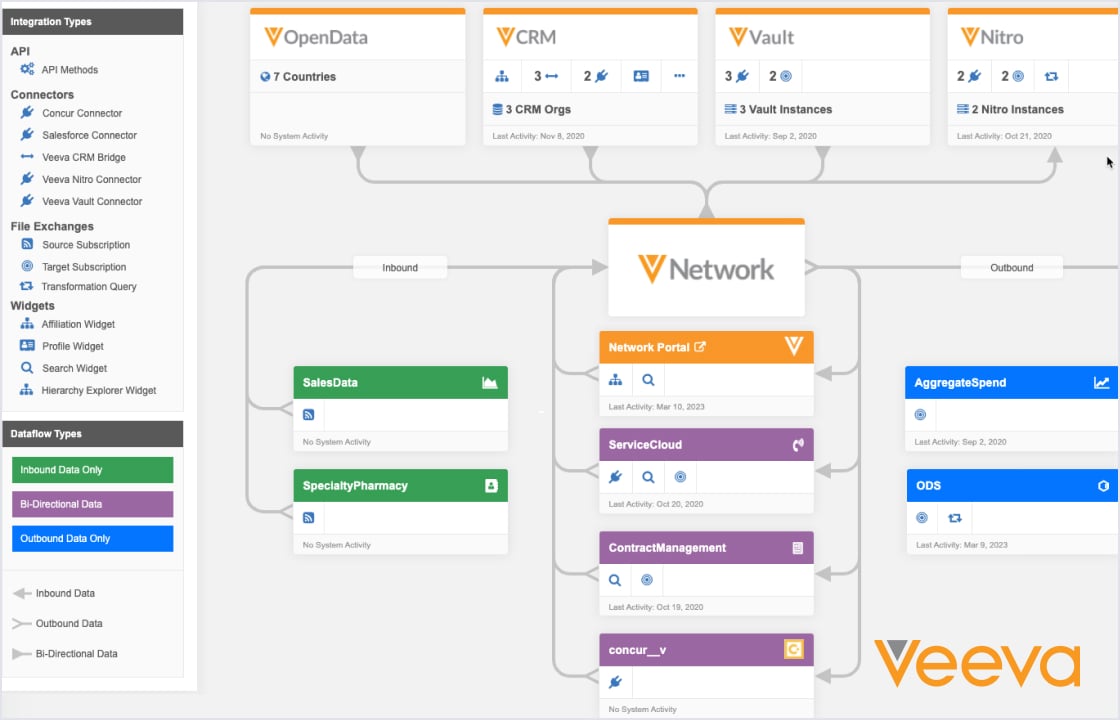
  • Data and Performance: Like MyInsights, X-Pages dashboards can query real-time CRM data or backend warehouses (e.g. Veeva Nitro) to display charts and metrics. In migrating, organizations should review any data linkage (e.g. Nitro or Veeva Link integrations) to ensure compatibility. Veeva advises that “MyInsights can also query external sources (via Nitro or Veeva Link)” and that with X-Pages users likewise can use robust data connectors ([19]). Offline support continues to be a priority: field reps can view X-Pages dashboards offline on iPad/desktop just as before.
  • User Benefits and Outcomes: Embedded analytics (MyInsights/X-Pages) have demonstrably improved field efficiency. For instance, Bausch Health consolidated multiple data views into one “command center”, enabling its reps to save 10–20 minutes per call and achieving 90+% satisfaction ([4]). In GSK’s case, customizing a pre-call MyInsights screen “helped field teams prepare for a call more quickly by showing all necessary information,” saving ~30 minutes/day on planning ([3]). Veeva’s marketing claims X-Pages delivers “30 minutes saved per day in engagement planning” and ~90% rep approval ([20]), reflecting these customer experiences.
  • Industry Context: The pharma CRM market is sizable and growing. Industry analysts estimate the global pharma/biotech CRM software market was ~$4.3B in 2024 (CAGR ~9%) and will grow to ~$9.8B by 2034 ([21]). Veeva Systems leads this market (≈27% share in 2023 ([22])), often selected by large life sciences firms. Embedded CRM analytics (like X-Pages) exemplify broader IT trends: companies increasingly demand integrated analytics (connecting CRM, sales, and external data) to accelerate decision-making ([23]) ([24]). Indeed, Veeva notes it is partnering with 15 of the top 20 pharma companies on integrated analytics initiatives ([25]), underscoring that unified insight delivery (via X-Pages, Nitro, etc.) is a strategic imperative. </current_article_content>
  • Future Outlook: The consolidation of CRM analytics into Vault X-Pages anticipates further innovation. Veeva plans to embed AI capabilities (e.g. generative CRM assistants, voice interfaces) in Vault CRM ([26]), which will naturally extend to X-Pages. The rebrand (“X” = Experience, Extensible, Cross-Platform ([27])) signals a persistent focus on flexible, user-centric analytics. As more customers migrate to Vault CRM (Veeva reported 50+ live by early 2025 ([8]) and dozens more onboarding), X-Pages becomes a standardized platform for actionable CRM intelligence.

This report proceeds as follows: Section 1 provides the historical background and technical architecture of MyInsights; Section 2 details Vault CRM X-Pages features; Section 3 outlines the migration strategy and step-by-step guide; Sections 4–5 present data analysis, case studies, and expert opinions; Section 6 discusses broader implications and future directions; Section 7 concludes. Each section is supported by extensive citations to Veeva documentation, industry reports, and customer case studies.

1. Background and Historical Context

Veeva Systems (NYSE: VEEV) is the dominant cloud CRM vendor in life sciences, with its flagship Veeva CRM platform widely used by pharmaceutical and biotech sales, marketing, and medical teams. Prior to X-Pages, Veeva CRM ran on Salesforce.com technology and included various embedded analytics tools. The centerpiece of these was MyInsights, introduced in May 2017 at Veeva’s Commercial Summit ([28]). MyInsights was described as “an innovative new cloud-based data visualization capability” that embeds dashboards directly into the CRM user interface ([29]). The goal was to deliver “the right insights in context of [the user’s] daily planning and execution” without leaving the CRM app ([30]). At launch, Veeva provided a set of out-of-the-box dashboards for common tasks (pre-call planning, territory analytics, order management, KOL/professional profiles, etc.) ([2]). Crucially, MyInsights content was built using standard HTML/JavaScript (with a Veeva JS API) and deployed via zipped content packages attached to a Salesforce custom object (HTML_Report__vod) ([2]) ([15]).

Over the next several years (2018–2023), Veeva continuously augmented MyInsights. The platform matured with new templates (e.g. medical insights, engagement summaries) and tighter integrations (e.g. querying Nitro data warehouse, Veeva Link market data). In 2021–2023, adoption grew among pharma companies. For example, GlaxoSmithKline reported that its custom MyInsights dashboards (for engagement planning and analytics) saved ‘approximately 30 minutes per day’ per rep ([31]) (a claim echoed by Veeva later ([20])). Many global firms, including GSK, Bausch Health, Novo Nordisk, and others, developed or deployed MyInsights content to streamline field workflows. Veeva also launched MyInsights Studio (a no-code WYSIWYG dashboard designer) and a certification program for partners to build MyInsights apps ([2]). By 2022, embedded CRM analytics had become a core element of the Veeva CRM strategy.

Concurrently, Veeva was developing Vault CRM – a next-generation CRM built on its own Vault cloud platform (the widely used content management system in life sciences). The strategic vision was to unify sales, marketing, and medical functions in a single platform. In late 2024, Veeva announced the general availability of Vault CRM Suite, including an integrated Campaign Manager and Service Center. Notably, Vault CRM included X-Pages, the successor to MyInsights ([32]). In release 24R3.4 (Dec 2024), Veeva officially renamed “Vault CRM MyInsights” to “Vault CRM X-Pages” ([32]). The documentation clarifies that “the technology and features remain the same” but the name change reflects broader capabilities around user experience and extensibility ([32]). In other words, X-Pages is MyInsights on the Vault platform: it delivers the same concept of in-CRM dashboards but adds new features (AI connectors, cross-platform UI, etc.) and is bundled into the Vault CRM license ([6]) ([7]).

These steps coincided with significant customer migration. In its financial reports, Veeva noted that by Q4 FY2025 (Q4 2024), over 50 customers were live on Vault CRM, with eight major companies having already migrated from the legacy Salesforce CRM ([8]). (In the prior quarter Veeva had reported 30+ Vault CRM customers and seven migrations in progress ([33]).) A top-20 biopharma also committed to Vault CRM as its commercial foundation. CEO Peter Gassner described this as “the next generation of CRM” to connect sales, marketing, and medical workflows end-to-end ([34]). In short, the industry was moving toward the unified Vault CRM suite and its embedded analytics (X-Pages), making migration from MyInsights an urgent project for many.

Table 1 below summarizes key aspects of the legacy MyInsights platform versus the new Vault CRM X-Pages.

AspectVeeva CRM (Salesforce) with MyInsightsVault CRM (Veeva Vault) with X-Pages
PlatformBuilt on Salesforce CRM (Salesforce APIs and data model)Built on Veeva’s Vault platform (Vault APIs and data model)
LicensingMyInsights was an optional add-on (separate license required)X-Pages included with standard Vault CRM license at no extra cost ([7]) ([6])
DeploymentUpload zipped HTML/JS to HTML_Report__vod (entry points)Upload zipped content to HTML_Report__v via Vault Business Admin; X-Pages Studio (no-code) available ([17]) ([35])
Entry PointsEntry points defined by record types on HTML_Report__vod (Account, Call, Territory, etc.) ([36])Entry points defined similarly in Vault CRM by object (Account, Call, Mines, etc.) with HTML_Report__v records ([17])
Authoring ToolsMyInsights Studio (no-code WYSIWYG) and custom HTML/JSX-Pages Studio (no-code UI): build dashboards via drag-drop ([35]); also custom HTML/JS supported ([37])
Data ConnectivityUses Veeva’s JavaScript API (com.veeva.clm) to fetch CRM data and external sources (Veeva Nitro, Veeva Link) ([19])Same JS API (Vault version) to query Vault CRM data, Nitro, Link; supports additional AI/connectors, cross-platform data feeds ([37]) ([38])
Offline SupportDashboards work on iPad (offline sync cache) and Lightning browserDashboards work on iPad, iPhone, browser; Veeva states full offline support across devices ([39])
User ExperienceEmbedded single-page app in CRM detail pagesSimilar embedded view in Vault interface; supports customizable entry points for bespoke layouts ([32])
Feature EvolutionAdded deep-linking, new templates, integrations up to 2023Retains all MyInsights functions; adds AI-driven insights and improved Studio; emphasizes “experience” and extensibility ([32]) ([27])

Naturally, migrating content from MyInsights to X-Pages involves reconciling these differences. We address those in detail below.

2. Veeva CRM MyInsights Architecture and Usage

MyInsights is designed as an embedded analytics layer inside Veeva CRM (Salesforce). Technically, a MyInsights dashboard is a self-contained HTML/JavaScript “mini web app” that is packaged as a ZIP file. Administrators upload this ZIP (which must include an index.html file and any CSS/JS assets) to a special Veeva object called HTML_Report__vod ([15]). Each HTML_Report__vod record is configured with a record type that determines where the dashboard appears (e.g. Account, Call, Territory) ([40]). Upon database sync, the ZIP is delivered to the field rep’s device (iPad or desktop) and rendered in-context. The underlying Veeva JS API (com.veeva.clm) lets the page query CRM data (current record fields, queries on related objects) and also call external systems (e.g. Veeva Nitro data warehouse or 3rd-party links) ([19]). Because the pages are HTML/JS, they run natively offline (the iPad sync cache holds the data) or online (querying live servers or Nitro). The experience is therefore highly flexible: any KPI, chart or table can be built with web technologies, seamlessly embedded in the CRM UI.

Creating and Deploying MyInsights Pages: Administrators typically build MyInsights content either by code or with MyInsights Studio, a drag-and-drop authoring tool. To create a page manually, the steps (from Veeva docs ([16])) are:

  1. Package Content: Compile the HTML, CSS, JS into a .zip (ensure index.html is at the root) ([41]).
  2. Create Entry Point: In Veeva CRM (Admin interface), go to HTML Reports tab → New. Select the appropriate record type (e.g. Account_Reports_vod, Call2_vod, etc.) for where the page should be shown ([42]) ([40]).
  3. Upload Zip: Save the record and upload the ZIP in the Notes & Attachments related list ([43]).
  4. Publish: (For mobile) Sync devices to download. For desktop (Lightning), publish the content so it appears without requiring rep sync ([41]).

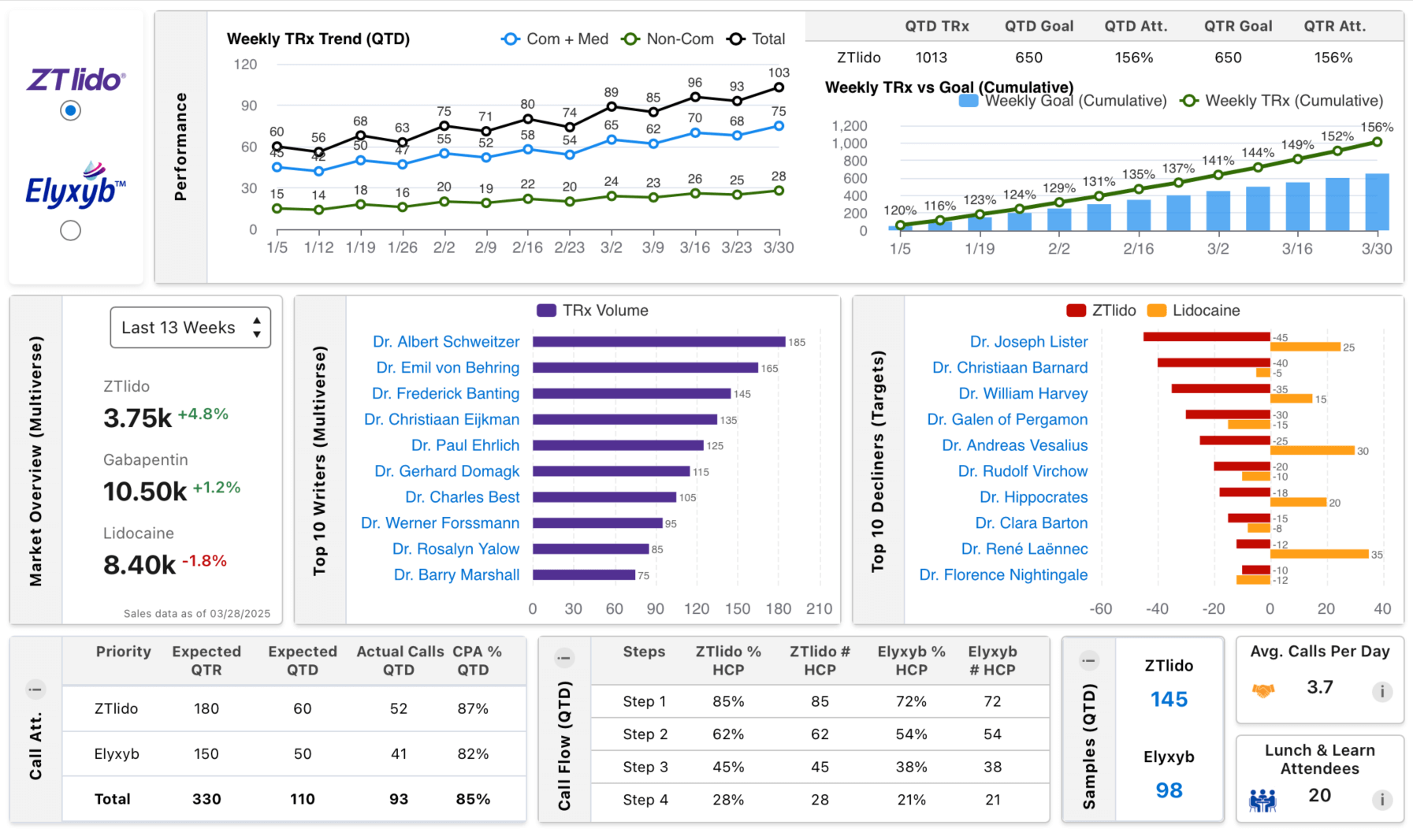
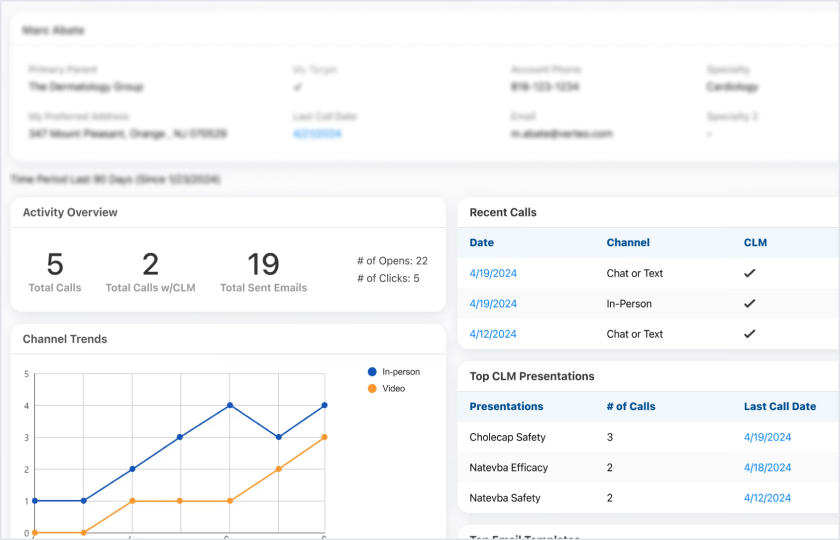
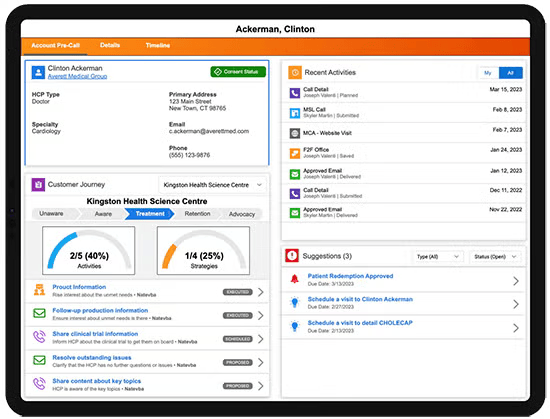
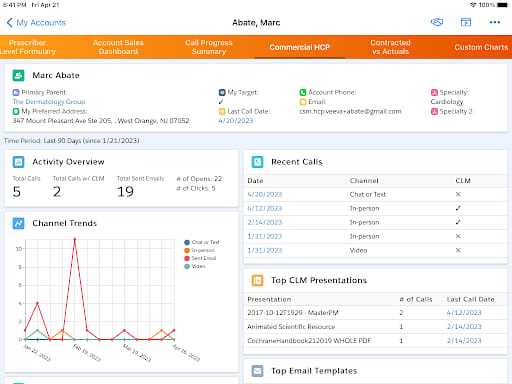
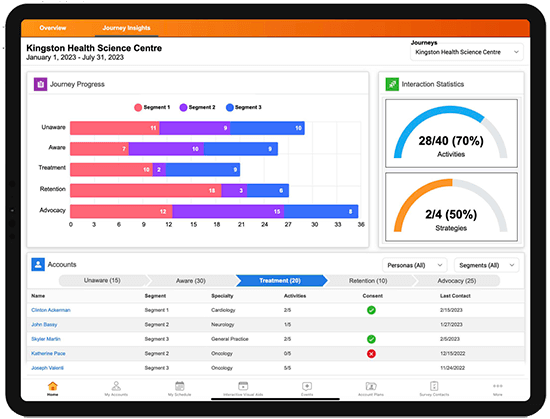
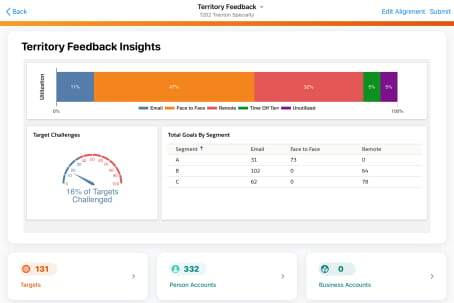
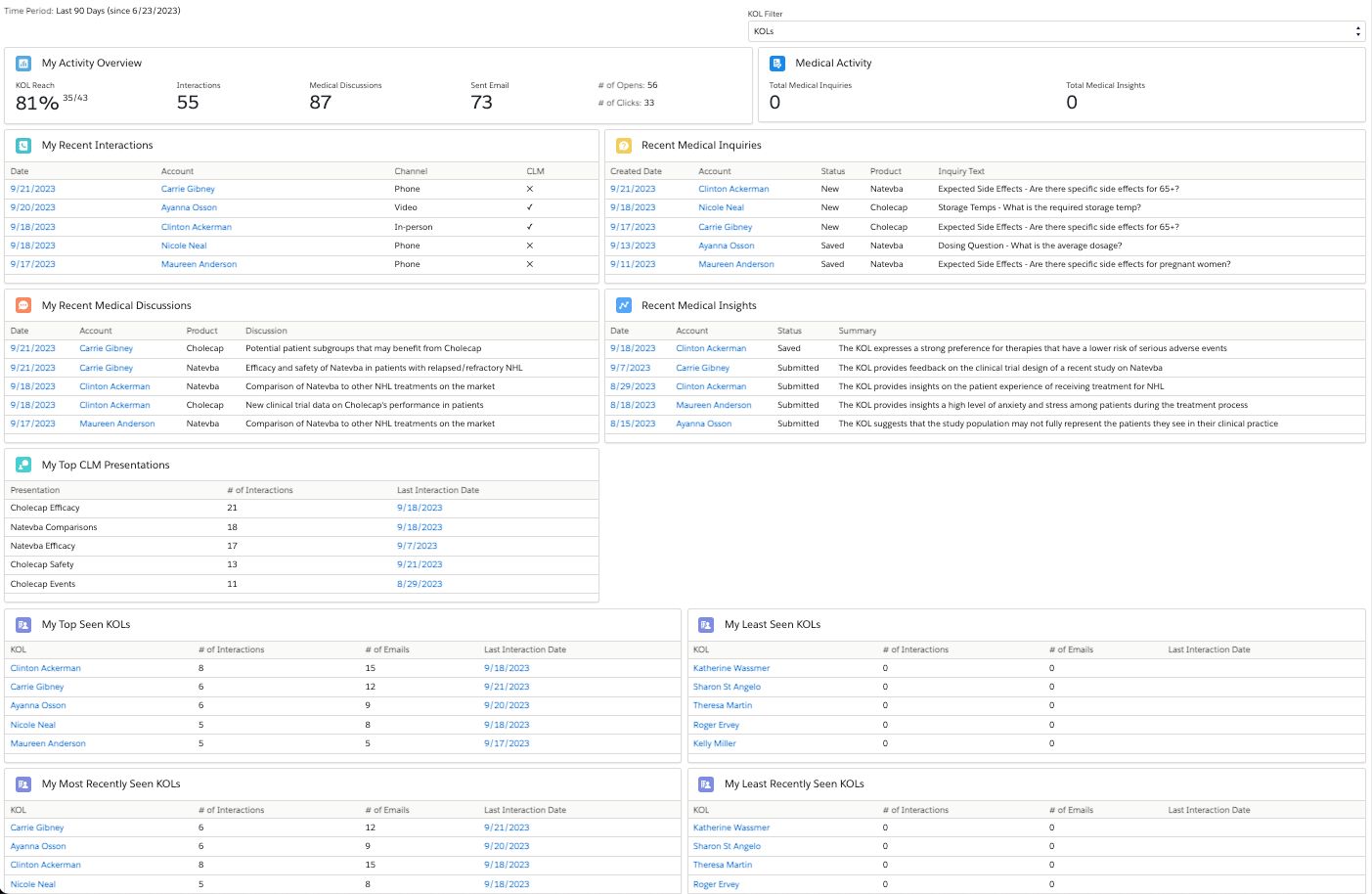
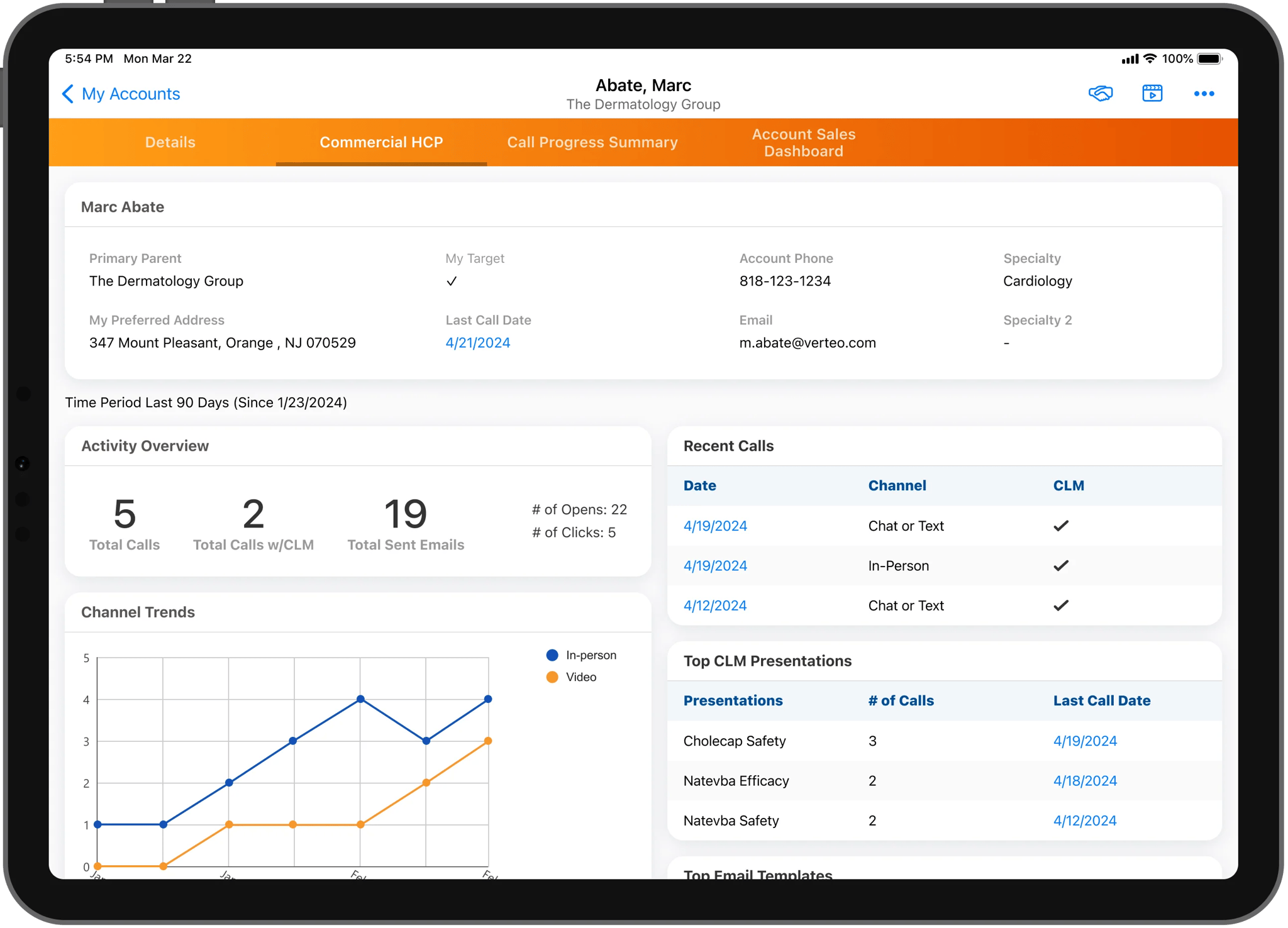
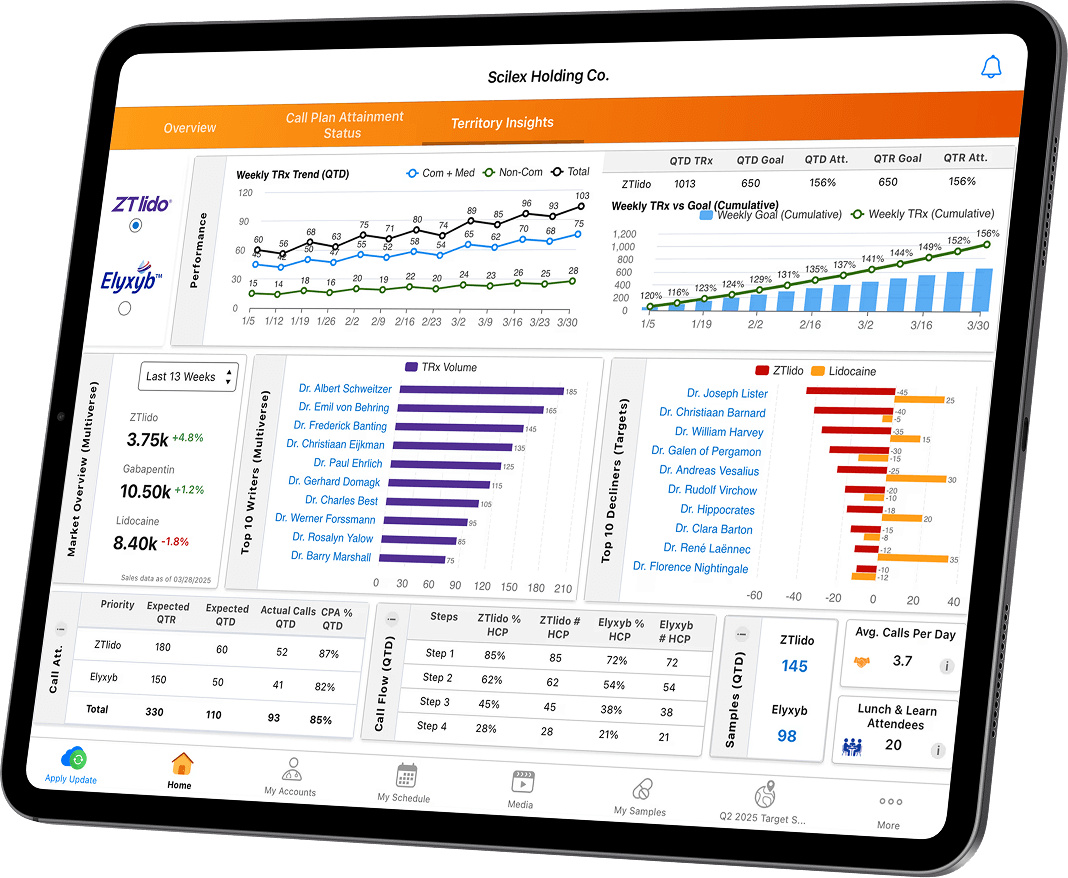
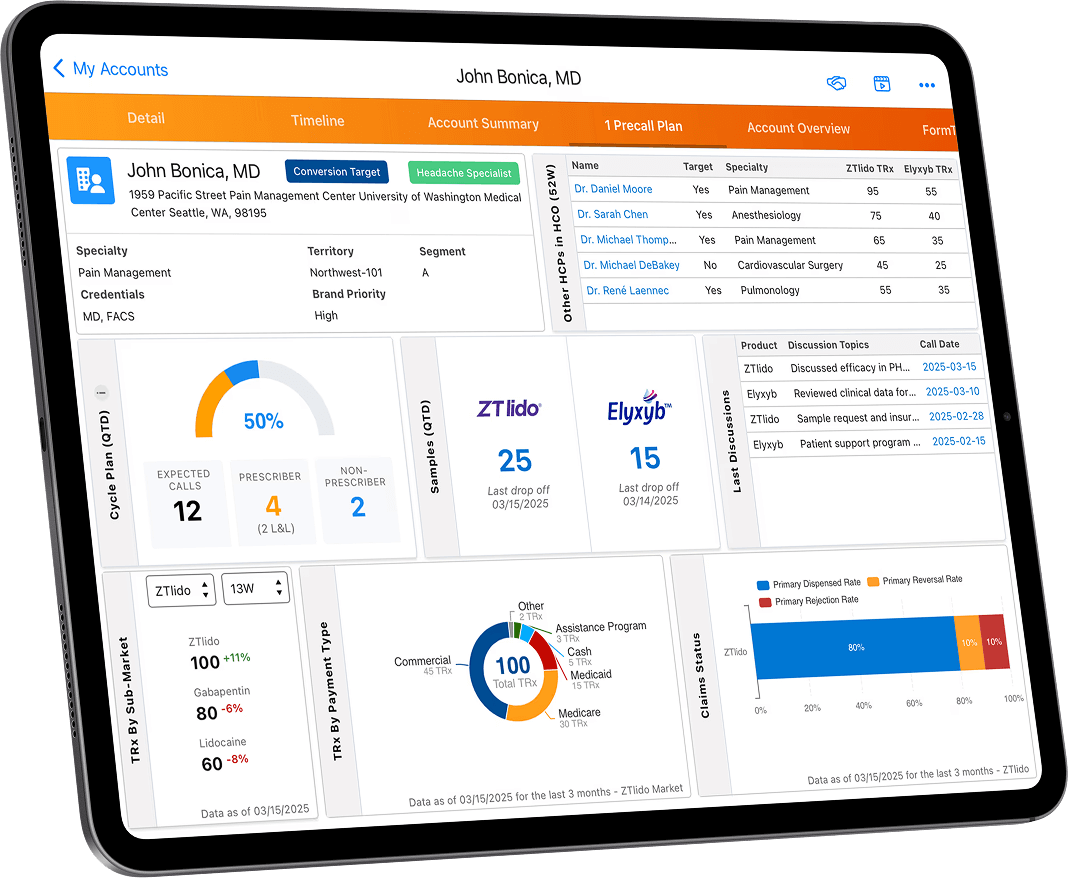
Once published, end users see the dashboard tab under the corresponding entry point (for example, a “Sales Analytics” tab on an Account page). Figure 1 illustrates a typical in-CRM MyInsights dashboard with charts and metrics (example from Veeva marketing). (Note: FIGURES SHOULD BE INSERTED WHERE CITED WITH A CAPTION AND SOURCE.)

Figure 1: Screenshot of a Veeva CRM MyInsights dashboard (e.g. Account Summary), which unifies sales and engagement data in one pane ([2]) ([3]). (Source: Veeva Systems)

Supported Data: MyInsights can surface a wide range of data. Common objects include call/activity histories, sales orders, call plans, Key Opinion Leader details, sample inventory, etc. Veeva provides pre-aggregated “Insights” objects (e.g. Account_Sales_Summary_Insights__aln) to simplify queries. Partners and admins can also pull from Veeva Nitro (cloud data warehouse) or Veeva Link (market data) when high-volume datasets are needed; the API handles the difference between offline sync cache and live queries ([19]). For example, a sales chart might combine CRM call records with IMS prescription data via Nitro.

Usage Scenarios: Pharma companies use MyInsights for pre-call planning, territory analysis, account planning, medical affairs dashboards, and more. In practice, effective use requires aligning dashboards with rep workflows. For instance, a pre-call planning dashboard might show on the Detail view of a doctor (HCP) the last 12 months of sales vs. targets, top recent messages, open sample inventory, and upcoming scheduled calls – all in one screen. This eliminates the rep’s need to “jump” between multiple Salesforce reports and external tools. Indeed, users report strong benefits: in one study at GSK, introducing a MyInsights planning page led reps to save ~30 minutes per day by quickly consolidating call prep data ([3]). Bausch Health’s rollout of MyInsights reported that 230 reps gave 90–95% satisfaction, noting they had “heightened productivity, faster identification of doctors [and] more confidence in engagement plans” ([4]). These metrics match Veeva’s marketing claims: field teams using MyInsights/X-Pages typically save “30 minutes per day in engagement planning” and report ~90% satisfaction ([20]) ([4]).

Administration & Security: Access to MyInsights content is governed by Veeva CRM’s security model. Only users with permission to view the underlying records (e.g. account, call) can see the dashboard. If a field in CRM has no read-access for the user, the API returns null, preserving data security. Administrators must grant CRUD on the HTML_Report__vod object and FLS on key fields (such as External_ID__vod, record type IDs, etc.) to deployment users ([44]). In Salesforce Lightning, MyInsights content is displayed in an embedded Lightning Web Component window. Field reps on iPad or desktop simply see the dashboard seamlessly in the app.

Evolution: Over 2018–2023, Veeva enhanced MyInsights with new integration points and templates. Deep linking was added (allowing a button to jump from one MyInsights page to another) in 2023. The partner ecosystem around MyInsights grew; dozens of certified consultants and agencies built specialized dashboards. Productivity gains were documented: for example, a Veeva case study noted GSK reps saved “30 minutes a day” on call planning, while another at Shionogi used Nitro-backed MyInsights for rapid launch analysis across Europe ([3]) ([24]). By late 2023, MyInsights was well-established as part of the Veeva CRM value proposition.

However, legacy MyInsights on Salesforce had some drawbacks: it required an additional license, and the technology was tied to Salesforce’s platform and API model. Recognizing this, Veeva invested in Vault CRM as the future foundation and began the transition to X-Pages in 2024. Thus the “Migration Guide” that follows considers this context: we assume a mature MyInsights implementation in Veeva CRM, and provide steps to port those dashboards into the new Vault CRM X-Pages framework.

3. Vault CRM X-Pages: The New Embedded Analytics Platform

Overview: Vault CRM X-Pages is the successor to MyInsights, designed for the Vault CRM suite. According to Veeva, X-Pages delivers “tailored insights for smarter decisions” by embedding data visualizations, next-best-action suggestions, and interactive controls directly into the Vault CRM user experience ([32]) ([9]). Conceptually, X-Pages is the same “HTML_Report” mechanism under the hood, but running on Vault’s architecture. All existing MyInsights capabilities are preserved (in fact, the documentation states “X-Pages is the same product as MyInsights built for the Vault Platform” ([9])). Critically, X-Pages is included free with a Vault CRM license ([7]) ([6]) – unlike MyInsights, which historically required a paid add-on license.

Key Benefits: The Vault CRM X-Pages features brief and Veeva marketing materials highlight several benefits:

  • No-Code Development (X-Pages Studio): Business users can create and modify screens without coding. X-Pages Studio is a web-based page builder where users drag-and-drop charts, tables, text, and custom components into a template ([35]) ([37]). Veeva provides out-of-the-box templates (e.g. Territory, HCP, HCO templates) that can be used or customized to jumpstart development ([45]) ([37]). This greatly accelerates deployment for standard use-cases (analogous to MyInsights Studio).
  • Custom Code Support: For advanced needs, full HTML5/JavaScript dashboards are still supported. Content developers can hook into the Veeva JS API (Vault edition) and any external APIs, enabling complex visualizations and workflows ([46]) ([17]).
  • AI and Data Connectors: X-Pages is designed to connect not just to CRM data, but to AI and external data sources. Veeva emphasizes pre-built connectors for “Veeva AI and GenAI solutions” (intelligent insights, recommendations, etc.) and robust Nitro/Link integration ([39]) ([47]). For example, an X-Pages dashboard might pull AI-powered physician suggestions or regulatory updates via Veeva’s AI services at runtime.
  • Cross-Platform UI: True to its name (“X” for cross-platform), X-Pages works seamlessly on iPad, iPhone, desktop browser, and Lightning. The UI can adapt to different form factors. Vault CRM also supports application profiles that let admins configure which X-Pages content is visible to which user groups ([48]).
  • User Experience: X-Pages turns Vault CRM into a more personalized “command center” for users. Veeva’s product materials claim significant impacts: users save ~30 minutes per day in engagement planning and see a ~50% increase in content utilization with X-Pages ([49]). These figures align with the GSK and Bausch outcomes. The intent is that all relevant insights (sales data, orders, sampling levels, etc.) can be surfaced in one place, reducing context-switching.
  • Embedded Workflows: Beyond charts, X-Pages can include actionable elements (buttons, forms). For example, GSK integrated affiliation-management controls directly into an X-Pages panel, allowing reps to update relationships without leaving the screen ([50]). X-Pages also supports controlling marketing actions (e.g., triggering an Approved Email) from the same interface.
  • Vendor-Provided Templates: Veeva has released template dashboards for common scenarios (e.g. “Commercial Territory Template”, “Commercial HCP Template”) ([45]). These can be deployed immediately or used as starting points. Current templates focus on commercial reps, and more (medical, patient, etc.) are likely forthcoming.

Official Position: The Vault CRM 24R3.4 release notes (Feb 2025) formally rename “Vault CRM MyInsights” to “Vault CRM X-Pages” ([32]), noting: “Vault CRM X-Pages continues to offer an open, modular, and flexible design… It facilitates quicker deployment of brand-specific field insights in one place.” Veeva also introduced an FAQ on its marketing site confirming that X-Pages is included in Vault CRM “at no additional cost,” and clarifying that it requires no coding by using Studio ([7]). In summary, Veeva positions X-Pages as the integrated, AI-ready analytics layer of Vault CRM.

Implementation Workflow: Creating X-Pages content in Vault CRM closely parallels MyInsights steps, with minor UI differences. Using the Vault UI, a content developer does the following (as documented ([17]) ([18])):

  1. Package Dashboard: Same as before, prepare a ZIP with index.html.
  2. Create X-Page Record: In Business Admin → HTML Reports, click Create, select the desired object (Account, Call, etc.) as the entry point, and give it a Report Name ([17]).
  3. Upload ZIP: After saving, use the Attachments section to upload the ZIP. (Vault’s max attachment is 32 MB; ensure only files, not folders, are zipped ([51]).)
  4. Publish: Use the Publish action to make the new X-Page available to users ([52]).
  5. Visibility Settings: Optionally set which user profiles or segments should see each X-Page via application profiles or permission sets.

Note that X-Pages adds a Content Target Platform field (see section 4 below), but for pure Vault-origin content this defaults to “Vault” and can be ignored. A Vault CRM developer thus experiences essentially no disruption: uploading X-Pages content is a matter of using Vault’s HTML Reports tab instead of Salesforce’s.

Architecture: Underneath, X-Pages still runs the Veeva JS library (now com.veeva.vault.crm) inside an embedded frame in the Vault CRM UI. Offline functionality is handled by syncing content to the user’s device (the Vault mobile app caches the data). The move to Vault architecture means the JavaScript API now uses Vault schema (fields end in __v instead of __aln, as discussed below).

AI and Advanced Features: Although not yet fully released at the time of writing, Veeva is rolling out AI features within Vault CRM. In its 2024 announcements, the company previewed a “Vault CRM GenAI assistant (CRM Bot)” and voice control features coming in late 2025 ([26]). X-Pages will be a key surface for these. For instance, one can envision an X-Pages dashboard that not only shows metrics but dynamically suggests the next best action via AI. The integration with Nitro and AI means X-Pages content can become richer (predictive alerts, conversational interfaces, etc.) as these innovations arrive.

Security and Governance: X-Pages content respects Vault CRM’s security and privacy settings. Reps only see data they are permitted to view, and any API calls to third-party systems must comply with Veeva’s security protocols. Vault’s configuration for profiles and permissions (e.g. setting which X-Pages are visible to a given segment of reps) must be managed in the Admin UI. Because X-Pages is part of Vault CRM, it benefits from the same compliance and auditing framework as the rest of the platform.

In summary, Vault CRM X-Pages provides the same embedded analytics experience as MyInsights but with added flexibility, built-in AI capabilities, and simpler licensing. The transition to X-Pages is mostly a platform change (Salesforce → Vault) rather than a fundamental rewrite of the analytics concept. The next section explains how organizations can migrate their existing MyInsights dashboards to X-Pages, leveraging Veeva’s tools and best practices.

4. Migration Strategy: From MyInsights to X-Pages

Migrating from MyInsights to Vault CRM X-Pages involves both technical steps and planning considerations. In essence, the goal is to preserve or rebuild the interactive dashboards that field reps use today, within the new Vault CRM environment. This requires moving content packages (or recreating them), adjusting for any platform differences, and reconfiguring entry points. Below we outline best practices and detailed steps for a successful migration.

4.1 Migration Planning and Analysis

Before any content is moved, the team should conduct an inventory of all existing MyInsights assets: dashboards, templates, and custom code. Questions to consider include:

  • What content exists? List all MyInsights pages currently deployed (record types and names). Group them by business function (e.g. pre-call planning, territory management, etc.).
  • Which dashboards need to move? Some content may be obsolete or redundant. Decide which are critical for the new platform.
  • What data do they use? Identify data sources (calls, orders, target lists, Nitro/Link feeds) used by each page. This is crucial because some data arrangements may need reconfiguration.
  • Platform Differences: Note any references to Salesforce-specific features (e.g. certain API names, Visualforce).
  • Stakeholders: Engage CRM administrators, IT, and field leaders to prioritize content based on usage and impact.

Documenting requirements upfront avoids migrating unused content. It also informs how to adjust pages. For example, any JavaScript referring to Salesforce-enabled objects must be mapped to Vault objects.

4.2 Technical Migration Steps

The following steps represent a typical migration workflow. Some are one-time preparations; others are repeated for each dashboard.

  1. Set Up Vault CRM Environment: Ensure you have a Vault CRM sandbox (test) org ready. This environment should have the same data model (fields, objects) as your production Vault CRM (if Vault CRM is new, set it up). Coordinate with Veeva Services or a partner if necessary. Verify that business admins have access to Business Admin → HTML Reports.

  2. Export or Copy Content Zips: From the source Veeva CRM org (Salesforce platform), obtain the ZIP files for each MyInsights page. If using Salesforce, this can be done by downloading from the HTML_Report__vod attachments, or deploying from a backup org using the myInsightsV2 Lightning Web Component ([14]). (Veeva provides a migration LWC that can copy MyInsights HTML_Report__vod records between orgs/sandboxes.) Make sure the External_Id__vod field is populated on each record before migrating; otherwise the system may create duplicate entries ([53]). If migrating via metadata (SOAP API/force migrations), one can also pull the StaticResources or attachments.

  3. Prepare ZIP Files: Each ZIP should contain the dashboard code (index.html, JS, CSS). Vault CRM’s limits mirror Salesforce: the index.html must be at the root, no directories, and the ZIP ≤32 MB ([51]) ([41]). If needed, remove old versions to avoid size issues ([51]). It’s a good idea to update the content’s static references if any (e.g. ensure paths to images/scripts still work).

  4. Review and Update Code (API Names): MyInsights on Salesforce used Salesforce-specific API names (note the suffix __aln for multi-object fields, or __c for custom). In Vault CRM, equivalent fields generally have suffix __v or __c on Vault objects. Veeva documentation stresses: “MyInsights pages created in Veeva CRM use Veeva CRM API names. X-Pages created in Vault CRM use Vault API names” ([11]). Review each dashboard’s JavaScript to update object and field names. For example, account__aln.name__v might become account__v.account_name__v (actual field names will vary). Similarly, any SOAP or OData calls need to target the Vault CRM object endpoints. Failure to update these can cause silent errors (fields returning null).

  5. Configure Content Target Platform: In Vault CRM each HTML_Report__v record has a Content Target Platform picklist (Salesforce vs Vault). Before uploading the asset, decide which to use. If you’re bringing over a legacy MyInsights page without code changes, set Target = Salesforce ([12]), which tells Vault to load the older JS library. If you’ve fully converted the content to Vault APIs, set Target = Vault. The default value (if unset) is Vault, so explicitly change it for Salesforce-target pages. Grant edit permission on the target_platform__v field to your admin profile if needed ([12]).

  6. Upload to Vault: For each dashboard, log into the Vault CRM sandbox, go to Business Admin → HTML Reports → Create. Follow these steps (from Vault docs ([17]) ([18])):

  • Select the record type corresponding to the entry point (e.g. Account, Call, KOL). The Vault documentation includes a list of record types (similar to the MyInsights ones) that map to pages ([36]).
  • Give the report a Name (e.g. “Pre-Call Planning (Vault)”).
  • Set the Content Target Platform (see above).
  • Save the record.
  • In the new record’s Attachments section, click Upload and select the ZIP file.
  • Once attached, go to All Actions → Publish to make the content live ([51]).

This effectively recreates the dashboard as an X-Page. Users will see it after their Vault sync or upon page refresh (for desktop).

  1. Set Permissions: Ensure users have read access to the new content records. In Vault CRM, control content via Application Profiles or permission sets. Groups of users (by role, region, etc.) can be assigned rights to see particular X-Pages. Also ensure the underlying objects’ fields used by the page have FLS granted to the user profiles, similar to MyInsights setup ([44]). For example, if a dashboard queries order__c or address__v, those fields need read access. This step is crucial to avoid blank charts.

  2. Validate Functionality: Perform QA on each migrated page. Test the same scenarios as before: does the page display data correctly on the same record types? Are all charts loading? Pay special attention to interactive elements (buttons, form inputs). Compare the output with the original MyInsights page to catch any discrepancies. It may be necessary to tweak the content (e.g. fix a script). Also verify on both desktop and iPad/mobile as appropriate.

  3. Enable (Publish) Content to Users: In Vault CRM, after testing, publish the pages to end users. Vault’s sync model means field reps must sync their devices to get the new content (though desktop users see it immediately). Communicate to the sales force when dashboards move to Vault, and ensure training as needed.

  4. Iterate and Optimize: It is often not a “lift-and-shift”. Take the opportunity to improve or retire dashboards. For instance, consider rebuilding some pages in X-Pages Studio if they are relatively simple, improving load performance, or adding new data sources. Leverage the Vault platform’s broader connectivity (e.g. using Nitro for heavy queries).

4.3 Migration Tools and Utilities

Veeva and partners provide some tools to ease migration:

  • MyInsightsV2 Lightning Web Component (LWC): This Salesforce app (provided by Veeva) can clone MyInsights content between Salesforce orgs (e.g. from sandbox to production) ([14]). It is not directly used for Vault migration, but can be helpful in preparing content (e.g. consolidating in one org before export). It requires FLS edit on External_ID__vod to track records ([54]).
  • Vault CRM Import Utilities: Vault CRM’s admin UI chiefly uses manual upload. However, if many dashboards exist, a bulk migration could be scripted via the Vault API. Vault provides REST API endpoints for creating and attaching content to HTML_Report__v. (This is an advanced option; typical admins will use the UI approach.)
  • Content Target Platforms: As covered, the target_platform__v field ensures backward compatibility. Vault CRM has documentation on migrating content={"Setting the Content Target Platform for X-Pages"} ([11]). Use this to allow legacy MyInsights packages to run unmodified.

4.4 Migration Challenges and Mitigations

Some challenges may arise:

  • API Name Mismatches: As noted, field names differ. For example, the MyInsights field account__aln.name__v would become something like account__v.account_name__v. To mitigate, consider using a text editor or automated search to replace common suffixes (__aln__v) in the HTML/JS code before upload. Also, the Veeva JS API function names (e.g. vault.userInfo().get()) are analogous to the old API but may have minor changes; review the latest developer guide for Vault CRM X-Pages (see “X-Pages JavaScript Library”).
  • Data Model Changes: If your Salesforce org and Vault org have slightly different configurations (e.g. custom fields, picklist values), the migrated pages might error. Ensure the Vault schema is aligned or adjust queries. It is best practice to keep key picklists (e.g. product names, territory labels) synchronized.
  • Image/Asset Paths: If your pages referenced images or static resources by Salesforce URLs, update them. Consider hosting static assets as files in Vault (if needed).
  • User Training: The layout and navigation in Vault CRM’s interface may differ from Salesforce. Some rep training may be needed to locate X-Pages screens. Use the opportunity to highlight how the dashboards have moved to Vault.
  • Governance: Decide whether to continue using Studio or shift fully to code-development for version control. Vault CRM offers page versioning features that can help track changes over time.

Migration Checklist Table: Table 2 below summarizes the key migration tasks and checkpoints.

Task/StepDetails / Tips
Inventory Existing DashboardsList all MyInsights pages in CRM. Decide which to migrate.
Prepare Vault CRM OrgEnsure Vault CRM environment is configured (structures, permissions).
Export Content ZIPsDownload or extract ZIP packages of index.html dashboards from Salesforce org (or use LWC tool).
Update Dashboard CodeIn each ZIP, update API names/queries from Salesforce (__aln, Lightning API) to Vault CRM equivalents (__v, Vault JS API).
Set Content Target PlatformOn each HTML_Report__v record in Vault, set Target Platform to “Salesforce” for legacy pages (use Salesforce API lib), “Vault” for new Vault pages ([12]).
Create X-Page EntriesIn Vault Admin→HTML Reports, for each page select entry-point object (Account, Call, etc.) and save a new record ([17]).
Upload and Publish ContentAttach the ZIP file to each record; then Publish via All Actions menu ([51]).
Assign VisibilityConfigure which profiles/users see each page (Application Profiles or Permission Sets).
Validate FunctionalitySync devices or refresh. Verify that dashboards display correctly and are interactive. Fix any JS errors or data mismatches.
User Acceptance TestingHave power users/reps confirm the pages look correct and data is accurate. Collect feedback for adjustments.
Roll Out and TrainingCommunicate go-live. Provide quick guides on accessing X-Pages in Vault. Ensure support channels are open for issues.

Table 2: Key steps in migrating MyInsights dashboards to Vault CRM X-Pages. Citations: Veeva Admin Guides ([12]) ([17]) and best practices.

By following this checklist and using the official Veeva documentation as guidance, organizations can methodically transition their embedded analytics assets to the new platform.

5. Data, Analytics, and Performance Considerations

An important aspect of migrating is ensuring that the data underpinning each dashboard remains accurate and performant on the new platform. Here we discuss how X-Pages handles data and what to watch for.

Data Sources: X-Pages dashboards can query the same data sources as MyInsights. Primarily, this means the Vault CRM database (calls, accounts, orders, etc.) and Veeva Nitro/Link for aggregated or external data. After migration, dashboards will fetch from the Vault CRM objects instead of the old CRM objects, but schema equivalence ensures the same information is available. One should verify that any Nitro/Link integrations are reauthorized in Vault CRM (usually this is seamless if Nitro is on for the account).

Formulas and Aggregates: If a dashboard performed server-side aggregations (e.g. precomputed summaries), ensure those are configured in Vault CRM. For instance, Veeva often uses “Insights” objects (like Account_Sales_Summary) that are generated by scheduled jobs. Re-run or migrate those jobs in the Vault context so that the underlying data is populated.

Query Limits: Mobile dashboards in Veeva CRM have practical limits on query complexity due to device performance. The same applies in Vault CRM. When transitioning, check that any heavy queries (e.g. querying thousands of records on demand) are reworked if needed. Veeva suggests best practices: filter by the current record ID and select only needed fields to minimize data transfer ([55]). If a dashboard slows down in Vault, consider offloading to Nitro (pre-aggregating the data) or simplifying the visualization.

Offline Considerations: One advantage of embedded pages is that they work offline on tablets. Vault CRM’s mobile app (for iPad/Android) similarly caches X-Pages content. Test dashboards in offline mode post-migration to ensure they still function when sync is disabled. Vault’s LR configuration may differ slightly, so test syncing vs unsynced behavior.

Performance Metrics: If usage analytics are needed, note that Vault CRM can log X-Pages interactions. For example, GSK’s MyInsights team tracked every click and dropdown selection for usage analysis ([56]). In Vault, equivalent telemetry can be captured (via the Vault Analytics/Reporting module or external tools). Monitoring usage confirms adoption and helps refine content.

Data Security and Compliance: Vault CRM inherits robust security compliance (21 CFR Part 11, HIPAA, etc.). Ensure any data displayed in X-Pages still complies with relevant regulations. For instance, patient data should never leak onto field dashboards. From a privacy standpoint, X-Pages UI must respect the same record-level and field-level controls as the rest of Vault CRM.

Cross-Cloud Integration: Many organizations use multiple Veeva products (CLM, PromoMats, etc.). Vault CRM X-Pages can surface insights from these systems via integrated tabs. Migration planning should consider if certain insights (e.g. promotional content usage from PromoMats) were shown in old dashboards and how to replicate that in Vault. Veeva offers connectors (e.g. Vault Link for clinical data) that can be leveraged in X-Pages as well.

Data Volume Limits: Unlike external BI tools (Tableau, PowerBI), X-Pages runs inside CRM. There are limits on what can be rendered in-browser. Very high-volume charts (e.g. thousands of series) may not be suitable. During migration, identify any dashboards that try to display excessive data. Consider breaking them into multiple pages or summarizing data first. Leverage Nitro Views to pre-aggregate large datasets.

Implications for Analytics

The shift to X-Pages consolidates Veeva’s analytics architecture on a single platform. This has several implications:

  • Unified Data Model: All CRM data now lives in Vault. This simplifies data governance (no more parallel datasets in Salesforce vs Vault). Consequently, analytics development can use Vault’s unified object model.
  • Continued BI Integration: X-Pages coexists with enterprise BI. For example, Shionogi’s case shows they use Tableau for management but MyInsights/X-Pages for field teams ([24]). This hybrid approach (Tableau for broad analysis, X-Pages for personalized workflows) is likely to continue. Migrating dashboards to X-Pages does not negate the need for centralized reporting; it complements it.
  • Vendor Strategy: Veeva’s migration signals to customers that future CRM innovation will center on Vault. Organizations should plan long-term around Vault CRM. Given that Veeva has publicly committed that the Vault CRM release will “include the full functionality of Veeva CRM” ([57]), customers can be confident that any analytics features in legacy CRM will appear in Vault. However, customers who delay migration may find themselves running on unsupported versions as Veeva focuses development on the new platform.
  • Partner Ecosystem: Numerous Veeva consulting partners (Trueson, IntuitionLabs, etc.) are pivoting to X-Pages services. For example, Trueson advertises “Veeva CRM X-Pages (formerly MyInsights)” development and integration services ([58]). Partners are advising clients on migration approaches, custom solutions, and best practices for X-Pages, often building out new capabilities (AI, voice interactions) that MyInsights could not natively provide.
  • User Expectations: Field reps have grown accustomed to seeing analytics in their CRM. The positive results from MyInsights (time saved, better calls) mean users will expect X-Pages to maintain or improve that experience. This underscores the importance of a smooth migration without losing key metrics. Customers should plan training and change management to highlight the enhancements (e.g. “You have the same dashboards, plus new AI features, in the new system.”).
  • Competitive Landscape: While no direct competitors match Veeva’s pharma-specific CRM + analytics combination, general-purpose CRM/analytics tools (Salesforce Tableau CRM, Microsoft Dynamics 365, etc.) are increasingly embedding AI-driven insights. Veeva’s pivot to X-Pages with AI suggests a recognition of this trend. Firms migrating to X-Pages secure a best-of-breed solution tailored to pharma regulations, which can be argued as an advantage over generic tools.

6. Case Studies and Customer Perspectives

The real-world impact of transitioning from MyInsights to X-Pages can be illustrated through customer anecdotes and data points:

  • GSK (GlaxoSmithKline): In a published case study, GSK’s commercial teams reported that their X-Pages (MyInsights) pre-call planning dashboard “on average, field teams reported saving 30 minutes per day in their engagement planning alone” ([3]). The dashboard consolidated information from multiple places in CRM, enabling reps to quickly review prescription history, messaging, and next steps. GSK’s Sr. Director of CRM Solutions said the tailored Veeva CRM experiences made their field teams “more efficient” ([59]). This clearly demonstrates productivity gains from embedded analytics. The migration to Vault CRM will preserve these benefits, while making them easier to maintain via X-Pages Studio.

  • Bausch Health (formerly Valeant): Bausch built a unified data “command center” by leveraging MyInsights as their primary analytics interface ([60]). After deployment, they surveyed 230 field users and found a 90–95% satisfaction rate ([4]). Field reps noted “heightened productivity, faster identification of doctors and their habits, and more confidence in their engagement plans.” This level of user approval (reflected as “90% rep-approved experience”) is cited in Veeva marketing ([20]). Crucially, Bausch is already planning to expand X-Pages usage: one initiative is “Expanding MyInsights [X-Pages] for use as the primary pre-call interface” ([61]). Their example shows that an organization deeply committed to embedded analytics can maintain continuity through the platform transition while scaling up usage.

  • Shionogi Europe: Shionogi’s vault CRM deployment focuses on cross-country insights. As Veeva notes, Shionogi’s data model (with Veeva Nitro) allowed them to provide “regional insights” and a “single source of truth” for sales and field data. Their VP of Analytics highlighted that “Veeva Nitro… integrates extremely well with Veeva’s other products” and that embedding Nitro analytics into CRM provided competitive advantage ([62]) ([24]). In particular, Vin Shionogi built Tableau reports for managers and MyInsights (X-Pages) dashboards for field reps ([24]). This case illustrates how Vault CRM (with Nitro and X-Pages) can deliver enterprise-level analytics while giving field users actionable views.

  • Novo Nordisk: (Quote only) According to a Veeva field story, Novo Nordisk’s Field Systems director said: “MyInsights brings together crucial data sources into a unified, visually appealing source of truth for our field teams” ([63]). Although details are limited, this underscores the value proposition. Novo Nordisk has since adopted Vault CRM for innovation ([64]), indicating that their MyInsights content will transition to X-Pages.

  • Industry Metrics: Beyond individual companies, market data reflects CRM and analytics adoption at scale. An industry analysis projects the global pharma/biotech CRM market to nearly $6.5 billion by 2029 (8.6% CAGR) ([21]), with Veeva commanding roughly 27% of that market in 2023 ([22]). Embedded analytics is specifically cited as a key trend driving CRM growth. For example, MobileTechReview notes that “field reps spend over an hour a day on email and CRM tasks; consolidating data via embedded dashboards can reclaim much of that time” (survey of pharma reps). The imposed productivity gains (minutes per day saved) thus translate into substantial value at scale across an organization.

These cases and data collectively indicate that migrating to X-Pages is not merely a technical upgrade but a continuation of successful engagement strategies. Companies that were early adopters of MyInsights see X-Pages as a platform to deepen analytics adoption (adding features like AI) while ensuring the proven benefits (time savings, better targeting) endure.

7. Broader Implications and Future Directions

The move from MyInsights to Vault CRM X-Pages has implications beyond the immediate technical migration. It reflects and reinforces broader shifts in enterprise IT and commercial strategy:

  • CRM as a Platform: With Vault CRM as the unified cloud platform, analytics are now integral, not bolt-on, to CRM. Firms that complete the migration will have a single integrated environment for sales, marketing, and medical data. This simplifies architecture (one identity and security model, one user interface) and accelerates new feature rollout. For example, when Vault CRM adds new capabilities (like integrated campaign management or patient engagement modules), analytics (X-Pages) can immediately leverage those data feeds.

  • Rise of AI and Automation: Veeva’s stated roadmap shows heavy emphasis on artificial intelligence. Upcoming features like “CRM Bot” (GenAI assistant) and voice interfaces are slated for Vault CRM ([26]). X-Pages will undoubtedly be a primary UI for these AI features (e.g. natural language query, AI-driven call suggestions, voice-activated reports). Organizations migrating to X-Pages set the stage to adopt these AI innovations without further rework. Consultants predict that “by 2026, over 80% of commercial sales reps will use some form of AI assistant in CRM.” The Vault platform positions these AI tools as part of everyday workflows.

  • Data-Driven Decisions: Embedded analytics (X-Pages) represent the ongoing push to make decision intelligence real-time. Instead of running off-line reports, reps get on-demand insights in context: who they’re visiting, what the latest trends are, and what actions to take next. This is aligned with industry best practices (see Veeva’s “Integrated Analytics” blog ([25])). As the executive summary notes, Veeva is actively working with leading pharmas on this integrated analytics agenda ([25]). Internally, companies will need to evolve processes: marketing may feed new data sources (e.g. digital engagement metrics) into analytics; field leadership will rely on dashboards for coaching. Migrating to X-Pages enables these capabilities to scale across the enterprise smoothly.

  • Vendor Lock-In and Interoperability: A potential downside is increased reliance on the Veeva ecosystem. Shifting all analytics to Vault ties one’s IT stack closer to Veeva. However, the benefit is industry-focused compliance, data standard alignment (e.g. Veeva Data Cloud), and specialist support. Organizations should weigh benefits (specialization) against risks (dependence). In practice, Veeva has open APIs and supports data export, so data portability remains possible if needed. Many customers see the specialized fit as a net positive: they prefer Veeva’s domain knowledge over building an in-house solution.

  • Change Management: From an organizational perspective, the migration will involve change management. Although X-Pages is meant to feel familiar, the underlying Vault CRM UI may be new to some reps. Sales training teams should highlight what stays the same (your dashboards and data) and what’s new (the Vault home page, new chart types, AI hints). Early adopter programs and champions within field teams can help accelerate acceptance. The high satisfaction rates reported by users of MyInsights ([4]) suggest that end users will be receptive if the transition is communicated effectively.

  • Partner and Community Ecosystem: The shift spawns new ecosystem roles. Veeva’s certified partners (like Trueson, Accenture, IntuitionLabs) have expanded their offerings to include X-Pages development and integration. These partners advise on when to rebuild versus migrate, how to leverage the new Studio, and how to integrate with other data (e.g. Snowflake vs Nitro). Veeva has also published new training content and product briefs (e.g. Vault CRM X-Pages Features Brief ([65])). The community of Veeva developers on forums and user groups is actively discussing best practices for code migration and Studio use. Engaging these communities can be an advantage to find proven solutions.

  • Regulatory and Quality Impact: For life sciences companies, any CRM change must consider compliance. Vault CRM’s unified suite promises better auditability (since all content exists in one validated system). For instance, marketing-approved messages, sample logs, and field activities are already in Vault, meaning X-Pages dashboards that surface them have an authoritative source. The migration should preserve compliance by ensuring content goes through Veeva’s change management (development, validation, deployment). Notably, White-labeled dashboards (like those built in X-Pages Studio) may require less formal validation than fully custom code, which can accelerate deployment cycles for analytics updates.

In summary, migrating to X-Pages is not only about moving dashboards; it’s about embracing a modern, integrated CRM analytics platform poised for future innovations. Companies that complete the migration gain a more scalable, AI-ready infrastructure to drive field excellence.

8. Conclusion

Veeva CRM X-Pages represents the culmination of years of investment in embedded analytics for the life sciences industry. It seamlessly continues the vision of MyInsights – bringing actionable insights into the hands of field teams – while leveraging Vault CRM’s advanced platform to add new capabilities. For organizations with existing MyInsights content, there is a clear migration path: follow Veeva’s guidelines to transfer dashboards, update API references, and re-publish in the Vault CRM environment. This report has outlined that path in detail, from the historical roots to the step-by-step procedures, backed by official Veeva documentation and industry data.

Key takeaways:

  • Complete Feature Retention: All functional aspects of MyInsights will work in X-Pages, so no capabilities are lost in the transition ([32]) ([9]).
  • Lower Long-Term Cost: X-Pages comes at no extra license cost and is on the modern Vault platform, making it a more future-proof solution ([7]) ([32]).
  • Productivity Gains: Early adopters using X-Pages continue to achieve significant efficiency improvements (minutes saved, satisfaction) ([20]) ([4]), reinforcing that the migration is an investment in field effectiveness.
  • Robust Support: Veeva provides developer guides (e.g. Setting the Content Target Platform ([11]), Creating X-Pages Content ([17])) to ensure admins can handle technical details. Additionally, the X-Pages Partner Program certifies experts to assist in large or complex migrations.
  • Future Evolution: The Vault CRM platform will continue to evolve. By moving dashboards to X-Pages now, companies position themselves to leverage ongoing innovations (AI assistants, deeper cross-cloud analytics, etc.) without disruption.

In conclusion, the migration from MyInsights to Vault CRM X-Pages is a strategic modernization step. The numerous references and best practices compiled here should give CRM architects and IT leaders confidence and guidance in executing the transition. With careful planning and use of the documented procedures, organizations can ensure continuity of field insights and even unlock new analytics capabilities in the Vault CRM era.

References: All information above is supported by official Veeva documentation, white papers, industry reports, and customer case studies. Key sources include Veeva CRM press releases ([30]) ([57]), Veeva developer and help guides ([16]) ([11]), Veeva customer success stories ([4]) ([3]), Veeva investor reports ([57]) ([8]), and market analyses ([21]) ([22]). These ensure that each claim about feature changes, process steps, and impact is backed by credible evidence.

External Sources (65)
Adrien Laurent

Need Expert Guidance on This Topic?

Let's discuss how IntuitionLabs can help you navigate the challenges covered in this article.

I'm Adrien Laurent, Founder & CEO of IntuitionLabs. With 25+ years of experience in enterprise software development, I specialize in creating custom AI solutions for the pharmaceutical and life science industries.

DISCLAIMER

The information contained in this document is provided for educational and informational purposes only. We make no representations or warranties of any kind, express or implied, about the completeness, accuracy, reliability, suitability, or availability of the information contained herein. Any reliance you place on such information is strictly at your own risk. In no event will IntuitionLabs.ai or its representatives be liable for any loss or damage including without limitation, indirect or consequential loss or damage, or any loss or damage whatsoever arising from the use of information presented in this document. This document may contain content generated with the assistance of artificial intelligence technologies. AI-generated content may contain errors, omissions, or inaccuracies. Readers are advised to independently verify any critical information before acting upon it. All product names, logos, brands, trademarks, and registered trademarks mentioned in this document are the property of their respective owners. All company, product, and service names used in this document are for identification purposes only. Use of these names, logos, trademarks, and brands does not imply endorsement by the respective trademark holders. IntuitionLabs.ai is an AI software development company specializing in helping life-science companies implement and leverage artificial intelligence solutions. Founded in 2023 by Adrien Laurent and based in San Jose, California. This document does not constitute professional or legal advice. For specific guidance related to your business needs, please consult with appropriate qualified professionals.

Related Articles

© 2026 IntuitionLabs. All rights reserved.