What this CTMS screenshot shows
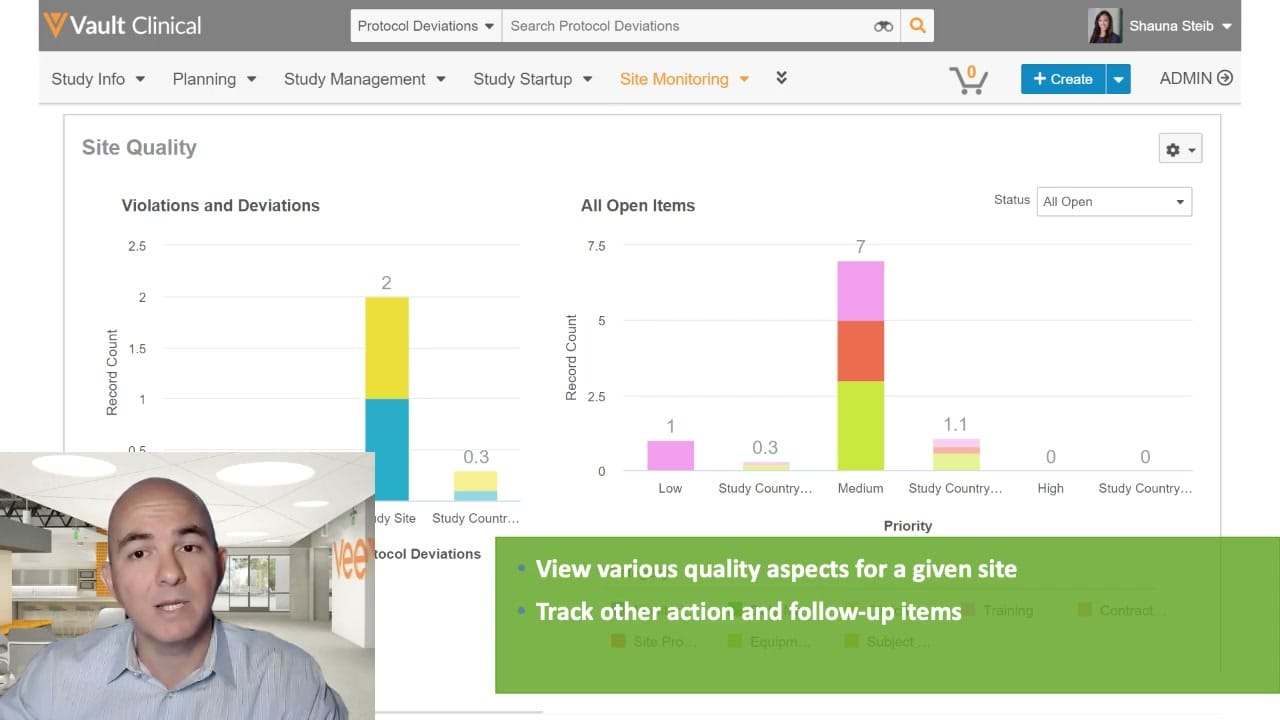
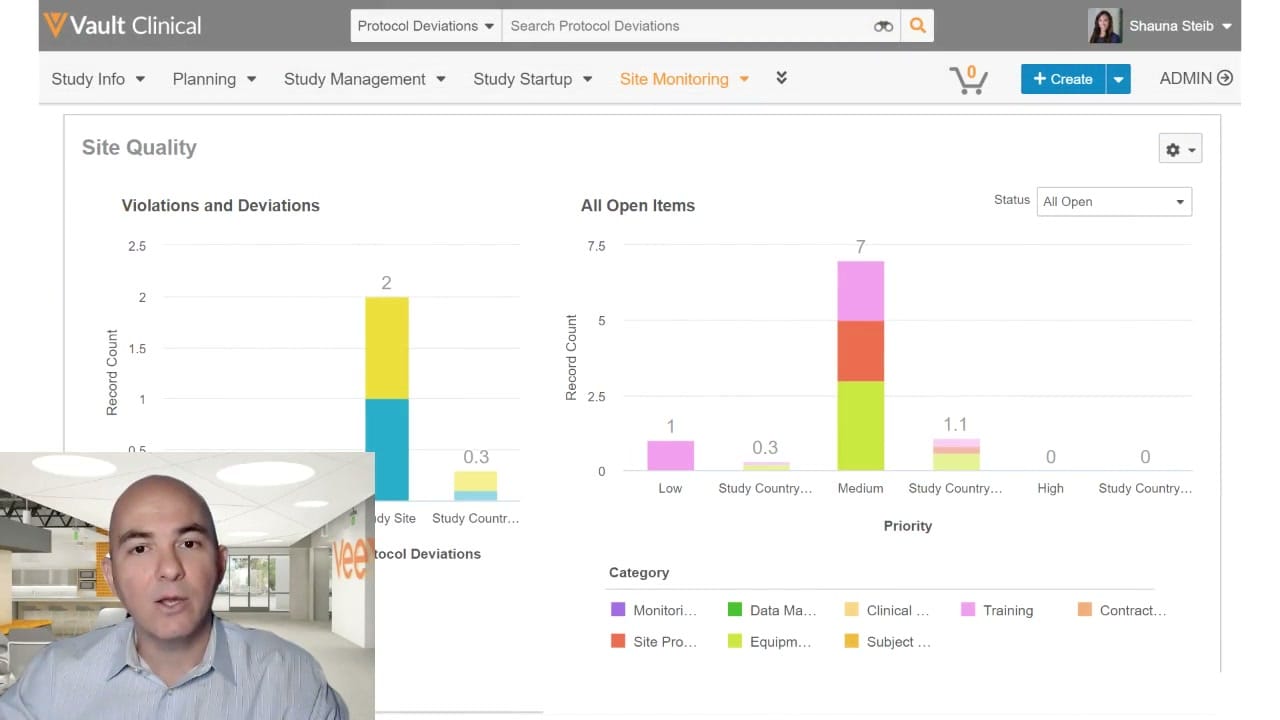
This public interface reference displays the Site Quality dashboard within Veeva Vault Clinical, specifically highlighting the Site Monitoring workspace. The dashboard presents visual summaries of clinical trial issues, protocol deviations, and open items to assist clinical operations teams in tracking site performance. The interface features two main bar charts: "Violations and Deviations" and "All Open Items." These charts categorize records by site, country, priority, and category. A status filter dropdown allows users to view specific subsets of data, such as "All Open" items. The top navigation bar provides access to various clinical modules, including Study Info, Planning, Study Management, Study Startup, and Site Monitoring. This structured layout is designed to help users monitor site compliance and manage outstanding issues during clinical trials.
Visible interface elements
- Vault Clinical header with a search bar configured for Protocol Deviations.
- Primary navigation bar with Site Monitoring highlighted in orange.
- Site Quality dashboard title with a configuration gear icon.
- Violations and Deviations stacked bar chart displaying record counts.
- All Open Items stacked bar chart categorized by priority levels.
- Status filter dropdown menu set to All Open.
- Color-coded Category legend for open items at the bottom.
- Presenter video overlay in the bottom-left corner of the screen.
Interface details
The interface is structured with a global header and a main dashboard area labeled "Site Quality." The global header includes the Vault Clinical logo, a search bar configured for "Protocol Deviations," a user profile for "Shauna Steib," and an administrative menu. Below this, the primary navigation bar lists key clinical workflows, with "Site Monitoring" highlighted in orange to indicate the active section. The dashboard itself contains two primary data visualizations. On the left, the "Violations and Deviations" stacked bar chart displays record counts across study sites and countries. On the right, the "All Open Items" stacked bar chart organizes issues by priority levels, including Low, Medium, and High, as well as by study country. A dropdown menu in the top right corner of the dashboard allows users to filter these charts by status, currently set to "All Open." Below the charts, a color-coded legend defines the categories of open items, which include Monitoring, Data Management, Clinical, Training, Contract, Site Procedures, Equipment, and Subject. A gear icon in the upper right corner of the dashboard panel provides access to configuration options.
Workflow context
In clinical trial management, tracking site quality and protocol deviations is essential for maintaining study integrity and patient safety. The Site Quality dashboard shown in this interface can support clinical operations users, such as Clinical Research Associates or Study Managers, in identifying outstanding issues that require attention. By presenting open items categorized by priority and type, the dashboard could help users allocate resources to high-priority issues first. For instance, the "All Open Items" chart allows users to quickly see which categories, such as training or equipment, have the highest volume of unresolved tasks. This visual representation can assist in identifying systemic issues across multiple sites or countries. While the interface displays synthetic demonstration data, the layout illustrates how a configured Vault CTMS environment can centralize monitoring metrics to support proactive issue resolution and study oversight.
Source, version, and interpretation limits
The source image is a frame from an official Veeva hosted demo titled "Study Oversight: Track, Manage, and Resolve Issues," published around 2020. A significant visual limitation is the presenter video overlay in the bottom-left corner, which partially obscures the "Violations and Deviations" chart and the lower navigation elements. Because this is a static screenshot of a demonstration environment, it does not represent real-time, live, or validated clinical data. The visible labels, charts, and configurations reflect a specific demonstration setup and may differ from actual customer implementations or newer software releases.
Authoritative references
Use these primary sources to confirm current product positioning, terminology, and release-specific behavior.
- Study Oversight: Track, Manage, and Resolve Issues(Official Veeva hosted demo)
- Veeva CTMS product overview(Official Veeva product page)
- Veeva CTMS trial-management overview(Official Veeva resource)