What this Vault Platform screenshot shows
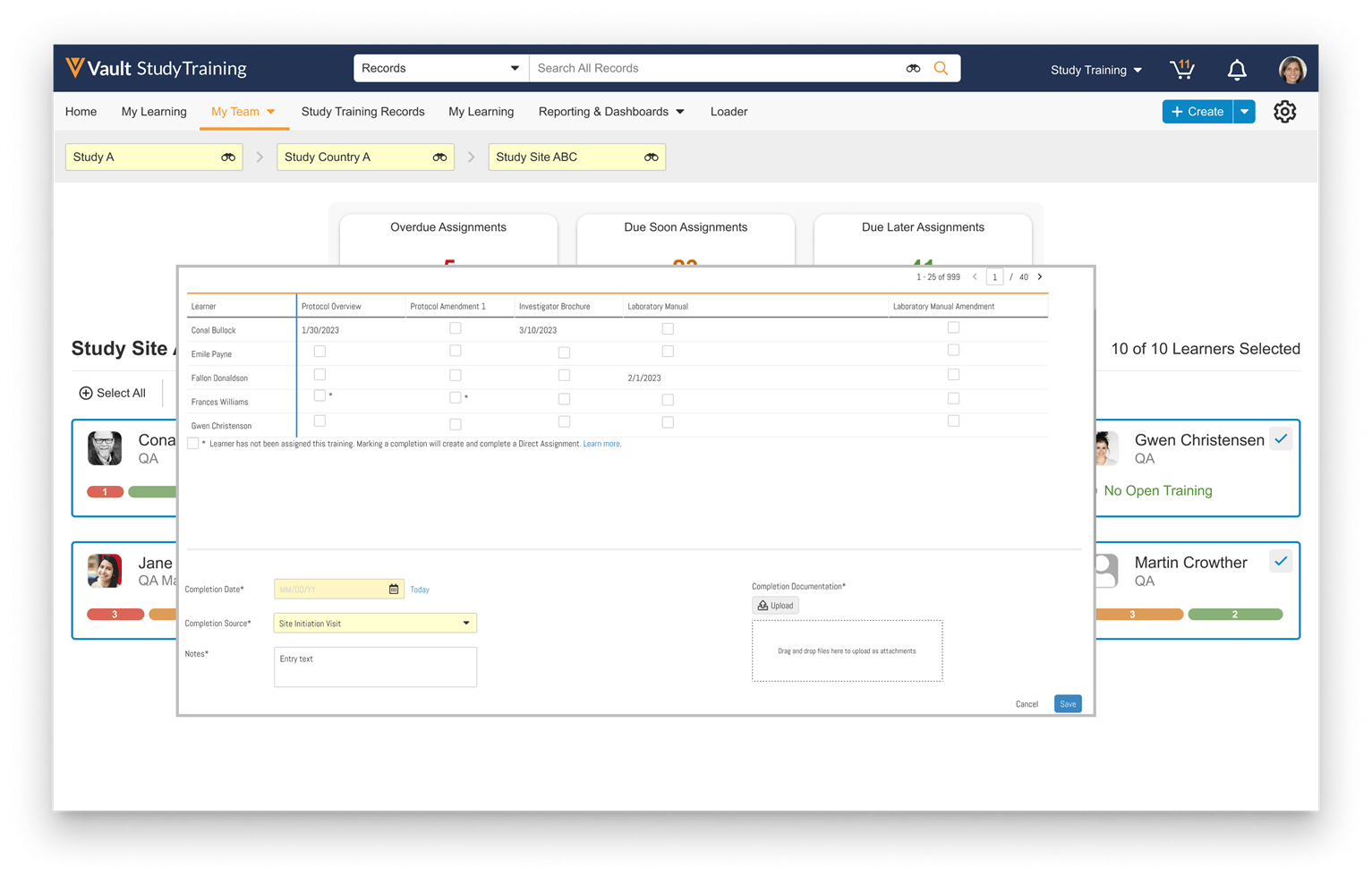
This public interface reference displays the Study Training Assignments workflow within Veeva Vault Clinical, specifically illustrating a modal dialog for managing and recording training completions. The interface presents a structured grid that maps individual learners, such as site personnel, against specific training materials like protocols, investigator brochures, and laboratory manuals. Users can view existing completion dates or select checkboxes to record new training completions. The lower portion of the modal contains input fields to document the completion details, including the completion date, completion source, notes, and supporting documentation uploads. This layout demonstrates how clinical operations personnel can track and update training statuses for a specific study site, ensuring that site staff qualifications are documented. The background interface elements, such as the breadcrumb navigation and summary cards, establish the hierarchical context of the active study, country, and site.
Visible interface elements
- Breadcrumb trail showing Study A, Study Country A, and Study Site ABC.
- Summary cards displaying counts for Overdue, Due Soon, and Due Later Assignments.
- Matrix grid mapping learners to specific training documents like Protocol Overview and Investigator Brochure.
- Footnote explaining that selecting an unassigned training checkbox will create a Direct Assignment.
- Required form fields for Completion Date, Completion Source, and Notes.
- Drag-and-drop file upload area for Completion Documentation.
- Save and Cancel action buttons at the bottom right of the modal.
Interface details
The interface features a prominent modal dialog overlaid on the main Study Training workspace. At the top of this modal, a matrix-style grid lists learners in the rows and training documents in the columns, including Protocol Overview, Protocol Amendment 1, Investigator Brochure, Laboratory Manual, and Laboratory Manual Amendment. Cells display either a recorded completion date or a checkbox for selection. An asterisk next to certain checkboxes indicates that the learner was not previously assigned that training, noting that marking it complete will trigger a direct assignment. Below the grid, the interface provides several required fields for documenting completions. These include a Completion Date field with a calendar picker, a Completion Source dropdown menu set to Site Initiation Visit, and a Notes text box. To the right, a dedicated file upload area allows users to drag and drop files or click to upload completion documentation. The modal is finalized with Cancel and Save buttons in the bottom right corner. In the background, breadcrumbs trace the hierarchy from Study A to Study Country A and Study Site ABC, while summary cards display counts for overdue, due soon, and due later assignments.
Workflow context
In clinical trials, maintaining documented evidence of site staff training is a critical operational activity. This interface supports clinical operations users, such as study managers or monitors, in recording training completions for multiple learners at a specific study site. By presenting a consolidated grid of learners and training requirements, the system allows users to quickly identify gaps and update records in bulk. For instance, during a Site Initiation Visit, a monitor can use this interface to document that several team members completed training on the current investigator brochure or protocol amendments. The ability to upload supporting documentation directly alongside the completion date and source helps establish a clear audit trail. This centralized approach to training management can support study compliance efforts and help prepare sites for upcoming trial activities by ensuring that all active personnel have completed their required training assignments.
Source, version, and interpretation limits
The screenshot is sourced from the IntuitionLabs public Veeva screenshot catalog and represents the Vault Study Training user interface from release 24R2.3. The displayed data, including learner names, study identifiers, dates, and assignment counts, is synthetic demonstration data and does not represent actual clinical trial records. Because this is a static image, it cannot verify real-time data synchronization, automated assignment generation, or regulatory validation status. Additionally, the specific fields, document types, and workflow configurations visible in this screenshot may vary based on individual customer implementations, user permissions, and subsequent software updates.
Authoritative references
Use these primary sources to confirm current product positioning, terminology, and release-specific behavior.
- IntuitionLabs public Veeva screenshot catalog(Public screenshot catalog)
- Veeva Clinical Platform overview(Official Veeva product page)
- Veeva Clinical Operations product sheet(Official Veeva resource)