What this Vault Platform screenshot shows
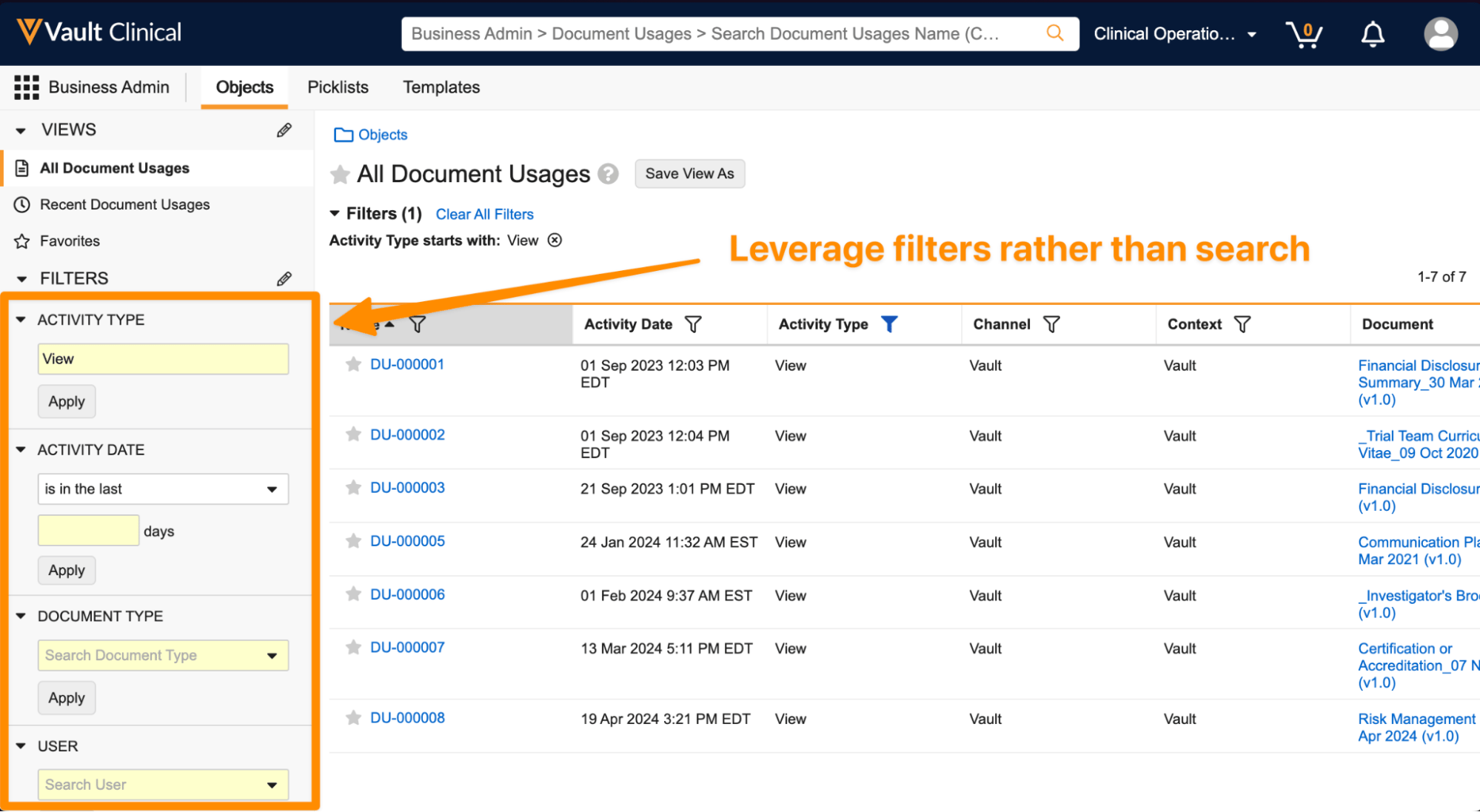
This public interface reference displays the Document Usage History and Filters screen within the Veeva Vault Clinical platform. Located under the Business Admin section with the Objects tab selected, this view presents a structured log of document interactions, specifically tracking how and when clinical documents are accessed. The interface features a dual-pane layout with a left-hand navigation and filter panel alongside a central data table displaying individual document usage records. An orange annotation highlights the recommendation to leverage filters rather than search for finding specific records. The visible dataset contains seven synthetic records spanning from September 2023 to April 2024, showing document names, activity dates, and activity types. This layout illustrates a standard administrative pattern for monitoring document engagement across clinical operations.
Visible interface elements
- Business Admin navigation path with the Objects tab selected in the top menu bar.
- Left-hand filter panel with collapsible sections for Activity Type, Activity Date, Document Type, and User.
- Main data table displaying seven document usage records from DU-000001 to DU-000008.
- Table columns for Name, Activity Date, Activity Type, Channel, Context, and Document.
- Active filter indicator showing 'Activity Type starts with: View' above the table.
- Orange annotation text and arrow reading 'Leverage filters rather than search' pointing to the Name column header.
- Save View As button located next to the All Document Usages header.
Interface details
The interface is divided into a left sidebar and a main data table. The left sidebar contains collapsible filter sections for Activity Type, Activity Date, Document Type, and User, each equipped with input fields and an Apply button to refine the displayed list. Currently, the Activity Type filter is set to View. The main panel displays the All Document Usages header, accompanied by a Save View As button and a summary of active filters. The central table lists seven records, with columns for Name, Activity Date, Activity Type, Channel, Context, and Document. The Name column is sorted in ascending order, as indicated by an arrow icon. The Activity Type column displays a blue filter icon, indicating an active filter is applied to show only View actions. Each row contains a star icon next to the document usage ID, such as DU-000001, and lists the corresponding document name and version, such as Financial Disclosure Summary v1.0. An orange annotation arrow points to the Name column header, emphasizing the use of column-level filters.
Workflow context
In clinical operations, tracking document access is a common administrative task. This interface presents a centralized log of document usage history, which can support compliance monitoring and audit readiness by showing who accessed which documents and when. A clinical operations user could utilize these filtering capabilities to isolate specific activities, such as viewing key trial documents within a particular timeframe. By applying filters for Activity Type, Activity Date, or Document Type, administrators can narrow down large volumes of usage data to identify specific patterns or verify that team members have accessed required study materials. This structured visibility could help clinical teams maintain oversight of document distribution and ensure that critical trial documentation, such as investigator brochures or financial disclosures, is being accessed by authorized personnel in accordance with study protocols.
Source, version, and interpretation limits
The screenshot is sourced from the IntuitionLabs public Veeva screenshot catalog and represents the Vault Clinical user interface from the 24R2 release. As a static image, it does not demonstrate real-time data updates, automated background processes, or active system integrations. The displayed records, dates, and document names are synthetic demonstration data and do not represent actual clinical trial activities or live regulatory submissions. Actual user interfaces, available fields, and navigation options may vary depending on specific customer configurations, user permissions, and subsequent software updates. The presence of orange annotations is for illustrative guidance and is not a native part of the Veeva Vault Clinical interface.
Authoritative references
Use these primary sources to confirm current product positioning, terminology, and release-specific behavior.
- IntuitionLabs public Veeva screenshot catalog(Public screenshot catalog)
- Veeva Clinical Platform overview(Official Veeva product page)
- Veeva Clinical Operations product sheet(Official Veeva resource)